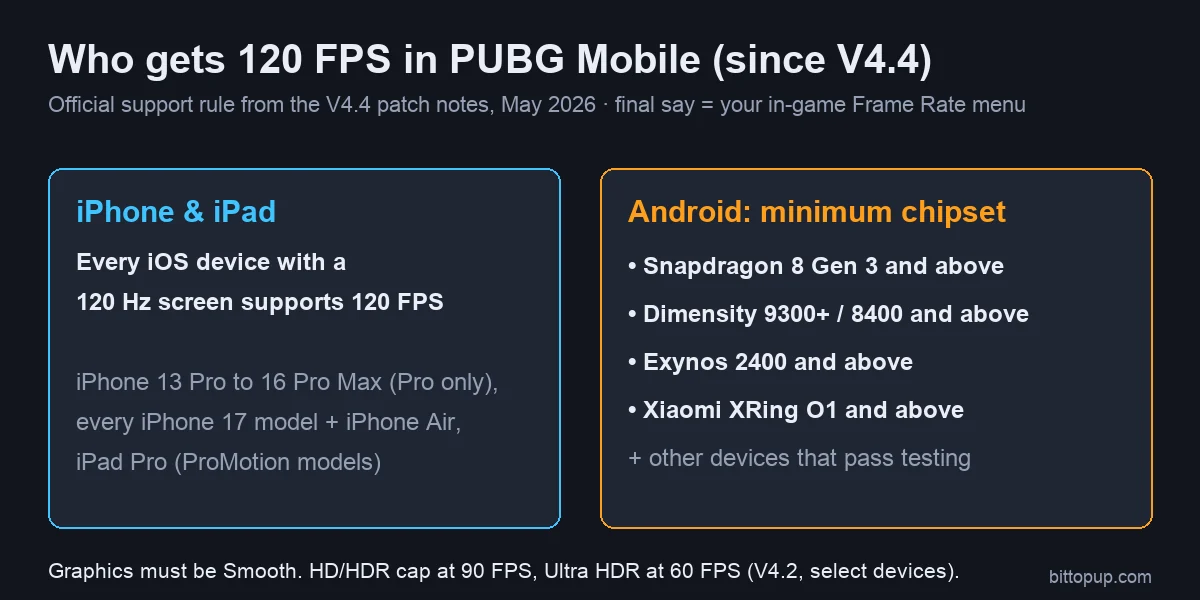
PUBG Mobile 120 FPS ("Ultra Extreme") works on every iPhone and iPad with a 120 Hz screen, and on Android phones with a Snapdragon 8 Gen 3, Dimensity 9300+ / 8400, Exynos 2400, Xiaomi XRing O1 or newer chip. That is the official support rule since Version 4.4 (May 2026). Older flagships such as the Galaxy S23 and Z Fold 5 also have 120 FPS from earlier updates, while Google Pixel phones are still not confirmed.
Updated 6 November 2026: checked against the official patch notes up to Version 4.6 (9 September 2026, no frame-rate changes) and the V4.7 beta notes. Version 4.7 is due on 12 November; we will add any device changes from its notes.
PUBG Mobile 120 FPS supported devices (November 2026)
How to read the table: Yes = covered by the official rule or confirmed in an official/maker announcement. Not confirmed = no official source; open the Frame Rate menu on your own phone after updating. The game itself has the final say: the V4.4 notes say "please refer to the in-game settings for final availability".
Brand | 120 FPS: Yes | Not confirmed / no |
|---|
Apple iPhone | iPhone 13 Pro / Pro Max, 14 Pro / Pro Max, 15 Pro / Pro Max, 16 Pro / Pro Max, iPhone 17, iPhone Air, 17 Pro / 17 Pro Max, 18 Pro / 18 Pro Max | No: iPhone 13, 14, 15, 16 (base and Plus), 16e, SE and older (60 Hz screens) |
Apple iPad | iPad Pro with ProMotion: 2017 and 2018 models, 2020 (A12Z), 2021 (M1), 2022 (M2), 2024 (M4), 2025 (M5) | No: iPad Air (including M4), iPad mini, base iPad (60 Hz) |
Samsung | Galaxy S23 / S23+ / S23 Ultra and Z Fold5 (since 3.2), S24 / S24+ / S24 Ultra, S25 series, S26 series, Z Fold6, Z Fold7, Z Flip6, Z Flip7, Tab S10+ / S10 Ultra, Tab S11 series | S22 series, Z Fold4, Tab S9 series (officially 90 FPS), S24 FE / S25 FE |
OnePlus | OnePlus 12, 13, 13R, 15 | OnePlus 11, 11R, 12R, Open, 15R |
Xiaomi / Redmi / POCO | Xiaomi 14 / 14 Pro / 14 Ultra, 14T Pro, 15 / 15 Pro / 15 Ultra, 15T, 15T Pro, 15S Pro, 17 / 17 Pro / 17 Pro Max / 17 Ultra, Mix Fold 4; Redmi K70 Pro, K80, K80 Pro; POCO F7 Pro, F7 Ultra | Xiaomi 13 series, Mix Fold 3, Redmi K70, POCO F5 Pro, F6, F6 Pro, X6 Pro, F7 |
vivo / iQOO | iQOO 12 / 12 Pro, 13, 15; vivo X200 series, X300 series, X Fold3 Pro, X Fold5 | iQOO 11, 15R, vivo X100 / X100 Pro, X Fold2, X Fold3 |
ASUS / RedMagic / nubia | ROG Phone 8 / 8 Pro, 9 / 9 Pro, 9 FE; RedMagic 9 Pro, 10 Pro, 11 Pro, 11S Pro; nubia Z60 Ultra, Z70 Ultra | ROG Phone 7 series, RedMagic 8S Pro, nubia Z50 |
Others | realme GT 7 (India), GT5 Pro, GT 7 Pro; Honor Magic6 Pro, Magic7 Pro; OPPO Find X7 Ultra, Find X8 / X8 Pro / X8 Ultra; Infinix GT 20 Pro (announced May 2024) | Motorola Edge 50 Ultra, OPPO Find X7, Nothing Phone models |
Google Pixel | — | No Pixel is confirmed. Google Tensor chips are not in the official chipset list |
Note on model names: there is no Xiaomi 16 (Xiaomi went from 15 to 17), no vivo X Fold4 and no ROG Phone 10. Lists that include them are copied from guesses.
Key takeaways
Ultra Extreme = 120 FPS. It only appears with Graphics set to Smooth.
120 FPS arrived in Version 3.2 (May 2024). Version 4.4 (May 2026) switched to a rule: every 120 Hz iOS device, plus Android phones at or above a minimum chipset.
On select devices, HD/HDR graphics cap at 90 FPS and Ultra HDR at 60 FPS (V4.2).
Your screen must run at 120 Hz. A 60 Hz phone cannot show 120 frames, whatever the chip.
Tools that force 120 FPS by editing game files can get the account banned.
What Ultra Extreme (120 FPS) is
Ultra Extreme is the highest Frame Rate option in PUBG Mobile. It draws up to 120 frames per second: twice as many as Extreme and a third more than 90 FPS. PUBG MOBILE added it in Version 3.2, pushed from 13 May 2024.
Frame Rate option | Frames per second |
|---|
Medium | 25 |
High | 30 |
Ultra | 40 |
Extreme | 60 (50–60 on some devices) |
90 FPS row (often called Extreme+) | 90 |
Ultra Extreme | 120 |
Values for Medium to Extreme are from the official V4.0 notes. The graphics preset limits the frame rate: on supported devices, Smooth allows 90 or 120, HD and HDR allow 90, and Ultra HDR allows 60. For a full explanation of each option, see our Ultra Extreme guide.
PUBG Mobile 120 FPS requirements (2026)
The V4.4 patch notes (May 2026) published the requirements for the first time:
iOS: "All iOS devices with 120 Hz refresh rate screens now support 120 FPS mode in-game."
Android minimum chipset: Qualcomm Snapdragon 8 Gen 3 and above; MediaTek Dimensity 9300+ / 8400 and above; Samsung Exynos 2400 and above; Xiaomi XRing O1 and above.
Other devices: phones below that line can still get Smooth + 120 FPS "after independent testing". That is why the Galaxy S23 (Snapdragon 8 Gen 2) kept the 120 FPS it received in 3.2.
The notes say the support rule raised the number of supported devices by 26% and that support is monitored and adjusted, so a phone can gain (or, rarely, lose) the option after an update. In practice you also need a 120 Hz screen set to its highest refresh rate in system settings, and enough free storage for the current update.
iPhone, iPad and Samsung details
iPhone: ProMotion (120 Hz) was limited to Pro models from iPhone 13 Pro to 16 Pro. The iPhone 17 line changed that: iPhone 17, iPhone Air, 17 Pro and 17 Pro Max all have ProMotion up to 120 Hz, so all four qualify. The 17 Pro models add an Apple-designed vapor chamber, which helps hold frame rate in long sessions. Full setup: iPhone 17 PUBG FPS guide.
iPad: only iPad Pro has a 120 Hz screen. iPad Air, iPad mini and the base iPad are 60 Hz and stay at 60 FPS. See which iPads support PUBG 120 FPS.
Samsung: the Galaxy S23 series (including the base S23), S24 series and Z Fold5 received 120 FPS in Version 3.2. The S24 is supported with both the Exynos 2400 and Snapdragon chips; the S25 and S26 families meet the chipset rule. Setup and Game Booster tips: Samsung S23–S26 PUBG FPS guide.
Gaming phones and other Android brands
Gaming phones with the newest Snapdragon chips all meet the rule: ROG Phone 8 and 9, RedMagic 9 Pro to 11S Pro, and nubia Z60/Z70 Ultra. Among regular flagships, OnePlus 12/13/15, Xiaomi 14/15/17, iQOO 12/13/15, vivo X200/X300, OPPO Find X7 Ultra/X8, Honor Magic6/7 Pro and realme GT5 Pro/GT 7 Pro qualify by chipset.
Phones with a Snapdragon 8 Gen 2, 8+ Gen 1, 8s Gen 3 or Dimensity 9200/9300 (non-plus) sit below the official line. Some had 120 FPS added after testing, many top out at 90 FPS. If yours is in the "not confirmed" column, update the game, set the screen to its highest refresh rate, then check the Frame Rate menu on Smooth.
Best phone for PUBG Mobile 120 FPS in 2026
Any phone in the "Yes" column can select 120 FPS. The difference is how long it holds that rate before heat lowers it. Phones with active cooling or large vapor chambers hold it best.
Phone | Chip | Why it suits 120 FPS |
|---|
RedMagic 11S Pro | Snapdragon 8 Elite Gen 5 Leading Version | Built-in fan (up to 24,000 RPM), 7,500 mAh (global), 144 Hz screen |
ASUS ROG Phone 9 Pro | Snapdragon 8 Elite | Gaming phone with shoulder triggers and clip-on cooler support |
OnePlus 15 | Snapdragon 8 Elite Gen 5 | Large ~7,300 mAh battery (India model) for long sessions |
Samsung Galaxy S26 Ultra | Snapdragon 8 Elite Gen 5 for Galaxy | Same chip in every market; strong all-round flagship |
iPhone 17 Pro Max | A19 Pro | Apple-designed vapor chamber, 120 Hz ProMotion |
Video (Gizmo Rush, April 2026): Galaxy S26 Ultra and iPhone 17 Pro Max running PUBG/BGMI at 120 FPS, with an hour of heat and battery testing.
Heat and battery at 120 FPS
Rendering twice as many frames as 60 FPS uses more power and makes the phone warmer, and most phones lower their performance when they get hot. The official notes do not publish battery figures, but they show that heat is a known issue: V4.2 optimised "Smooth 120 FPS in power saving mode" and V4.3 "reduced the performance load when playing at high frame rates, lowering device heat".
Take the case off and avoid charging while you play.
Play in a cool room, not on a bed or pillow.
A clip-on phone cooler helps glass-backed flagships hold 120 FPS longer.
If the frame rate swings between 90 and 120 in fights, a steady 90 FPS usually feels better.
How to enable 120 FPS

Update PUBG Mobile to the latest version from Google Play, the App Store or the official website.
Set your phone's screen to its highest refresh rate (Android: Display → Motion smoothness / Refresh rate → 120 Hz or High). iPhones with ProMotion handle this automatically.
In the lobby, open Settings → Graphics & Audio.
Set Graphics to Smooth.
Under Frame Rate, choose Ultra Extreme.
Close the game fully and reopen it.
On Android, the phone's game mode (Samsung Game Booster, Xiaomi Game Turbo, OnePlus Games, ASUS Armoury Crate) can limit frame rate to save battery. Set it to a performance profile for PUBG Mobile.
Graphics and sensitivity for 120 FPS
Setting | Value |
|---|
Graphics | Smooth (required for 120 FPS) |
Frame Rate | Ultra Extreme |
Anti-aliasing | Off (less GPU load) |
Shadows | Off (less GPU load) |
Auto-adjust graphics | Off, so the game does not lower settings mid-match |
Higher frame rates make camera movement smoother, so many players lower their sensitivity slightly after switching from 60 FPS. For starting values, see our PUBG Mobile sensitivity codes.
60 vs 90 vs 120 FPS
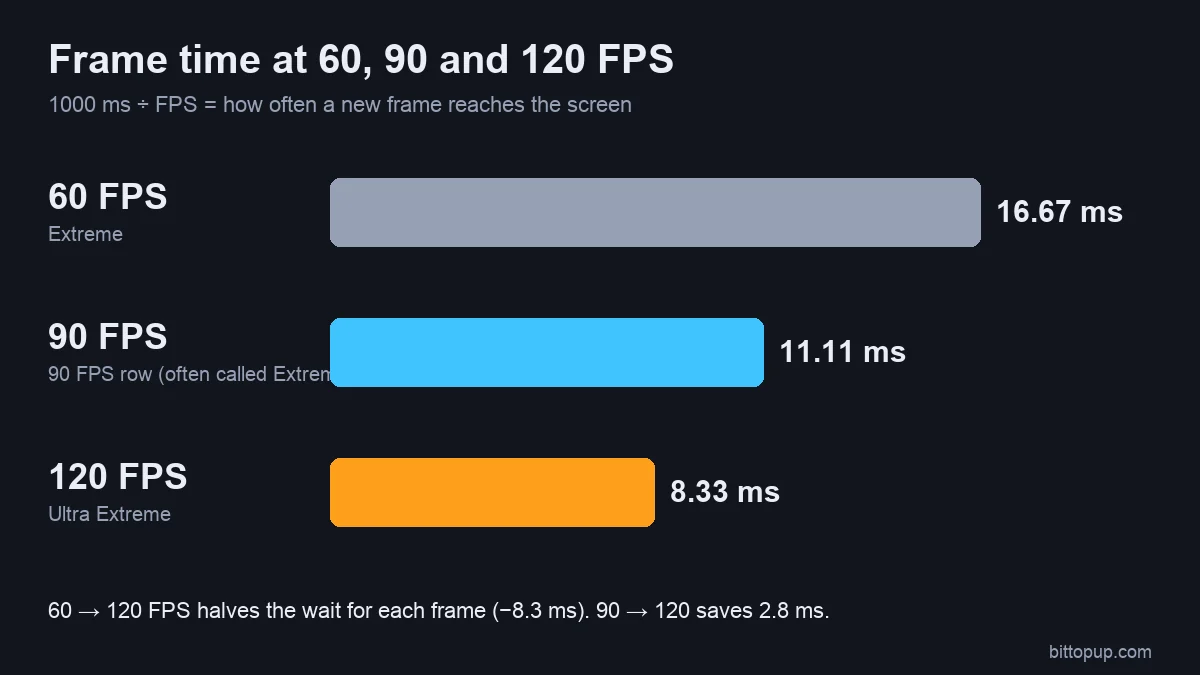
At 60 FPS a new frame arrives every 16.7 ms, at 90 FPS every 11.1 ms, and at 120 FPS every 8.3 ms. Moving from 60 to 120 halves the wait between frames, which makes tracking moving enemies and controlling recoil feel smoother. The step from 90 to 120 is smaller (2.8 ms), so on a phone that cannot hold 120 steadily, 90 FPS is the better choice. See the 90 FPS device list if your phone tops out there.
BGMI 120 FPS supported devices
Battlegrounds Mobile India (BGMI) is a separate client with its own updates. According to Indian gaming outlets, BGMI added 120 FPS in its 3.5 update (November 2024), and the base iPhone 17 received it in BGMI 4.2 (January 2026). Krafton India has not published a full device list, and lists on Indian sites contradict each other, so check the Frame Rate menu (Smooth → Ultra Extreme) in your own BGMI client. Phones that meet the global chipset rule above are the safest bet.
Do not force 120 FPS on an unsupported phone
GFX tools, Magisk modules and edited config files that unlock 120 FPS change game files. Anti-cheat can treat that as cheating and ban the account, and a phone the game did not approve usually stutters at 120 anyway. Use the highest official option you have, set the screen to its maximum refresh rate, and check again after each update.
Troubleshooting
Ultra Extreme is missing:
Update the game; device support changes with updates.
Set Graphics to Smooth first. HD, HDR and Ultra HDR hide 120 FPS.
Set the phone's screen to 120 Hz (not Standard/60 Hz or some Adaptive modes on Android).
Turn off battery saver and the game mode's power-saving profile.
If it is still missing, your model is not supported yet in your version.
120 FPS selected but it feels like 60: turn on the frame counter, check that battery saver is off, and let the phone cool down. Some iPad Pro (M4) and iPhone Pro owners have reported periodic frame drops on Apple's forums that went away while screen recording was running. This is a community workaround, not an official fix, and recording uses extra battery.
FAQ
Which phones support PUBG Mobile 120 FPS in 2026?
All iPhones and iPads with a 120 Hz screen (iPhone 13 Pro to 16 Pro Max, every iPhone 17 model, iPhone Air, iPad Pro), and Android phones with a Snapdragon 8 Gen 3, Dimensity 9300+ / 8400, Exynos 2400, XRing O1 or newer chip. Galaxy S23 and Z Fold5 also support it. Check the Frame Rate menu for the final answer.
How do I turn on 120 FPS?
Update the game, set your screen to 120 Hz, then go to Settings → Graphics & Audio → Graphics: Smooth → Frame Rate: Ultra Extreme, and restart the game.
Does the iPhone 17 support 120 FPS in PUBG Mobile?
Yes. The iPhone 17, iPhone Air, 17 Pro and 17 Pro Max all have 120 Hz ProMotion screens, and since Version 4.4 every 120 Hz iOS device supports 120 FPS.
Does Google Pixel support 120 FPS in PUBG Mobile?
Not officially. No Pixel model is named in any patch note, and Google Tensor chips are not in the V4.4 chipset list. Check the Frame Rate menu after each update.
Does 120 FPS overheat the phone?
It makes the phone warmer than 60 or 90 FPS, and most phones lower performance when they get hot. Remove the case, do not charge while playing, and consider a clip-on cooler for long sessions.
Can I unlock 120 FPS on a phone that is not listed?
Not safely. Tools that edit game files break the rules and can get the account banned. Wait for an official update or use 90 FPS.
Conclusion
In November 2026, PUBG Mobile 120 FPS is available on every 120 Hz iPhone and iPad, on Android phones with a Snapdragon 8 Gen 3, Dimensity 9300+ / 8400 or Exynos 2400-class chip and newer, and on a few older flagships such as the Galaxy S23. Select Smooth graphics, then Ultra Extreme, and keep the screen at 120 Hz. If you need UC for the Royale Pass, you can top up PUBG Mobile UC on BitTopup with your Player ID.
Sources