Only iPad Pro models can run PUBG Mobile at 120 FPS, because they are the only iPads with a 120 Hz ProMotion screen. Since Version 4.4 (May 2026) "all iOS devices with 120 Hz refresh rate screens" support 120 FPS, which covers every iPad Pro from 2017 to the 2025 M5 model. iPad Air (including the 2026 M4 model), iPad mini and the base iPad have 60 Hz screens, so they top out at 60 FPS. To enable it, choose Smooth graphics and the Ultra Extreme frame rate (Extreme is only 60 FPS).
Updated 6 November 2026 for PUBG Mobile 4.6. Version 4.7 is due on 12 November.
Which iPads support PUBG Mobile 120 FPS
iPad | Chip | Screen | Max PUBG FPS |
|---|
iPad Pro (M5, 2025) | M5 | ProMotion 120 Hz | 120 |
iPad Pro (M4, 2024) | M4 | ProMotion 120 Hz | 120 |
iPad Pro (M2, 2022) | M2 | ProMotion 120 Hz | 120 |
iPad Pro (M1, 2021) | M1 | ProMotion 120 Hz | 120 |
iPad Pro (2020) | A12Z | ProMotion 120 Hz | 120 |
iPad Pro (2018) | A12X | ProMotion 120 Hz | 120 by the rule (older chip, may not hold it) |
iPad Pro 10.5" / 12.9" (2017) | A10X | ProMotion 120 Hz | 120 by the rule (oldest chip, may not hold it) |
iPad Air (all, incl. M4 2026) | A14 / M1 / M2 / M3 / M4 | 60 Hz | 60 |
iPad mini, base iPad (incl. 11th gen) | A-series | 60 Hz | 60 |
A fast chip alone is not enough: an iPad Air with an M4 chip still cannot show more than 60 frames per second on its 60 Hz screen. Phones and other tablets: PUBG Mobile 120 FPS device list.
What ProMotion is
ProMotion is Apple's name for a screen that changes its refresh rate on the fly, up to 120 Hz. When PUBG Mobile renders 120 frames per second, the screen switches to 120 Hz automatically; there is no separate 120 Hz switch in iPadOS.
120 Hz vs 60 Hz iPads in PUBG
On a 120 Hz iPad Pro a new frame appears every 8.3 ms at Ultra Extreme, against 16.7 ms on a 60 Hz iPad. Turning, spraying and tracking moving players look noticeably smoother. The large screen also makes multi-finger layouts easier, which is why many players use an iPad Pro for PUBG.
iPad Pro models and PUBG Mobile performance
Newer is steadier
All iPad Pro models from 2017 qualify for 120 FPS, but newer chips hold it longer and run cooler. M1 and later models are the safe choice for long sessions; 2017 and 2018 models qualify by the official rule, but we found no reliable tests of how well they hold 120 in current versions.
Requirements for 120 FPS on iPad
An iPad Pro (120 Hz ProMotion screen).
The latest PUBG Mobile version; the App Store lists iOS/iPadOS 13 or later as the minimum.
Graphics set to Smooth; HD and HDR stop at 90 FPS on select devices, Ultra HDR at 60.
Low Power Mode and Limit Frame Rate turned off.
Video (tandav gaming, September 2026): iPad Pro M4 at 120 FPS in BGMI, with handcam gameplay, battery drain and screen recording.
Enabling 120 FPS on iPad: step by step
iPadOS settings
Settings → Accessibility → Motion → turn Limit Frame Rate off (when on, it caps the screen at 60 Hz).
Turn off Low Power Mode (Settings → Battery).
Update PUBG Mobile from the App Store.
In-game graphics settings
Setting | Value |
|---|
Graphics | Smooth |
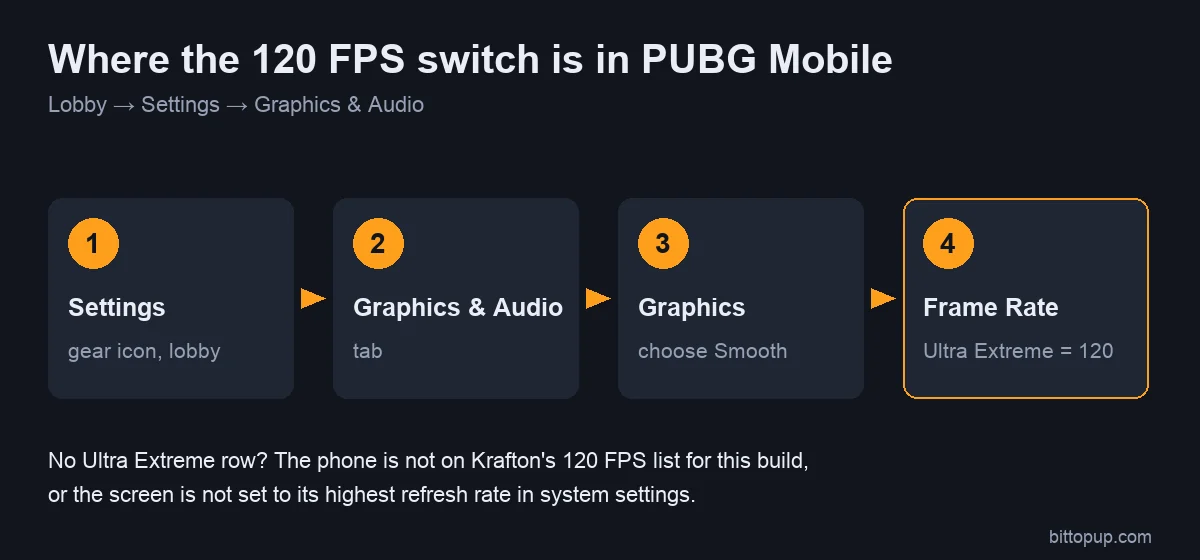
Frame Rate | Ultra Extreme (120 FPS). Extreme = 60 FPS |
Anti-aliasing | Off |
Shadows | Off |
Path: lobby → Settings → Graphics & Audio → Graphics: Smooth → Frame Rate: Ultra Extreme. Restart the game afterwards.
Troubleshooting frame rate issues
Only Extreme (60) is shown: your iPad has a 60 Hz screen (Air, mini, base iPad), Graphics is not on Smooth, or Limit Frame Rate is on.
Drops after a few minutes: check Low Power Mode, remove the case and let the iPad cool.
M4 iPad Pro dropping frames every few minutes: owners reported this on Apple's forums in 2024, and some said keeping a screen recording running stopped it. That is an unofficial workaround, not a fix from Apple or PUBG MOBILE; it uses extra battery and storage.
Sensitivity and controls on iPad
Touch sensitivity calibration
A larger screen means your thumb travels further for the same turn, so iPad players usually need different camera and ADS sensitivity from phone players, and 120 FPS makes movement feel faster. Start with our PUBG Mobile sensitivity codes, then adjust in Training Grounds. Many iPad players move to a four- or five-finger layout so they can aim and shoot at the same time.
Heat and battery
iPads spread heat over a larger body than phones, but 120 FPS still uses more power than 60. Remove thick keyboard cases while playing, avoid charging during long sessions if the iPad gets hot, and lower brightness slightly.
FAQ
Which iPad supports 120 FPS in PUBG Mobile?
Only iPad Pro models (2017 and later, including M1, M2, M4 and M5), because they have 120 Hz ProMotion screens.
Does the iPad Air M2, M3 or M4 support 120 FPS?
No. Every iPad Air has a 60 Hz screen, so PUBG Mobile tops out at 60 FPS on it, regardless of the chip.
How many FPS does PUBG run on the base iPad (11th gen) or iPad mini?
Up to 60 FPS, because their screens are 60 Hz.
Is Extreme 120 FPS on iPad?
No. Extreme is 60 FPS. 120 FPS is the Ultra Extreme option, available only with Smooth graphics.
Conclusion
For PUBG Mobile at 120 FPS on a tablet, you need an iPad Pro; M1 and newer models hold it best. Turn off Limit Frame Rate and Low Power Mode, choose Smooth and Ultra Extreme, and tune sensitivity for the bigger screen. If you need UC for the Royale Pass, you can top up PUBG Mobile UC on BitTopup with your Player ID.
Sources