Every iPhone 17 model runs PUBG Mobile at up to 120 FPS: the iPhone 17, iPhone Air, iPhone 17 Pro and 17 Pro Max all have 120 Hz ProMotion screens, and since Version 4.4 (May 2026) "all iOS devices with 120 Hz refresh rate screens" support 120 FPS. In BGMI, the base iPhone 17 received 120 FPS with the 4.2 update. Select Smooth graphics and the Ultra Extreme frame rate to use it.
Updated 6 November 2026 for PUBG Mobile 4.6. Version 4.7 is due on 12 November.
iPhone 17 PUBG FPS: every model
Model | Chip | Screen | Cooling | Max PUBG Mobile FPS |
|---|
iPhone 17 | A19 | 6.3", ProMotion up to 120 Hz | no vapor chamber | 120 |
iPhone Air | A19 Pro (5-core GPU) | 6.5", ProMotion up to 120 Hz | no vapor chamber | 120 |
iPhone 17 Pro | A19 Pro (6-core GPU) | 6.3", ProMotion up to 120 Hz | Apple-designed vapor chamber | 120 |
iPhone 17 Pro Max | A19 Pro (6-core GPU) | 6.9", ProMotion up to 120 Hz | Apple-designed vapor chamber | 120 |
The iPhone 17 is the first non-Pro iPhone with ProMotion; the iPhone 13 to 16 base models have 60 Hz screens and stay at 60 FPS. Apple says the 17 Pro's vapor chamber gives up to 40% better sustained performance, which matters most in long sessions at 120 FPS. For other phones see the PUBG Mobile 120 FPS device list.
The iPhone 18 Pro and 18 Pro Max (September 2026) also have 120 Hz ProMotion screens, so they support 120 FPS as well.
iPhone 17 vs 17 Pro Max for PUBG
All four models reach the same 120 FPS cap. The difference is how long they hold it: the 17 Pro and Pro Max have a vapor chamber and the A19 Pro with a 6-core GPU, so they stay at 120 longer before heat lowers performance. The base iPhone 17 and the thin iPhone Air are more likely to warm up and drop frames in long ranked sessions.
Video (Harsh Gamer, January 2026): the base iPhone 17 running PUBG Mobile at 120 FPS after the 4.2 update, with FPS meter, heat and battery test.
How to enable 120 FPS on iPhone 17
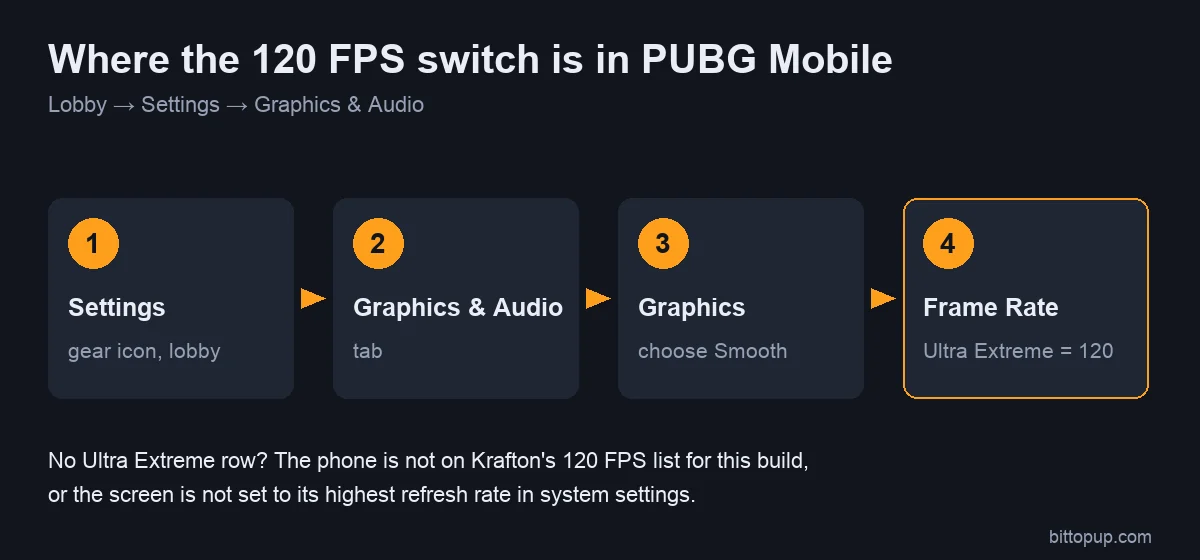
Update PUBG Mobile (or BGMI) from the App Store.
iPhone Settings → Accessibility → Motion: make sure Limit Frame Rate is off. When it is on, iOS caps the screen at 60 Hz.
Turn off Low Power Mode; it also limits the frame rate.
In the game lobby: Settings → Graphics & Audio → Graphics: Smooth.
Frame Rate: Ultra Extreme (120 FPS).
Close the game completely and reopen it.
ProMotion switches to 120 Hz automatically while the game draws 120 frames; there is no separate 120 Hz switch in iOS.
If 120 FPS feels like 60 or 90
Check Limit Frame Rate and Low Power Mode again; both are common causes.
Let the phone cool down: hot iPhones lower performance to protect the battery.
Turn on the in-game FPS display to see what the game is actually rendering.
Some players on Apple's forums report that keeping a screen recording running stops periodic frame drops on ProMotion devices. It is an unofficial workaround, not a fix from Apple or PUBG MOBILE, and recording uses extra battery and storage.
Best graphics settings for iPhone 17
Setting | For 120 FPS | For better visuals |
|---|
Graphics | Smooth | HD or HDR |
Frame Rate | Ultra Extreme (120) | 90 FPS (max with HD/HDR on select devices) |
Anti-aliasing | Off | On |
Shadows | Off | On |
Which setting to pick
For ranked, most players choose Smooth + Ultra Extreme: twice as many frames as 60 FPS makes tracking and recoil smoother. On the base iPhone 17 or iPhone Air, if frames drop after 15–20 minutes, Smooth + 90 FPS is the steadier choice.
Heat and battery
Remove thick or leather cases during long sessions.
Do not charge while playing at 120 FPS; charging adds heat.
Lower screen brightness a little; the display is a large part of power use.
Take short breaks between matches, especially on iPhone 17 and Air.
Sensitivity after switching to 120 FPS
Smoother frames make camera movement feel faster, so many players lower camera and ADS sensitivity slightly after moving from 60 to 120 FPS. Start from our PUBG Mobile sensitivity codes and adjust in Training Grounds.
BGMI on iPhone 17
Does iPhone 17 support 120 FPS in BGMI?
Yes. Indian gaming outlets reported that BGMI 4.2 (January 2026) added 120 FPS for the base iPhone 17, and the 17 Pro models support it as well. BGMI uses the same Smooth → Ultra Extreme setting. BGMI enables devices on its own schedule, so check the Frame Rate menu after each BGMI update.
FAQ
How many FPS does PUBG Mobile run on iPhone 17?
Up to 120 FPS (Ultra Extreme with Smooth graphics), on the iPhone 17, iPhone Air, 17 Pro and 17 Pro Max.
Is the iPhone 17 Pro Max better than the iPhone 17 for PUBG?
Both reach 120 FPS. The Pro Max holds it longer thanks to its vapor chamber, larger body and A19 Pro chip.
Does the iPhone 16 support 120 FPS?
Only the iPhone 16 Pro and 16 Pro Max. The base iPhone 16 and 16 Plus have 60 Hz screens.
Can I play at 120 FPS with HD graphics?
No. 120 FPS needs Smooth graphics. HD and HDR allow up to 90 FPS on select devices.
Conclusion
The whole iPhone 17 lineup supports 120 FPS in PUBG Mobile. Turn off Limit Frame Rate and Low Power Mode, choose Smooth and Ultra Extreme, and keep the phone cool. The 17 Pro models hold 120 longest. If you need UC for the Royale Pass, you can top up PUBG Mobile UC on BitTopup with your Player ID.
Sources