


Recharge Xena Coins at BitTopup
Complete your Xena Live recharge using the Xena ID linked to your account. Choose a coin package from the options above, check its region requirements, and review your order before paying. Coins are credited to the account identified by the ID you enter, without sharing your Xena password.
Xena coins are the virtual currency used in Xena Live, a group voice chat app. They can be used for virtual gifts, decorations, and VIP privileges available in the app. Buying coins adds to your balance; it does not automatically activate every premium feature.
How to Complete a Xena Coin Recharge
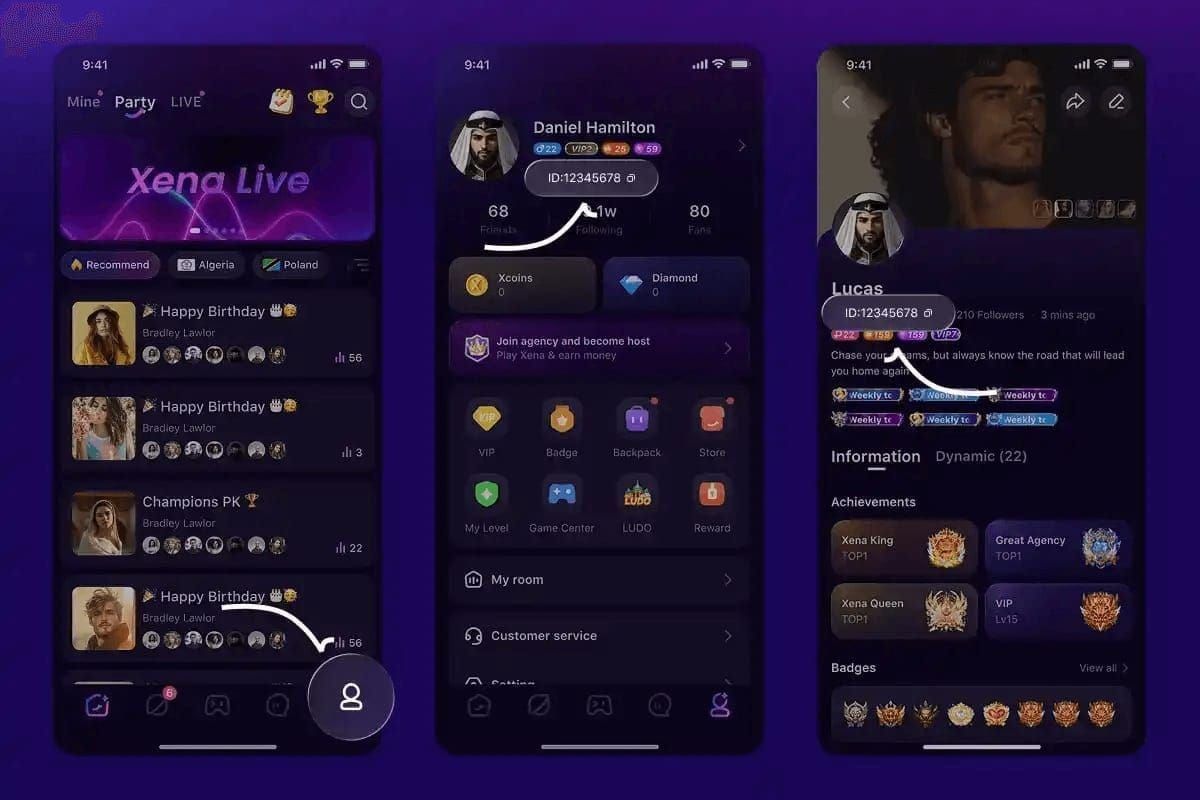
Open the Xena Live account you want to recharge and copy its numeric ID.
Check the region option shown, such as MENA or GLOBAL, and confirm that it supports your account.
Select a coin package and paste your account ID into the Xena ID field.
Review the ID, coin amount, payment currency, and final total, then pay using an available checkout method.
Follow your order status and check your coin balance in Xena Live once the recharge is complete.
Where to Find Your Xena ID
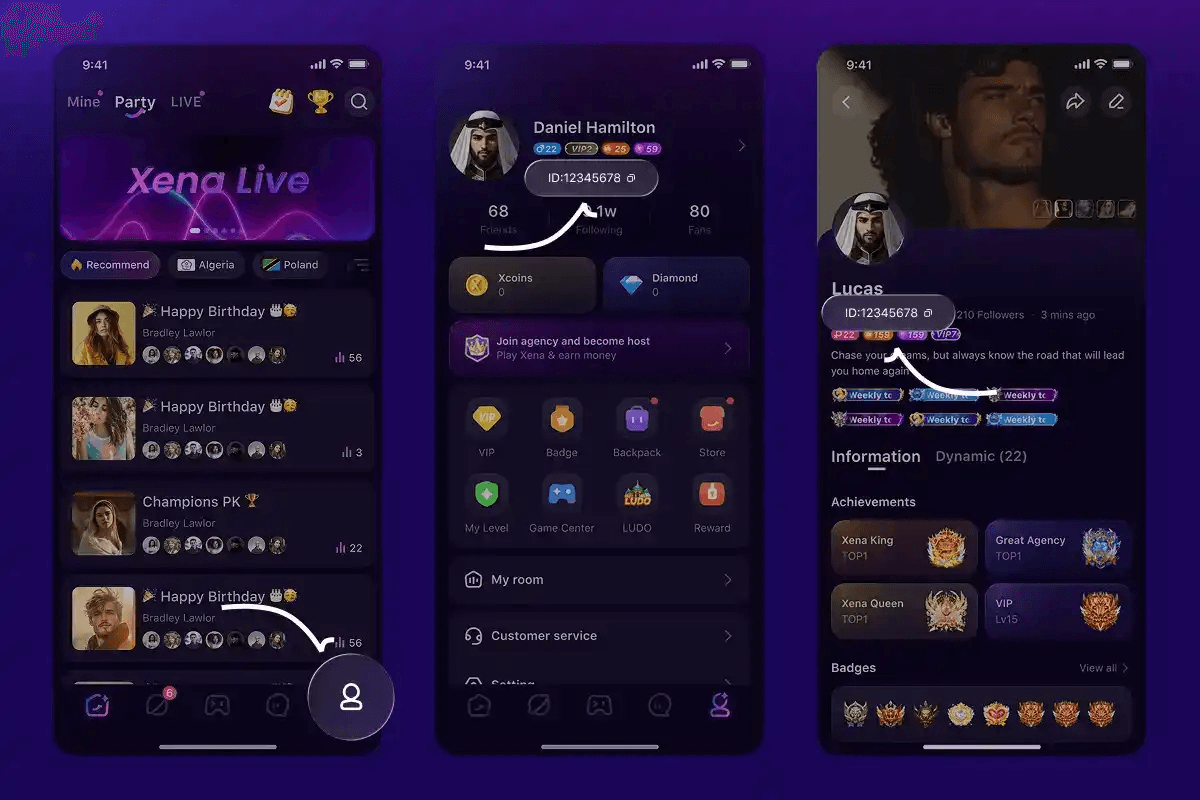
Open Xena Live, go to ME, and open Personal Information. Copy the numeric account ID displayed in your profile and paste it into the recharge field. Menu labels may vary with your app language and version.
Use your numeric account ID, not your display name, room ID, or Show ID. If you use multiple accounts, confirm that you have copied the ID for the account you want to top up.
Compare Xena Coin Packages and Prices
Compare packages using the same payment currency and the total number of coins you will receive. Include any fees shown before payment. A package with a lower total price does not necessarily have a lower cost per coin.
Cost per 1,000 coins = final payment total ÷ coin amount × 1,000.
Choose an amount that matches your intended use and budget. Check the package selector for current prices and offers, as these can change. A larger package is only useful if you need the additional coins.
Check Account Region and Payment Availability
Before placing a Xena recharge order, confirm that the selected product supports your account and location. A GLOBAL or MENA label does not override the availability rules in Xena's Terms of Service. If eligibility is unclear, check with support before paying.
Available payment methods are shown at checkout and may differ by country and currency. Review the final amount and any fees before confirming your purchase.
Xena Live Recharge FAQ
Do I need to share my Xena password?
No. This recharge process uses your Xena ID to identify the receiving account. Do not share your Xena password or verification codes.
How long does a recharge take?
Orders are usually completed within a few minutes, although payment confirmation and service conditions can affect delivery. Follow the status of your order for progress.
What if my Xena coins have not arrived?
Check that payment succeeded and review the order status. If the order is marked complete, reopen Xena Live and confirm that you are viewing the correct account. Contact BitTopup support with your order number and Xena ID if the balance is still unchanged.
What if I entered the wrong Xena ID?
Contact support immediately with your order number and the ID you submitted. Whether the error can be corrected depends on the processing status. Do not assume that coins already credited to another account can be moved or recovered.
Choose a package above, confirm your Xena ID and region eligibility, and review the final total to complete your order.











 Is BitTopup Xena Recharge Safe? An Editor's Honest 2026 Test
 How to Find Your Xena Live ID: The Complete 2026 Guide to Locating, Copying & Using It
 How to Recharge Xena Live Coins at BitTopup (2026 Guide): Fast, Safe & Cheaper Per Coin