

Hiya Live Top Up: Coins, Features, and Room Utility
Hiya Live is an interactive social platform centered around multi-guest voice chat rooms, casual games, and real-time community engagement. Users join audio rooms to chat, sing, play party games, and support their favorite broadcasters. Hiya Coins serve as the primary in-app virtual currency required to access premium social features and interactive elements across the platform.
What Hiya Coins Are Used For
- Animated Virtual Gifts: Send gifts ranging from standard emotes to full-screen 3D luxury animations (sports cars, crowns, yachts) to room hosts and microphone speakers.
- VIP Badges and Levels: Level up your account badge by sending gifts and spending coins, gaining prestige and visual recognition in room member lists.
- Room Entrance Effects: Unlock special entrance banners, vehicles, and audio alerts that announce your arrival when entering any public voice room.
- Custom Profile Frames and Chat Bubbles: Customize your profile avatar with exclusive decorative borders and stylized chat bubbles inside live conversations.
- Microphone Seat Privileges: Support room owners to secure VIP microphone spots during crowded group voice events and community parties.
- Interactive Mini-Games: Use coins to participate in community party games and lucky draw events hosted inside voice channels.
Step-by-Step Guide: How to Recharge Hiya Live Coins with Player ID
Recharging your Hiya Live wallet on BitTopup is direct and requires only your numeric Player ID. Follow these steps to complete your order:
- Select Your Coin Package: Choose the denomination of Hiya Coins you want to add to your account from the catalog list above.
- Enter Your Hiya Player ID: Type your numeric Player ID into the required account field. Double-check the digits to ensure accuracy.
- Proceed to Checkout: Click the recharge button and select your preferred payment method from the available local and international options.
- Finalize Payment: Complete the secure payment verification.
- Check Your In-App Balance: Open Hiya Live and check your profile wallet. The coins are credited directly to your account.
How to Find Your Hiya Live Player ID in the App
To ensure your recharge reaches your profile without delay, copy your exact numeric Player ID directly from the application.
- Launch the Hiya Live app on your iOS or Android mobile device.
- Tap the Profile / Me tab situated in the bottom right corner of the main navigation bar.
- Your numeric Player ID is displayed directly beneath your display name and avatar.
- Tap the small Copy icon next to the number to copy your ID to your clipboard.
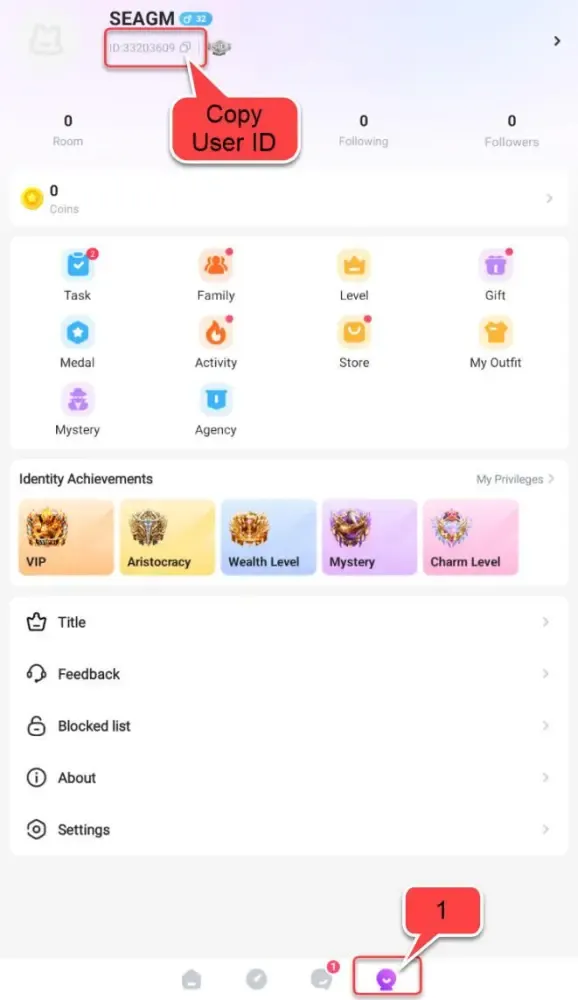
Tip: Always use your numeric Player ID rather than your display nickname. Nicknames can contain special characters or change frequently, while your numeric Player ID remains permanently tied to your profile.
Hiya Coins Pricing and Available Package Denominations (2026)
BitTopup offers multiple package sizes to match different user needs, from small gifting bundles to high-tier social room packages. Exact pricing and regional currency conversions are updated live directly on the checkout selection table.
| Coin Package Tier | Primary Use Case | Delivery Method |
|---|---|---|
| Starter Tier | Small tip gifts, basic chat bubbles, casual room participation | Direct Player ID Crediting |
| Popular Tier | Medium animated gifts, entry-level room entrance effects | Direct Player ID Crediting |
| Social Elite Tier | VIP badge progression, high-tier gift sequences | Direct Player ID Crediting |
| Room Host / Whale Tier | Top-tier room animations, customized frames, leaderboard climbing | Direct Player ID Crediting |
Note: Current live prices, promotional rates, and localized currency options appear directly on the BitTopup product selection panel above.
Why Choose BitTopup for Hiya Live Recharge
BitTopup offers a reliable, streamlined platform for digital currency top-ups across global and regional entertainment apps.
- ID-Based Processing: No need to share sensitive login credentials. Your recharge is processed entirely through your public Player ID.
- Competitive Pricing: Access competitive live rates and clear package breakdowns with no hidden checkout fees.
- Extensive Payment Support: Pay with multiple localized payment channels, major credit/debit cards, e-wallets, and digital payment methods.
- Speed and Reliability: Direct server routing ensures that your Hiya Coins are delivered straight to your account wallet swiftly after payment confirmation.
- Dedicated Customer Service: BitTopup provides responsive customer support to help resolve order inquiries or balance verification questions.
Safe and Secure ID-Only Checkout Without Account Password
Account safety is essential when purchasing digital items online. BitTopup uses a direct UID top-up system, which protects your private data:
- Zero Password Requirements: BitTopup will never ask for your password, Apple ID, Google login, or verification codes.
- No Third-Party Logins: You never have to hand over account access to an agent or third party.
- Send Coins to Friends Easily: Because only the Player ID is needed, you can surprise friends, broadcasters, or family members by entering their Player ID at checkout to send coins directly to their accounts.
- Safe Transactions: All checkout processes use standard encryption protocols to protect your billing details.
Troubleshooting Common Hiya Coin Delivery and Balance Questions
If you experience any delay in seeing your new coin balance inside the Hiya Live app, use the following troubleshooting steps:
- Restart the Application: Completely close the Hiya Live app from your background apps switcher, then reopen it. This forces the app to refresh your profile balance from the server.
- Check Your In-App Wallet Section: Go to
Profile>Wallet(orCoins) to view the updated total rather than relying solely on the room chat interface. - Verify Order Status on BitTopup: Check your order history in your BitTopup account to confirm that payment processing is marked as completed.
- Check Player ID Accuracy: If you entered an incorrect Player ID during checkout, contact BitTopup Customer Support immediately with your transaction ID and the correct Player ID for assistance.
Frequently Asked Questions
What is my Hiya Live Player ID and where can I find it?
Your Player ID is a permanent numeric string assigned to your account. You can find it by opening the Hiya Live app, tapping the "Me" or "Profile" tab at the bottom right, and looking directly beneath your avatar and username.
Do I need to provide my account password to recharge Hiya Live coins?
No. BitTopup only requires your numeric Player ID. You should never share your account password, SMS verification codes, or social media logins with anyone.
How long does it take for Hiya Live coins to arrive after recharge?
Coins are credited directly to your Hiya Live wallet shortly after payment confirmation. In most cases, the balance updates almost immediately once the transaction clears.
How much does Hiya Live coin recharge cost?
Prices depend on the coin denomination you select. Live rates and package options are displayed directly on the BitTopup checkout menu above, allowing you to choose the exact amount you wish to purchase.
What can I purchase with Hiya coins in the live voice chat rooms?
Hiya coins allow you to purchase virtual animated gifts, unlock custom room entry effects, acquire profile frames, level up your VIP badge rank, and take part in interactive room mini-games.
Can I recharge Hiya Live coins for another user using their Player ID?
Yes. Enter the recipient's numeric Player ID in the account field at checkout. Once the payment is complete, the coins will be delivered directly to their Hiya Live wallet.
What should I do if my Hiya coins do not reflect in my wallet after purchase?
First, force-close and restart the Hiya Live app to refresh your wallet balance. If the coins do not appear after a few minutes, check your BitTopup order status and reach out to BitTopup customer support with your order number for swift assistance.