



Ayome Top Up: What Are Ayome Coins and How Are They Used?
Ayome is an interactive social platform that brings people together through multi-guest voice chat rooms, live streaming entertainment, social party games, and dynamic audio communities. Whether you are participating in casual social games like Ludo, singing in karaoke rooms, or interacting with popular broadcasters, the platform relies on an in-app virtual currency known as Ayome Coins.
Ayome Coins allow users to participate actively in live room ecosystems. With coins in your account balance, you can:
- Send Virtual Gifts: Support your favorite audio broadcasters and video hosts with animated digital gifts ranging from simple flowers to elaborate 3D luxury animations.
- Boost PK Battles: Send high-impact gifts during head-to-head streamer competitions (PK battles) to help your chosen creator win match rounds and climb leaderboards.
- Unlock Room Customization: Purchase special chat bubbles, entrance banners, custom avatars, and exclusive vehicle entry animations that announce your arrival when entering crowded voice rooms.
- Access VIP Privileges: Raise your community wealth tier to unlock exclusive profile badges, special room seats, and direct interaction channels with community leaders.
To maintain an active presence and support creators without interruption, getting an Ayome top up through BitTopup offers a quick, secure, and reliable way to add coins directly to your account.
How to Locate Your Ayome Player ID
To complete an Ayome coin recharge online, you only need your unique numeric Player ID. You do not need to share your password or log in through external credentials. Follow these simple steps to find your ID inside the Ayome mobile application:
- Launch the Ayome app on your mobile device.
- Ensure you are signed in to your personal account.
- Tap the Profile or Me icon located in the bottom right corner of the main screen.
- Look directly below your profile picture and nickname to see your Player ID (a unique sequence of numbers).
- Tap the copy icon next to your Player ID to copy the number directly to your clipboard.
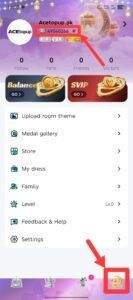
Always double-check your Player ID before submitting an order to ensure the coins are sent to the correct profile.
Step-by-Step Guide to Recharge Ayome Coins Online
Recharging Ayome Coins on BitTopup is designed for speed and clarity. Follow this direct guide to buy Ayome coins in minutes:
- Select Your Desired Coin Package: Browse the available Ayome coin denominations on BitTopup and choose the pack that matches your budget and social needs.
- Enter Your Ayome Player ID: Paste your numeric Player ID into the designated input field on the product page. Verify that the numbers match your in-app profile.
- Proceed to Secure Checkout: Choose your preferred global or local payment method from the available checkout options.
- Receive Your Coins: Once payment verification is complete, the coins are automatically credited directly to your Ayome in-app wallet. Refresh your Ayome profile to view your updated coin balance.
Ayome Live Features: Voice Rooms, Streamer Gifting, and PK Battles
Ayome is built around real-time interactive entertainment. Understanding how coins enhance each core feature helps you get the most value out of your recharge.
Interactive Voice Chat Rooms
Voice rooms serve as the community hub of Ayome. Users gather to discuss shared interests, play casual board games, and host interactive discussions. Room hosts and moderators can organize talent shows, casual trivia, and music sessions. Coins allow participants to tip speakers, purchase mic effects, and support community organizers.
Animated Streamer Gifting
Gifting is the primary method of rewarding creative hosts on Ayome. Sending virtual gifts increases your contributor ranking within the streamer's room and unlocks special fan badges. High-tier gifts trigger full-screen animations that showcase your support across the entire room.
Live Host PK Battles
PK battles pit two broadcasters against each other in real-time popularity contests. During the timed battle, viewers send gifts to raise their host's battle score. The broadcaster with the highest coin score at the end of the timer wins the match. Fast top-ups ensure you never miss critical final seconds during intense PK competitions.
| Feature | Primary Coin Utility | Key Benefit |
|---|---|---|
| Voice Chat Rooms | Tipping hosts, buying mic effects | Enhances interaction and secures premium room seats |
| Virtual Gifting | Sending 2D/3D animated gifts | Boosts supporter ranking and unlocks VIP profile badges |
| PK Battles | Contributing battle points to creators | Helps your favorite broadcaster win live competitions |
| Profile Cosmetics | Buying entrance effects and avatar frames | Distinguishes your profile across busy audio rooms |
Account Safety: Secure ID-Only Recharge Without Sharing Passwords
Protecting your personal data and gaming credentials is vital when buying virtual currencies online. BitTopup uses a direct ID-based delivery system that guarantees full account security:
- Zero Password Exposure: You will never be asked for your Ayome account password, SMS verification code, or social login credentials. Delivery requires only your public Player ID.
- No Account Handover: Your account remains strictly in your hands. You do not need to log out, share access, or allow third parties into your account.
- Encrypted Transactions: All payment processing on BitTopup is protected by advanced SSL encryption protocols, keeping your financial and personal data fully private.
- Safe Delivery Channels: Orders are processed through standard direct-credit systems, avoiding unauthorized account modifications or service penalties.
Ayome Coins Packages and Live Pricing
BitTopup offers multiple Ayome coin package sizes to cater to different user requirements, from modest gift bundles to large coin packages for dedicated community supporters.
Live pricing for every Ayome coin denomination is updated in real time directly on the BitTopup checkout catalog. This allows you to view transparent rates in your local currency without hidden fees. Select your preferred package size on the product page to see the exact current price before completing your purchase.
Order Troubleshooting and Delivery Support for Ayome Recharge
While most Ayome coin top-ups process immediately, technical or network delays can occasionally occur. Use the following troubleshooting checklist if you experience any issues:
- Restart the Ayome App: Completely close the Ayome app from your background applications and reopen it. Check your coin wallet balance on the profile screen.
- Verify the Submitted Player ID: Review your BitTopup order confirmation to ensure the Player ID you entered matches your in-app ID.
- Check Payment Confirmation: Confirm that your payment provider successfully processed the transaction and generated a transaction ID or receipt.
- Contact 24/7 Customer Support: If your coins do not appear after completing the steps above, reach out to the BitTopup support team through the live support portal. Provide your order number, Player ID, and payment receipt for immediate assistance.
Frequently Asked Questions About Ayome Top Up
What is Ayome and what features does it offer?
Ayome is a live social entertainment and voice chat platform that lets users join group audio rooms, play party games, interact with live streamers, and build online communities through real-time communication.
What are Ayome Coins used for?
Ayome Coins are the in-app virtual currency used to purchase animated gifts for hosts, participate in live PK battles, unlock customized entrance animations, and acquire exclusive profile decorations and badges.
How do I find my Ayome Player ID?
Open the Ayome app, tap the Me or Profile tab in the bottom right corner, and locate the numeric Player ID displayed underneath your avatar and username. Tap the copy icon to copy it.
Do I need to share my Ayome password to recharge coins?
No. Recharging through BitTopup requires only your public Ayome Player ID. You should never share your account password or verification codes with anyone.
How long does it take for Ayome Coins to reach my account?
Ayome top-up orders on BitTopup are processed automatically upon successful payment verification. Coins typically reflect in your in-app balance shortly after completing checkout.
What should I do if my Ayome Coins are not credited after payment?
First, restart the Ayome application to refresh your account balance. If the coins do not display, check your BitTopup order history to verify your Player ID and contact BitTopup 24/7 customer support with your order number for fast resolution.
Can I recharge Ayome Coins for another user using their Player ID?
Yes. Because the top-up process only requires a Player ID, you can enter a friend's or streamer's Player ID at checkout on BitTopup to send coins directly to their account as a gift.