



Hoby Chat Top Up: Overview and In-App Coin Value
Hoby Chat is a global voice chat and social entertainment platform where users join live audio rooms, meet friends worldwide, and play interactive casual games. The entire social ecosystem inside Hoby Chat revolves around virtual coins. These coins serve as the primary currency for expressing appreciation, standing out in crowded voice rooms, and participating in platform activities.
When you top up Hoby Chat coins, you gain instant access to interactive features across public and private audio rooms. Coins allow you to send visual gifts to room hosts and speakers, enter community events, and personalize your profile. Because Hoby Chat places a strong focus on community engagement and live voice communication, having a ready balance of coins ensures you never miss a chance to support your favorite creators or join ongoing room competitions.
Direct web top-ups through BitTopup provide a reliable and quick method to credit coins straight to your account using your Player ID, without going through restrictive app store billing systems.
Step-by-Step Guide: How to Recharge Hoby Chat Coins via Player ID
Recharging your coin balance on BitTopup is direct and requires only your public account ID. Follow these steps to complete your purchase:
- Select Your Coin Amount: Browse the available Hoby Chat coin packages on the BitTopup product page and select the amount you want to buy. Live pricing and package details are shown directly on the checkout screen.
- Enter Your Hoby Chat Player ID: Input your exact numerical Player ID into the designated field. Double-check the digits to ensure the balance is routed to the correct account.
- Choose Your Payment Method: Pick your preferred regional or international payment option from the available checkout list.
- Complete the Transaction: Confirm the order details and complete payment through the secure payment portal.
- Verify Your In-App Balance: Open your Hoby Chat app, go to your profile wallet, and confirm that your new coin balance has been credited.
| Feature | BitTopup Web Recharge | Native App Store In-App Purchase |
|---|---|---|
| Credentials Required | Player ID only (No password) | App store account login required |
| Payment Options | Broad selection of local & global methods | Tied strictly to app store payment methods |
| Process Speed | Direct instant automated crediting | Depends on app store receipt verification |
| Device Dependency | Works on any browser (Mobile / PC) | Requires active device with installed app store |
| Gifting to Friends | Enter any friend's Player ID directly | Limited to the logged-in store account |
How to Find Your Hoby Chat Player ID in the App
Locating your Player ID (UID) inside the Hoby Chat app takes only a few seconds. You need this numerical identifier to process your top-up on BitTopup accurately.
- Launch the Hoby Chat application on your mobile device.
- Tap the Profile or Me tab located in the bottom right corner of the main screen.
- Your profile page will display your avatar, nickname, and account details.
- Find your numerical Player ID (UID) located right below your display name.
- Tap the small Copy icon next to the number to copy your exact ID to your clipboard.
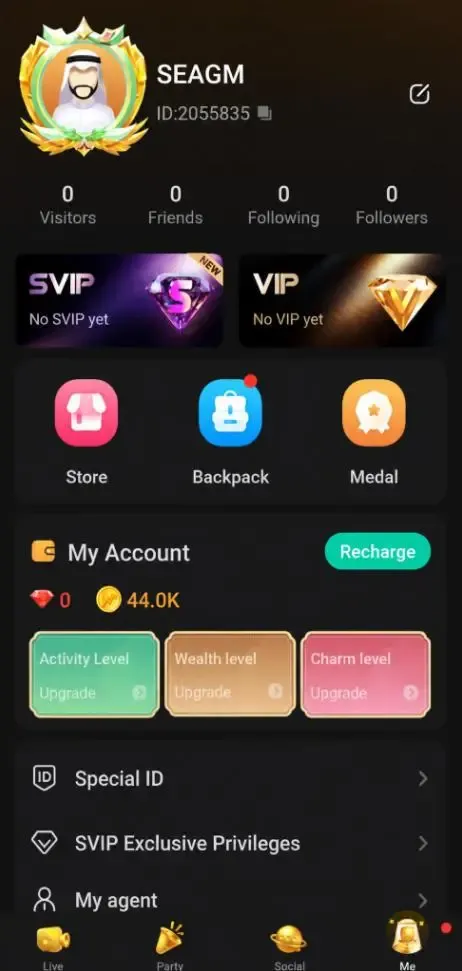
Always copy and paste the ID directly rather than typing it manually. This prevents typos and guarantees that your purchased coins arrive in your account without delays.
Exclusive Perks: Luxury Gifts, Interactive Games, and VIP Badges
Hoby Chat coins unlock a wide range of social privileges and interactive entertainment features across the platform:
- 3D Animated Luxury Gifts: Send custom animated gifts—such as sports cars, private jets, castles, and sparkling bouquets—to room broadcasters and friends on the microphone. Sending gifts increases your room contribution rank and triggers full-screen special effects.
- Room Mini-Games: Use your coins to enter community games directly inside voice rooms, including classic Ludo and lucky wheel activities, competing with other participants for leaderboards and prizes.
- VIP Badges and Chat Bubbles: High-tier coin usage unlocks exclusive VIP status indicators, distinct chat bubble styles, and special entrance effects that announce your arrival whenever you enter a voice room.
- Custom Headwear and Avatar Frames: Purchase limited-edition profile borders and animated headwear to stand out in user lists and active voice seats.
Account Safety: Safe Recharges with No Password Required
Account security is a critical priority when buying virtual currencies online. BitTopup uses a direct-to-account crediting model that relies exclusively on your public Hoby Chat Player ID.
- Zero Login Credentials: You never need to share your Hoby Chat password, phone verification codes, Facebook login, or Google account credentials.
- No Account Takeover Risk: Because authentication credentials are never requested or stored, your account remains completely secure from unauthorized access.
- Encrypted Checkout: All checkout pages on BitTopup are protected with industry-standard SSL encryption to secure your transaction data and personal details.
- Safe Third-Party Gifting: You can safely buy coins for friends, family, or room hosts by entering their Player ID, without needing access to their personal devices or accounts.
Payment Methods and Instant Balance Delivery Overview
BitTopup offers a versatile checkout experience tailored to users globally. When you select a Hoby Chat coin package, the checkout system presents available regional payment solutions, e-wallets, credit/debit cards, and local online banking channels.
Current package prices and localized currency conversions are calculated and displayed dynamically on the live checkout page, allowing you to see the exact total before confirming payment. Once your payment clears, our automated distribution system transmits the coins directly to your Hoby Chat account ID, ensuring fast fulfillment so you can get right back to chatting and gifting without waiting.
Troubleshooting Hoby Chat Top-Up Delays and Order Issues
While coin delivery is generally instantaneous, occasional network delays or user errors can happen. Use these troubleshooting steps if you encounter an issue:
- Refresh Your Hoby Chat Wallet: If your balance has not updated after payment, completely close the Hoby Chat app from your phone's app switcher and reopen it. You can also log out and log back in to force a wallet synchronization with the server.
- Check the Player ID on Your Invoice: Review your BitTopup order confirmation receipt to make sure the Player ID entered matches your in-app ID. If you accidentally submitted an incorrect ID, reach out to customer support immediately.
- Confirm Payment Authorization: Verify with your payment provider or bank that the transaction was successfully processed and not flagged as pending.
- Contact BitTopup Customer Support: If your payment was deducted but your coins have not appeared after several minutes, contact BitTopup 24/7 customer support via the help center. Provide your order number, Player ID, and transaction screenshot for swift resolution.
Frequently Asked Questions
How do I recharge Hoby Chat coins on BitTopup?
To recharge Hoby Chat coins, select your desired coin package on the BitTopup Hoby Chat page, enter your Hoby Chat Player ID, choose your payment method, and complete the checkout. The coins will be delivered directly to your account balance.
Where can I find my Hoby Chat Player ID?
Open the Hoby Chat app, tap the Profile (or Me) icon in the bottom navigation bar, and look below your profile picture and nickname. Your numerical Player ID is displayed there with a copy button next to it.
Do I need to share my Hoby Chat password to top up coins?
No. BitTopup only requires your public Hoby Chat Player ID. You should never share your account password, email login, or verification codes with anyone.
How fast will the coins appear in my Hoby Chat balance after payment?
Coins are typically delivered instantly after successful payment processing. In rare cases of server congestion, delivery may take a few minutes. Restarting your app can help refresh the balance.
What can I purchase with Hoby Chat coins?
Hoby Chat coins can be used to purchase and send animated virtual gifts in voice rooms, join interactive mini-games like Ludo, unlock VIP badges, and acquire custom avatar frames and profile headwear.
What should I do if my Hoby Chat coins do not arrive immediately?
First, close and reopen the Hoby Chat app to refresh your wallet balance. If the balance remains unchanged, verify your order status on BitTopup and ensure your Player ID was entered correctly. If you need assistance, contact BitTopup 24/7 customer support with your order number.