



Amo Chat Top Up: Instant Recharge with Player ID
Amo Chat is a global social communication and live interaction platform designed to connect people through real-time voice, video chat, dynamic communities, and interactive rooms. Whether you want to send virtual gifts to your favorite creators, start private 1-on-1 conversations, or unlock exclusive VIP privileges, having a sufficient balance of Amo Chat coins is essential.
On BitTopup, completing an Amo Chat top up is direct, secure, and fast. You only need your Amo Chat Player ID to reload your account balance. There is no requirement to share your login credentials or password, keeping your personal account completely protected.
Overview of Amo Chat App and Virtual Currency Features
The Amo Chat platform centers around social entertainment, live voice parties, and direct messaging. The platform operates on a virtual coin economy that allows users to interact with features across the app.
Core Uses of Amo Chat Coins and VIP Status
- Sending Virtual Gifts: Express appreciation to broadcasters and friends during live audio streams and private chats with animated 3D gifts and entrance effects.
- 1-on-1 Voice and Video Calls: Connect directly with other active users without interaction limits.
- VIP Membership: Activate VIP status to receive distinct profile badges, exclusive avatar frames, profile visitor tracking, and prioritized room placement.
- Message Boosts & Matching: Increase profile visibility to expand your reach within global and local discovery feeds.
Amo Chat Currency & Feature Summary
| Feature / Item | Primary Use Case | Delivery Method |
|---|---|---|
| Amo Chat Coins | Virtual gifting, call credits, interactive mini-games | Direct to Player ID |
| VIP Subscriptions | Chat badges, custom profile frames, priority matching | Automatic via Coin Conversion |
| Special Gift Packs | High-tier animations and broadcast-wide notifications | Credited to Account Inventory |
How to Find Your Amo Chat Player ID
To ensure your Amo Chat recharge reaches the right account instantly, locate your numerical Player ID inside the mobile app before completing your order.
- Open the Amo Chat application on your mobile device.
- Tap the Profile / Me icon located in the bottom navigation bar.
- Look directly beneath your display avatar and nickname.
- You will see your unique ID / User ID (a numerical string).
- Tap the Copy icon next to the number to copy your Player ID to your clipboard.
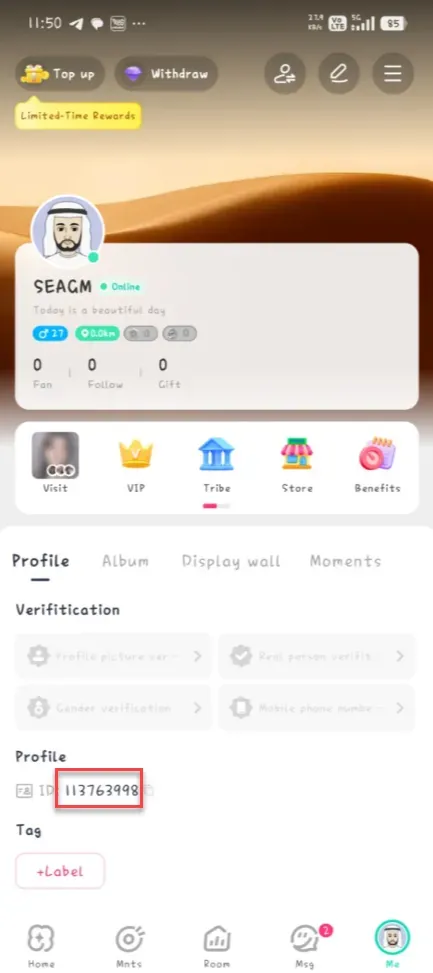
Tip: Always double-check that you copied the complete numerical string without any extra spaces or symbols.
How to Recharge Amo Chat on BitTopup (Step-by-Step)
To buy Amo Chat coins on BitTopup, follow this simple process:
- Select Your Package: Choose the denomination of Amo Chat coins that matches your needs from the product list above.
- Enter Your Player ID: Paste your Amo Chat Player ID into the designated input field. Make sure the number matches your profile exactly.
- Proceed to Checkout: Click the recharge button to open the secure payment screen.
- Complete Payment: Select your preferred localized payment method and confirm the transaction.
- Check Your In-App Balance: Once the order status shows completed on BitTopup, open Amo Chat and check your updated coin total in your wallet section.
Live pricing, active bundle selections, and local currency conversions are displayed directly in the product selection menu above.
Benefits of Amo Chat VIP and Direct In-App Currency Recharging
Maintaining a ready balance of coins on Amo Chat gives you full access to the platform's social features:
- Instant Gifting in Audio Rooms: Participate in live party events and support room hosts instantly without missing conversation moments.
- Profile Customization: Stand out in discovery feeds with VIP profile banners, animated text bubbles, and exclusive entrance vehicles.
- Unrestricted Social Reach: Initiate private chats and video sessions without running into daily free-tier message restrictions.
- Zero Risk Direct Top Up: Direct Player ID recharge means zero risk of account theft, phishing, or third-party login flags.
Safe Payment Methods and Security Precautions in 2026
Account safety is critical when purchasing digital items online. When topping up your Amo Chat account on BitTopup, your personal information is protected by industry-standard security protocols.
Safety Guidelines for Amo Chat Users
- Never Share Passwords: BitTopup will never ask for your Amo Chat password, phone verification code, or social login credentials. Only your public Player ID is required.
- Avoid Unofficial APK Hacks: Third-party "unlimited coin" mods or unauthorized scripts violate Amo Chat terms of service and lead to permanent account bans. Always obtain coins through direct Player ID recharges.
- Verify Your ID Number: Take a moment to verify your Player ID before confirming payment, as digital goods are credited automatically upon order completion.
Common Amo Chat Top Up Issues and How to Avoid Mistakes
If you experience any delay or issue with your Amo Chat order, check these quick troubleshooting points:
- Typo in Player ID: Entering an incorrect Player ID causes the coins to be delivered to another user. Always use the built-in copy button in your Amo Chat profile.
- App Cache Delay: If your balance does not update immediately after order completion, close Amo Chat completely, clear your app cache, and relaunch it.
- Pending Payment Status: Ensure your payment provider has cleared the transaction. Orders are processed immediately once payment confirmation is received.
- App Name Confusion: Verify that you are using the official Amo Chat social/voice app and not an unrelated application sharing the "Amo" name.
If you still need assistance, BitTopup customer support is available to review your transaction status and help verify your order details.
Frequently Asked Questions
What is the purpose of the Amo Chat app?
Amo Chat is a social networking and live entertainment mobile app where users connect through voice rooms, 1-on-1 private messaging, video interactions, and virtual gifting across a global community.
How do I locate my Amo Chat Player ID for recharge?
Open the Amo Chat app, tap the Me or Profile tab at the bottom right corner, and locate the numerical ID displayed beneath your avatar. Tap the copy icon next to it to use during checkout.
Do I need to provide my Amo Chat password to top up?
No. BitTopup requires only your public Amo Chat Player ID. You should never share your account password, email access, or verification codes.
How long does it take for Amo Chat recharge to reflect on my account?
Orders placed on BitTopup are processed automatically. In most cases, your coins reflect in your Amo Chat wallet shortly after payment confirmation. Refresh your profile page to see the updated balance.
Can I recharge Amo Chat for someone else using their Player ID?
Yes. As long as you have the recipient's valid Amo Chat Player ID, you can enter it during checkout to send coins directly to their account as a gift.
What should I do if my Amo Chat recharge does not arrive?
First, verify your Player ID in your order receipt. Next, restart the Amo Chat app to refresh your wallet balance. If your balance remains uncredited, reach out to BitTopup customer support with your Order ID for rapid verification.