



Hi Party Top Up: Instant Coins Recharge Online
Hi Party is a popular interactive voice chat and social entertainment platform where users join live audio rooms, play casual games, share music, and connect with global communities. Coins are the primary in-app virtual currency used across Hi Party rooms to send dynamic gifts, activate special entrance effects, customize profile badges, and support room creators.
Getting a fast Hi Party top up on BitTopup ensures you never run out of coins during lively room parties or gifting battles. Our direct recharge system routes your coin package straight to your Hi Party account using only your numerical Player ID. There is no need to share private passwords or wait for manual staff intervention. Choose your package, input your Player ID, complete your purchase, and watch your coin balance update immediately.
What Are Hi Party Coins and What Can You Use Them For?
Hi Party coins unlock interactive perks and social features within the app. Recharging your balance allows you to participate fully in audio rooms and build your reputation across the platform.
- Animated Room Gifts: Send virtual gifts ranging from simple roses to full-screen luxury animations to show appreciation to room hosts and speakers.
- Profile Customization: Purchase custom avatar borders, distinctive chat bubbles, and nameplate decorations that stand out in crowded voice rooms.
- Exclusive Entrance Effects: Announce your presence in high-traffic rooms with customized vehicles, animations, and banner sound effects when entering a voice party.
- Room Ranking and Leveling: Sending gifts boosts your personal wealth level and drives the ranking of your favorite voice rooms on the daily and weekly leaderboards.
- Interactive Mini-Games: Use coins to join in-room social activities and community mini-games alongside friends.
How to Locate Your Hi Party Player ID
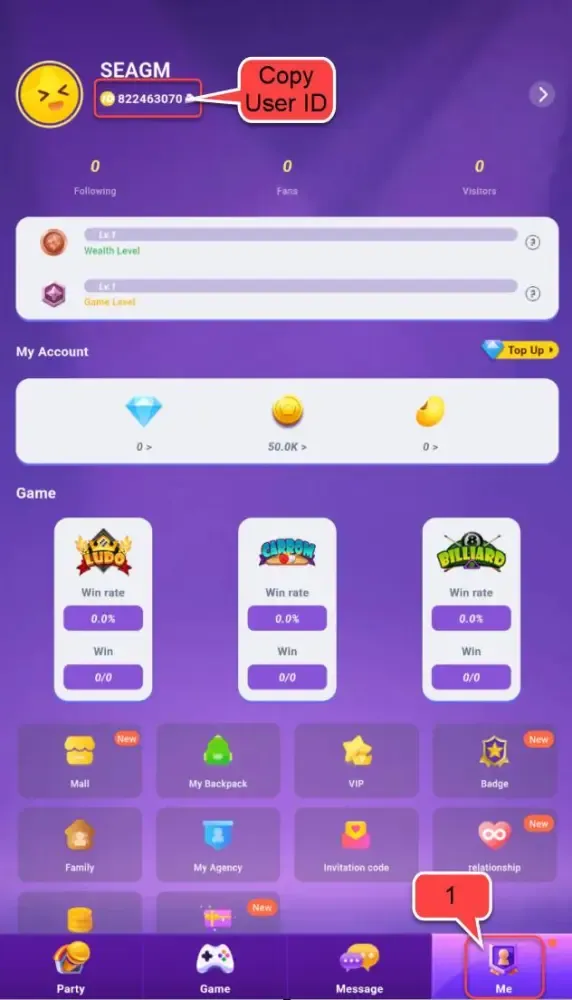
To ensure your coins arrive at the correct account, you must enter your exact Hi Party Player ID during checkout. Follow these steps on your mobile device to locate your ID:
- Open the Hi Party application on your phone or tablet.
- Tap the Profile or Me icon located in the bottom-right corner of the main navigation bar.
- Your profile screen will display your avatar, nickname, and account details.
- Locate the numerical ID string displayed directly below your display name.
- Tap the copy icon beside the numbers to copy your Player ID directly to your device clipboard.
Always double-check your copied Player ID before proceeding to payment on BitTopup to prevent sending coins to an incorrect user.
Step-by-Step Guide to Hi Party Coin Recharge on BitTopup
Recharging your Hi Party account on BitTopup takes less than a minute. Follow this walkthrough to complete your order:
- Select Coin Quantity: Browse the available coin packages on this page and pick the amount you want to add to your account.
- Enter Your Player ID: Paste your numerical Hi Party Player ID into the dedicated input field.
- Select Payment Method: Choose from the available secure local and international payment options at checkout.
- Review Order Details: Check the coin amount and verify that your Player ID is accurate.
- Complete Checkout: Finalize your payment. The automated dispatch system verifies the transaction and transfers your Hi Party coins directly to your balance.
Hi Party Coin Packages and Order Overview
BitTopup supports a wide selection of coin packages to match your specific gifting and room needs. All denominations are processed directly through automated routing for rapid fulfillment.
| Order Detail | Specifications |
|---|---|
| Game / Platform | Hi Party (Global) |
| Required Account Info | Player ID (Numerical UID only) |
| Password Required? | No — Never provide account passwords |
| Delivery System | Automated direct top-up |
| Operating Hours | 24 Hours a day, 7 Days a week |
| Supported Platforms | Android and iOS devices |
| Package Pricing | Displayed in real-time on the live checkout selector above |
Note: Current prices and special regional bundles are updated dynamically on the live order module above. Check the top of this page for active checkout rates.
Why Choose BitTopup for Hi Party Top Up?
Choosing the right top-up platform ensures safety, fair rates, and speed. BitTopup provides an optimized top-up experience built around customer convenience:
- Fully Automated 24/7 Delivery: Unlike services that rely on manual customer service agents operating during limited store hours, BitTopup processes top-up orders automatically day and night.
- ID-Only Security: You never have to share account passwords, verification SMS codes, or third-party social login details. Top-ups require only your public Player ID.
- Comprehensive Payment Support: Pay with trusted credit cards, debit cards, digital e-wallets, and regional payment methods tailored to your country.
- Responsive Customer Service: If you have questions about an order or need assistance verifying a transaction, our customer care team is available 24/7 to help resolve your inquiry.
Safe and Secure ID-Only Recharge Guarantee
Account safety is a top priority when purchasing in-app currency online. BitTopup uses direct ID recharge architecture. This means:
- No Account Access Needed: We never log into your Hi Party profile. Your private messages, friends list, and personal account settings remain strictly confidential.
- Encrypted Transactions: All payment processing utilizes modern data encryption standards to keep your billing details private and secure.
- No Risk of Account Takeover: Because you never share login credentials, your account security remains 100% under your control on your personal mobile device.
Troubleshooting Common Hi Party Recharge Issues
If your coins do not show up immediately after completing your order, review these troubleshooting steps:
1. Refresh the Hi Party App
Occasionally, the app cache needs to update to reflect newly added coins. Force close the Hi Party app on your mobile device, reopen it, and check your profile coin balance again.
2. Verify Your Network Connection
Ensure your device has a stable internet connection. A slow Wi-Fi or mobile data connection can prevent the game client from syncing with live server balances.
3. Check Your BitTopup Order Status
Log in to your BitTopup account and review your order history. Confirm that the payment completed successfully and that the status indicates "Completed."
4. Verify the Submitted Player ID
Check your order confirmation email or order details to confirm you submitted the correct Player ID. If you made a typo, contact BitTopup support immediately with your order ID and correct details.
Frequently Asked Questions (FAQ)
How do I recharge Hi Party coins?
Select your desired coin package on BitTopup, type in your Hi Party Player ID, choose your payment method, and complete the payment. Your coins will be credited directly to your Hi Party balance automatically.
Where can I find my Hi Party Player ID?
Open the Hi Party app, tap the Profile / Me icon in the bottom-right corner, and find the numerical ID displayed beneath your avatar and display name. Tap the copy icon next to it to grab your ID.
Do I need to share my Hi Party account password to top up?
No. BitTopup only requires your numerical Player ID. You should never share your Hi Party password or SMS login codes with anyone.
How long does it take for Hi Party coins to reach my account?
Orders are processed through an automated delivery system that dispatches coins within seconds after your payment is confirmed.
What should I do if I entered an incorrect Hi Party Player ID?
Contact the BitTopup 24/7 customer support team immediately with your order number. If the order has not yet been processed by the automated system, support can assist in correcting the destination ID.
What payment methods are supported for Hi Party recharge?
BitTopup supports a wide variety of global and regional payment channels, including major credit/debit cards, e-wallets, and local banking options. The full list of available methods for your location is displayed at checkout.