




Fast and Secure Ahlan Top Up Online
Ahlan is a popular global voice chat and social entertainment platform designed for group voice rooms, interactive casual games, and live community events. Users from across the globe gather in Ahlan to host audio rooms, share music, participate in voice competitions, and connect with friends in real time.
Ahlan Coins serve as the primary in-app virtual currency. Coins allow you to participate actively in voice room interactions, reward talented room hosts with animated gifts, purchase exclusive profile decorations, and boost your standing across community leaderboards. To maintain an uninterrupted social experience, completing an Ahlan top up gives you instant access to in-app assets directly credited to your account.
BitTopup provides a direct recharge system that connects directly to your Ahlan Player ID. You do not need to share passwords, login credentials, or third-party social authentications. By entering your numerical Player ID and selecting your coin package, your account balance updates quickly so you can continue enjoying voice rooms and special events.
How to Find Your Ahlan Player ID in the App
To ensure your coins are sent to the correct account, you must enter your exact Ahlan Player ID during checkout. Follow these steps on your mobile device:
- Launch the Ahlan app and log in to your account.
- Tap the Me or Profile icon located at the bottom-right corner of the main screen.
- Locate your profile card at the top of the screen. Your numerical ID is displayed directly beneath your username and avatar.
- Tap the copy icon beside your ID number to copy it directly to your clipboard, preventing manual typing mistakes.
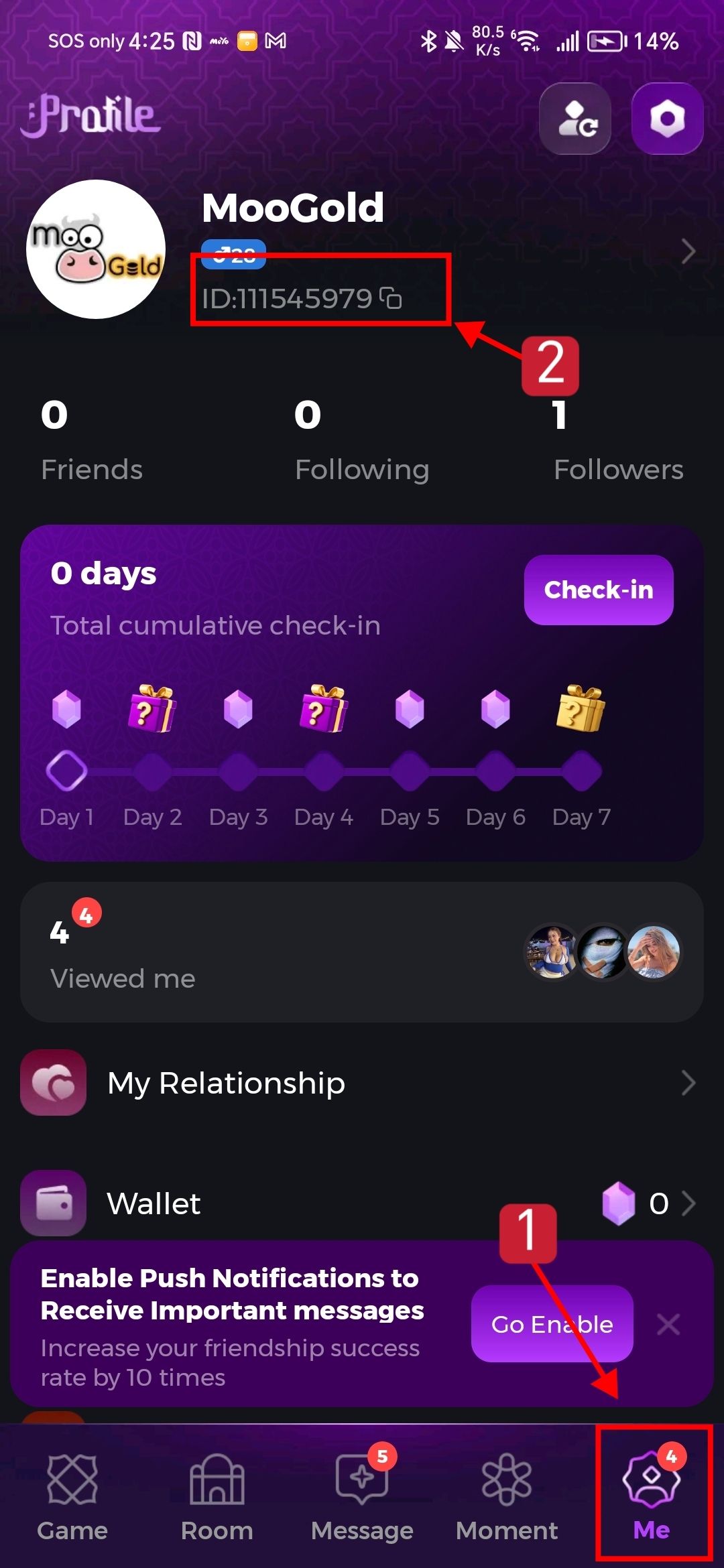
Always double-check your ID before submitting your order on BitTopup. Coin top-ups are processed automatically based on the ID entered.
Step-by-Step Guide to Recharge Ahlan Coins
Recharging your Ahlan account on BitTopup takes only a few straightforward steps:
- Select Coin Denomination: Browse the available Ahlan coin packages on the live checkout selector and choose the amount that fits your needs.
- Enter Player ID: Paste or type your numerical Ahlan Player ID into the designated input field.
- Select Payment Method: Choose from the available secure payment options displayed at checkout.
- Review and Confirm: Verify your Player ID and selected coin package, then proceed to complete payment.
- Check Balance in Ahlan: Once the order completes, open your Ahlan application, go to your profile wallet, and check your updated coin total.
| Feature Category | Description | Primary In-App Benefit |
|---|---|---|
| Virtual Gifts | Standard and animated 3D gifts sent in voice rooms | Supports broadcaster rankings and triggers screen animations |
| Entrance Vehicles | Custom arrival effects when joining a room | Displays dynamic visual banners upon entering voice lounges |
| VIP Profile Frames | Special badges and glowing avatar borders | Distinguishes your profile identity in public chat feeds |
| Interactive Games | Coin-based participation in room mini-games | Allows joint gameplay with hosts and room guests |
| Room Ranking Boost | High-tier gifting events | Propels your favorite group room to platform leaderboards |
In-App Perks: Virtual Gifting, Badges, and Voice Room Upgrades
Ahlan Coins unlock a wide variety of social features designed to personalize your profile and enhance your interaction in audio rooms.
Animated Virtual Gifting
Broadcasters, singers, and room hosts create entertaining environments for their communities. By using Ahlan Coins, you can send dynamic gifts ranging from simple roses to luxury sports cars, animated dragons, and room-wide party fireworks. High-value gifts trigger global platform notifications, putting your profile in front of thousands of active listeners.
Exclusive Entrance Effects and Avatar Frames
Standing out in crowded voice rooms becomes effortless when you equip custom entrance effects. Entering an audio room with a sports car or mystical beast effect announces your arrival to everyone inside. Coins also allow you to acquire limited-edition avatar frames and chat bubbles that reflect your community status.
VIP Status and Badges
Active participation and gifting build your VIP level in Ahlan. As your level climbs, you unlock dedicated profile badges, customized name styling, and priority mic seating in partner rooms. These cosmetic badges indicate your engagement and support within the broader Ahlan voice community.
Account Safety: Why Player ID Only Top-Up Protects Your Account
Account security is essential when buying digital currency online. BitTopup uses a Player ID-only delivery system to protect your personal information:
- Zero Password Requirement: You never share your Ahlan account password, Apple ID, Google account details, or SMS verification codes. Your private credentials remain completely confidential.
- No Account Handover: Your account stays in your hands at all times. There is no need for third parties to log in to your account to process orders.
- Direct System Dispatch: Coin packages are routed straight to your public numerical ID through secure processing channels, eliminating the security risks associated with shared logins.
- Complete Privacy: Your personal chat logs, friend lists, audio recordings, and private group memberships remain safe from unauthorized access.
Supported Payment Methods and Delivery Tracking
BitTopup offers flexible payment solutions tailored to users around the world. Pricing and available checkout channels are displayed clearly on the live product page in your local currency, allowing you to choose the payment method that suits you best.
Tracking Order Delivery
Once your transaction completes, you can track the progress of your coin recharge directly inside your BitTopup user center under order history. Coin credits are processed promptly through automated delivery pipelines. If you have the Ahlan app open during the purchase, simply refresh your profile page or restart the app to see your new coin balance reflected in your wallet.
Frequently Asked Questions About Ahlan Recharge
Where can I find my Ahlan Player ID?
You can find your Ahlan Player ID by opening the Ahlan app, tapping the Profile (Me) tab at the bottom-right corner, and looking directly below your avatar and display name. Your ID is a dedicated numerical code with a quick-copy icon next to it.
Do I need to share my Ahlan password to recharge coins?
No. Recharging Ahlan coins on BitTopup requires only your public Player ID. You should never share your password, social login details, or verification codes with anyone.
How long does it take for Ahlan coins to appear after purchase?
Coin orders are processed through an automated system immediately upon payment confirmation. Your balance typically updates within moments. If your app is running, pull down to refresh your profile wallet or restart the Ahlan application.
Can I recharge Ahlan coins for a friend using their Player ID?
Yes. Because the top-up process only requires a Player ID, you can send coins to friends or family by entering their numerical ID in the Player ID field during checkout. Verify their ID carefully before paying.
What should I do if my Ahlan coins balance does not update?
First, restart the Ahlan app and check your profile wallet again to confirm your network connection refreshed. Next, check your BitTopup order history to ensure the transaction shows as completed and verify that the entered Player ID matches your account. If the balance still has not updated, reach out to BitTopup customer support with your order number for fast assistance.
Which payment methods are supported for Ahlan top up on BitTopup?
BitTopup supports a comprehensive range of international and regional payment methods, including credit cards, debit cards, local e-wallets, and online banking options. Check the live checkout page to see the exact payment options and pricing available in your region.