



What is a MiFinity eVoucher (GBP) Top Up and How Does It Work?
A MiFinity eVoucher is a prepaid digital payment solution that allows you to fund your MiFinity eWallet or make direct payments at partner merchants without linking a personal bank account or credit card. Issued in British Pound Sterling (GBP), this digital voucher contains a unique 20-digit PIN that carries a fixed monetary value.
When you purchase a voucher, you receive digital credits that act as private, standalone funds. You can redeem this PIN instantly inside your personal MiFinity account or enter it directly at checkout on thousands of international websites across gaming, digital entertainment, travel, and retail.
Because the voucher is prepaid, it provides full spending control with zero risk of overdrawing. It also serves as an extra layer of privacy, keeping your banking credentials and card details completely disconnected from online merchants.
Step-by-Step Guide: How to Redeem Your 20-Digit MiFinity PIN
Redeeming your voucher code is straightforward. You can deposit the funds directly into your balance or pay on an integrated merchant platform.
Method 1: Depositing into Your MiFinity eWallet
- Log in to your MiFinity eWallet via the official web portal or mobile app.
- Click on the Deposit button located on your main dashboard.
- From the list of payment methods, select eVoucher by MiFinity.
- Choose the GBP currency option corresponding to your voucher.
- Enter the exact monetary value of the voucher you purchased.
- Type in your 20-digit PIN carefully.
- Click Submit to finalize the transaction. The funds will immediately appear in your GBP eWallet balance.
Method 2: Direct Merchant Checkout
- Visit the checkout page of your chosen merchant.
- Select MiFinity or MiFinity eVoucher as your payment method.
- Enter your 20-digit prepaid PIN and select GBP as the voucher currency.
- Confirm the transaction to complete your order immediately.
How to Locate Your 20-Digit PIN and Account Details
After completing your purchase on BitTopup, your 20-digit digital code is issued immediately. You can locate your code inside your BitTopup order history or in the order confirmation sent to your registered email address.
Ensure that you copy the full 20-digit code without spaces or punctuation marks before entering it into the deposit field.
Avoiding Currency Conversion Surcharges on GBP Accounts
When using prepaid digital vouchers, foreign exchange fees can reduce the total balance credited to your account. To maximize the value of your funds, follow these currency matching rules:
- Match Your eWallet Currency: If your primary MiFinity eWallet pocket is denominated in British Pounds (GBP), always purchase a GBP eVoucher. MiFinity deposits between matching currencies incur no cross-currency exchange rate fees.
- Secondary Wallets: If your account default is EUR or USD, create a secondary GBP sub-wallet inside your MiFinity dashboard before redeeming your voucher. MiFinity allows users to hold multiple currency balances simultaneously.
- Merchant Invoicing: Ensure the merchant charges in GBP at checkout. If a store charges in USD or EUR and you pay with a GBP PIN, standard foreign exchange rates will apply at the point of sale.
Where to Use MiFinity: Accepted Merchants and Unsupported Regions
MiFinity operates globally under regulatory authorization from the Financial Conduct Authority (FCA) in the UK and the Malta Financial Services Authority (MFSA). Its prepaid vouchers are accepted by a broad network of online businesses.
| Feature | Details |
|---|---|
| Currency Code | GBP (£) |
| Code Format | 20 Numeric Digits |
| Voucher Lifespan | 12 Months from Issue Date |
| eWallet Fund Lifespan | Non-Expiring (Active Account) |
| Supported Platforms | Gaming, e-Commerce, Forex, Travel, Digital Entertainment |
| Key Excluded Jurisdictions | United States, FATF Blacklisted Territories |
Regional Restrictions
While the GBP voucher can be redeemed worldwide by eligible account holders, regulatory restrictions apply in certain regions:
- United States: MiFinity eVouchers cannot be used or redeemed by US residents due to local state-by-state financial licensing laws.
- Restricted Territories: Sanctioned regions and high-risk FATF jurisdictions cannot activate or hold MiFinity accounts.
Always verify that your destination merchant supports MiFinity transactions in your region before completing your voucher purchase.
MiFinity Voucher Code Expiry vs eWallet Balance Validity
There is a critical distinction between the lifespan of an unredeemed voucher PIN and the funds stored inside your activated eWallet:
- 20-Digit Voucher PIN (12 Months): The digital voucher code itself is valid for 12 months from the date of creation. If the code is not redeemed or spent within 365 days, it becomes invalid and can no longer be processed.
- Active eWallet Balance (Non-Expiring): Once you redeem the 20-digit code into your personal MiFinity account balance, the voucher ceases to exist and the funds become standard eWallet money. These funds do not expire under voucher rules, provided your account remains active under standard user terms.
To prevent code expiration, deposit your voucher into your MiFinity balance promptly after purchase.
Troubleshooting 20-Digit PIN Redemption Errors
If you encounter an error message while redeeming your voucher, review the following troubleshooting steps:
- Verify PIN Character Count: Ensure the PIN contains exactly 20 digits. Double-check that no spaces, hyphens, or trailing characters were accidentally pasted.
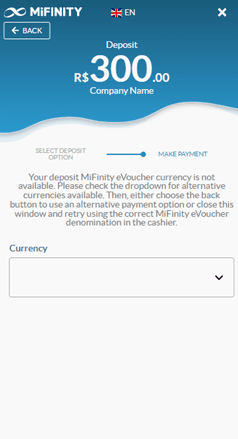
- Confirm Exact Denomination: When depositing inside the MiFinity portal, the deposit amount you enter manually must match the exact face value of your voucher.
- Check Selected Currency: Confirm that the currency drop-down menu is set to GBP. Attempting to deposit a GBP code under a EUR or USD selection will generate an invalid code error.
- Verify Single-Use Status: MiFinity eVouchers must be redeemed in full. Once used, the PIN cannot be split across multiple partial deposits or reloaded.
- Account Verification Status: Check if your MiFinity profile has reached its unverified transaction threshold. If deposit limits have been exceeded, complete standard identity verification within the MiFinity dashboard to restore full deposit functionality.
Safe and Private Payments: No Passwords or Bank Details Required
Using a digital prepaid voucher provides high transaction security. At no point during the BitTopup checkout or redemption process do you need to share your MiFinity account password or bank login credentials.
- You do not need to share account passwords or sensitive personal authentication codes.
- Online merchants only receive the transaction confirmation, never your payment card details or banking data.
- If you ever receive an unsolicited request asking for your full voucher PIN outside the official MiFinity checkout page, do not disclose it.
Why Recharge MiFinity eVoucher GBP via BitTopup
BitTopup delivers a secure, clear, and convenient purchasing experience for digital voucher buyers:
- Fast Digital Code Delivery: Receive your 20-digit PIN immediately upon order confirmation directly in your account orders and email.
- Zero Financial Data Exposure: Pay using your preferred supported method without exposing sensitive banking credentials to third parties.
- Transparent Denominations: View exact pricing and available GBP balance tiers clearly on the live checkout interface before placing an order.
- Reliable Customer Assistance: Access professional customer support ready to assist with order questions, verification, and code retrieval whenever needed.
Check the live product catalog above to select your desired denomination and complete your order.
Frequently Asked Questions
How do I redeem my 20-digit MiFinity eVoucher GBP code?
Log in to your MiFinity account, navigate to the Deposit section, and select eVoucher by MiFinity. Choose GBP as the currency, enter the exact voucher amount, paste your 20-digit code, and confirm. The funds will credit to your account immediately.
How long is a MiFinity eVoucher valid before expiration?
Unredeemed MiFinity eVoucher codes are valid for 12 months from their date of purchase. Once redeemed into your eWallet balance, the funds follow standard account terms and no longer expire under the 12-month voucher rule.
Can I use a GBP MiFinity eVoucher in other countries?
Yes. You can redeem a GBP voucher globally wherever MiFinity is supported, provided your account can hold or convert GBP. If you redeem a GBP voucher into a non-GBP wallet balance, standard foreign exchange conversion fees may apply.
Do I need to share bank or credit card details to use a MiFinity voucher?
No. A MiFinity eVoucher requires only the 20-digit numeric PIN for redemption. You do not need to link or disclose bank accounts, credit cards, or passwords during the checkout or deposit process.
What should I do if my MiFinity eVoucher code fails to redeem?
First, confirm that the 20-digit PIN was entered accurately without extra spaces. Ensure you selected GBP as the currency and entered the exact face value of the voucher. If the issue persists, verify your eWallet deposit limit status or contact BitTopup support with your order number.
Are there any fees for depositing a MiFinity eVoucher into an eWallet?
MiFinity deposits via eVoucher may be subject to standard merchant or processing fees depending on your eWallet account tier and configuration. Review the deposit summary screen inside your MiFinity dashboard before final confirmation to see the exact net amount.