

PCS Mastercard EU Top Up: What It Is and How It Works
A PCS Mastercard EU top up is a secure digital voucher that allows you to add funds directly to your prepaid PCS card account without exposing personal banking details. PCS Mastercard cards operate on the Mastercard payment network across the European Union and internationally, providing the utility of a payment card without requiring a traditional bank account or credit check.
When you purchase a PCS recharge voucher, you receive an alphanumeric coupon code. This digital code acts as prepaid cash. Once entered into your MyPCS account via the web portal, mobile app, or SMS, the face value of the voucher is instantly credited to your card balance. This gives you complete control over your budget for online shopping, gaming, subscription management, and retail payments.
Supported PCS Card Tiers: Black, Chrome, Absolut, and Virtual
PCS offers different prepaid card tiers designed for specific spending needs. Digital top-up vouchers purchased on BitTopup are compatible across all active European PCS card types. Before loading your funds, check your card tier limits to ensure your account balance cap accommodates the voucher amount.
| PCS Card Tier | Card Type | Recharge Methods | Primary Use Case |
|---|---|---|---|
| PCS Virtual Card | Digital Only | App & Web Voucher | Online purchases, digital services, and gaming |
| PCS Chrome | Physical Reloadable | App, Web, SMS | In-store payments and standard online shopping |
| PCS Black | Physical Reloadable | App, Web, SMS | Daily retail, ATM withdrawals, and global travel |
| PCS Absolut | Premium Physical | App, Web, SMS | High-limit European and international transactions |
Each card tier carries specific holding limits based on your account verification status. Virtual and Chrome cards typically serve short-to-medium term spending needs, while Black and Absolut tiers offer expanded limits for regular household or business expenses.
How to Find Your PCS Card Information and Account ID
To redeem your voucher code successfully, you need access to your active PCS card details and linked MyPCS profile. You do not need to share these credentials during purchase on BitTopup, but you will need them when logging into your official PCS account.
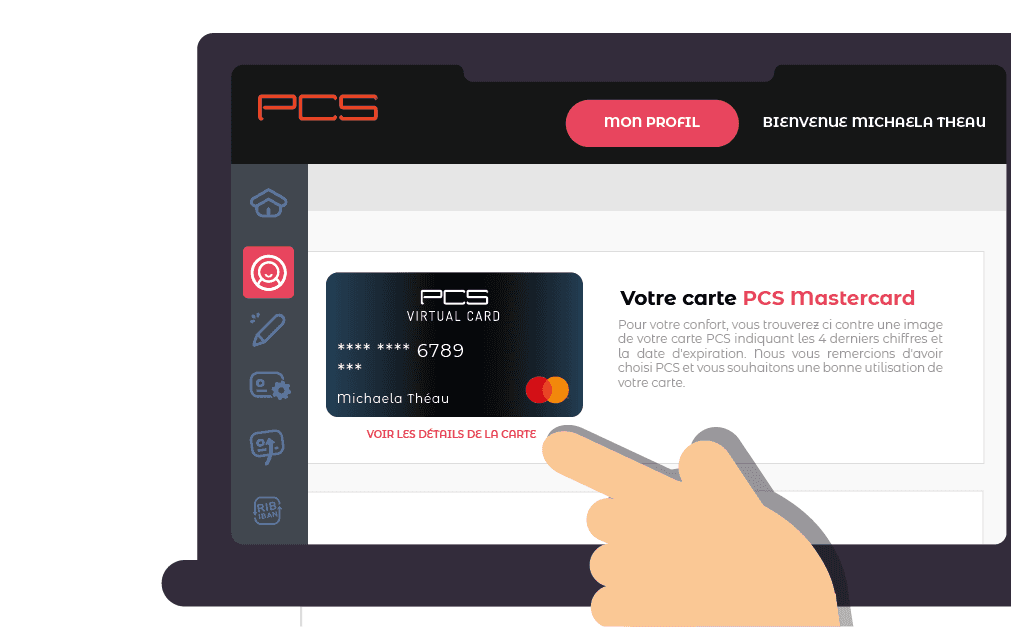
- Locate your 16-digit card number and security information printed on the back of your physical card, or view them inside your MyPCS Virtual Card dashboard.
- Note your registered mobile phone number linked to your PCS profile if you intend to redeem using the SMS method.
- Verify that your card status displays as "Active" in your account dashboard before attempting to apply a new top-up code.
Step-by-Step Guide: How to Top Up PCS Prepaid Mastercard
Redeeming your digital code is straightforward. Follow these instructions to credit your balance via the web portal or mobile application.
Method 1: Redemption via the MyPCS Mobile App
- Open the MyPCS mobile application on your iOS or Android device.
- Log in using your registered credentials and security PIN.
- Tap on the Recharge tab on the home dashboard.
- Select PCS Voucher (Coupon de rechargement) as your top-up method.
- Type the 10-digit digital voucher code you received from BitTopup into the input field.
- Confirm the entry. Your updated card balance will display immediately.
Method 2: Redemption via the MyPCS Web Portal
- Visit the official MyPCS web dashboard on your browser.
- Sign in to your personal cardholder profile.
- Navigate to the Recharge Card section in the account menu.
- Enter the 10-digit voucher code precisely as provided in your order delivery.
- Click Validate to execute the reload. Funds will reflect in your ledger balance right away.
Method 3: Redemption via SMS (Participating Regions)
- Open the messaging app on the mobile phone registered to your PCS card.
- Compose a new message containing:
RECHfollowed by a space, your10-digit voucher code, a space, and thelast 4 digits of your PCS card(e.g.,RECH 1234567890 5678). - Send the message to the official PCS recharge shortcode designated for your country (such as 36000 or 0601788888 for France).
- Wait for the confirmation SMS verifying that the balance has been credited.
European Residency Rules and Account Verification Limits
PCS Mastercard operates in strict compliance with European banking and anti-money laundering (AML) regulations. Keep the following regional conditions in mind:
- Geographic Scope: PCS cards and voucher top-ups are configured for residents within the European Economic Area (EEA), with primary support across France, Belgium, Spain, Luxembourg, and neighboring EU territories.
- Account Verification (KYC): PCS accounts are categorized by identity verification tiers. Unverified profiles (Classic tier) possess strict lifetime load limits and balance caps. Upgrading to the verified status (Premium tier) by submitting a valid European government ID and proof of address unlocks the maximum balance and transaction limits of your card.
- Currency Standard: All vouchers are denominated in Euros (EUR). When using your card outside the Eurozone, standard Mastercard foreign currency conversion rates apply.
- Non-Refundable Policy: Digital voucher codes are single-use assets that link to specific account ledgers upon redemption. Once a code is generated, it cannot be returned or transferred.
Key Benefits of Managing Funds with PCS Prepaid Cards
- Privacy Protection: You do not need to link your primary bank account, credit lines, or employer payroll information to your prepaid PCS card.
- Fraud Prevention: Keep online merchants isolated from your main financial holdings by loading only the exact amount required for purchases.
- Budget Control: Since prepaid cards do not permit overdrafts, you can never spend beyond the funds loaded via your voucher codes.
- Universal Acceptance: PCS cards function anywhere Mastercard is accepted, covering online merchants, in-store points of sale, and ATM networks worldwide once activated.
Why Buy Your PCS Recharge Voucher on BitTopup
BitTopup delivers a dependable and straightforward way to purchase PCS Mastercard EU vouchers online without complex verification steps:
- Direct Code Dispatch: Receive your 10-digit digital coupon code immediately after your payment is confirmed.
- Account Security: BitTopup never asks for your MyPCS login password or private card PIN. You receive the raw voucher code to redeem privately on official PCS platforms.
- Transparent Checkout: View live pricing and available EUR voucher denominations directly on our checkout interface before placing your order.
- Dedicated Support: Access our 24/7 customer service team anytime you need assistance with transaction tracking or order inquiries.
Troubleshooting Invalid Codes and Failed PCS Top-Ups
If you experience an issue when loading your code into MyPCS, check these common resolution steps:
- Incorrect Digit Entry: Check for typing errors. The voucher code contains 10 numeric or alphanumeric characters. Ensure no accidental spaces are copied into the web or app form.
- Exceeded Card Holding Limits: If your PCS card has reached its maximum regulatory balance cap (especially on unverified accounts), the system will reject the voucher. Verify your current card tier limits inside the MyPCS app before attempting another redemption.
- Inactive Card Status: Newly purchased physical cards must be activated on the MyPCS portal before they can accept recharge vouchers. Ensure your card shows as fully activated.
- Network Sync Delays: During peak banking traffic hours, ledger balance updates may take a few moments. Log out of MyPCS, clear your app or browser cache, and log back in to check your updated transaction history.
Frequently Asked Questions
How do I redeem my PCS Mastercard recharge code?
Log in to your MyPCS mobile application or web portal, open the Recharge section, select PCS Voucher, input your 10-digit code, and confirm. You can also redeem via SMS from your registered phone number in supported EU regions.
Do I need an active PCS card before buying a recharge ticket?
Yes. The digital voucher is not a standalone credit card; it is a balance reload ticket. You must own an active physical or virtual PCS Mastercard to load and spend the voucher funds.
Can PCS Mastercard EU vouchers be refunded or transferred?
No. Digital voucher codes are single-use, non-refundable digital products. Once delivered, they cannot be exchanged, cancelled, or transferred to another payment platform.
Which PCS prepaid cards can be recharged with this digital code?
These digital vouchers are compatible with all official PCS prepaid products, including PCS Virtual Card, PCS Chrome, PCS Black, and PCS Absolut cards.
Can I use my recharged PCS Mastercard outside of Europe?
Yes. Once your voucher funds are loaded onto your PCS card, you can use the card internationally anywhere Mastercard is accepted. Transactions conducted outside the Eurozone will convert based on Mastercard exchange rates.
What should I do if my PCS recharge voucher code is not working?
First, confirm that your card has not reached its regulatory balance limit and that you typed the 10-digit code correctly without spaces. If the issue persists, take a screenshot of the error message on MyPCS and contact BitTopup customer support along with your order details for swift verification.