



Knives Out PIN Top Up: Overview and Features
A Knives Out PIN top up provides players with a direct, secure method to add funds to their game account using prepaid NetEase Pay vouchers. Instead of linking personal credit cards directly to mobile app stores or sharing sensitive account login credentials, digital PIN codes allow you to purchase in-game vouchers quickly and redeem them on the official NetEase portal.
Knives Out utilizes vouchers and diamonds to purchase weapon skins, sports car vehicle wraps, limited-edition character outfits, and premium seasonal Battle Passes. Purchasing a digital PIN code through BitTopup gives you instant access to your digital code, allowing you to credit your account on your own terms.
Direct UID Top-Up vs. Digital PIN Vouchers
Understanding the distinction between direct UID recharges and digital NetEase Pay PIN codes helps you choose the right redemption method for your account:
- Direct UID Top-Up: The service provider sends vouchers or diamonds directly to your game account via your Character ID. You do not receive a redeemable code; the balance updates inside the game automatically.
- NetEase Pay PIN Voucher: You receive a 16-digit card number and a matching verification PIN code. You manually enter this code on the official NetEase Knives Out redemption site. This method offers total privacy, makes an ideal gift for squad members, and can be redeemed whenever an in-game event launches.
What is a Knives Out PIN (NetEase Pay Voucher)?
A Knives Out PIN is a digital prepaid voucher issued by NetEase. It functions as digital store credit specifically configured for NetEase titles. When redeemed through the official web portal, the value of the card converts into Knives Out Vouchers instantly.
Each PIN product consists of two crucial pieces of data:1. Card Number: The unique identifier for the voucher.2. Card Password / PIN: The security key used to authorize the redemption.
These vouchers do not require you to provide your game account password, Apple ID, or Google Play credentials to anyone. Once bought, the voucher code remains active until redeemed on your selected server profile.
Step-by-Step Guide: How to Redeem Knives Out PIN Online
Redeeming your code takes less than two minutes through any desktop or mobile browser. Follow these steps to credit your game balance:
- Log in to your BitTopup account dashboard and retrieve your purchased Card Number and PIN.
- Open your web browser and visit the official Knives Out NetEase Pay Redemption Center.
- Select your active Game Server (e.g., Japan Server or Global Server).
- Enter your Character ID (UID) into the account verification field.
- Click verify or confirm to view your in-game nickname and ensure the profile matches.
- Select NetEase Pay as your redemption payment option.
- Enter the 16-digit Card Number and the PIN code exactly as shown in your BitTopup order details.
- Click Confirm Redemption. Launch Knives Out on your device and check your in-game mailbox or voucher counter.
| Voucher Option | Delivery Format | Required Redemption Info | In-Game Asset Received |
|---|---|---|---|
| NetEase Pay PIN | Card Number + Password | Character ID + Game Server | Knives Out Vouchers / Diamonds |
| Direct Top-Up | Automatic Account Credit | Character ID + Game Server | Knives Out Vouchers / Diamonds |
How to Find Your Knives Out Character ID and Server
To ensure your vouchers arrive at the correct game profile, you must obtain your exact Character ID from the game client.
- Launch the Knives Out app on your iOS, Android, or PC client.
- On the main lobby screen, look at the bottom-right corner to identify your current login server (Global, Japan, or North America).
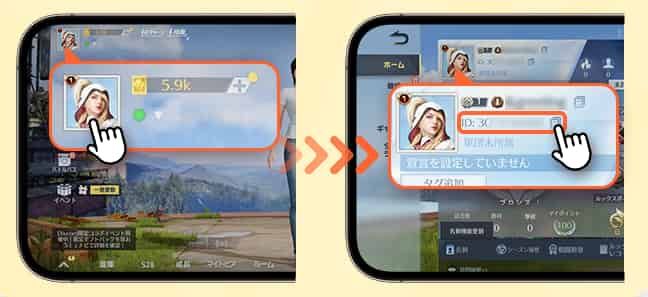
- Tap on your Avatar / Profile Icon located in the top-left corner of the main screen.
- Locate your numerical Character ID (UID) displayed near your nickname.
- Tap the small copy icon next to your ID to copy the digits directly to your clipboard.
Double-check your server selection before entering your PIN on the web portal. Digital vouchers cannot be transferred between different servers once redeemed.
Voucher Usage: In-Game Draws, Cosmetics, and Diamond Conversion
Knives Out Vouchers serve as the core premium currency within the game ecosystem. Redeeming your PIN gives you immediate access to several in-game systems:
- Gacha Supply Draws: Use vouchers to open limited collaboration supply crates, vehicle gachas, and exclusive weapon camouflage packs.
- Battle Pass Upgrades: Upgrade the free seasonal pass to the Elite Pass or Advanced Elite Pass to unlock tiered weapon blueprints, medals, and outfit bundles.
- Direct Diamond Conversion: Convert your redeemed vouchers into regular diamonds to purchase daily consumable items, rename cards, room cards, and basic supply packs.
- Store Cosmetics: Buy legendary character suits, parachutes, weapon charms, and wingman aircraft skins directly from the in-game mall.
Supported Regions and Game Servers in 2026
Knives Out operates distinct regional servers to ensure optimal connection latency. When you redeem a NetEase Pay PIN, your card value is applied based on the server your character resides on.
- Japan Server: The most active competitive server with frequent exclusive anime collaborations and regional vehicle events.
- Global Server (North America / Europe / Southeast Asia): Unified international servers tailored for global players.
Always verify that the PIN denomination you purchase on BitTopup corresponds to your regional account settings. Real-time rates and denomination availability are displayed directly on the live checkout interface.
Troubleshooting Common Redemption and PIN Errors
If you encounter an issue while attempting to redeem your PIN, consult these common solutions:
1. Card Number or Password Error
- Check for accidental spaces before or after the card number and PIN.
- Ensure that you did not swap the Card Number and PIN fields.
- Copy and paste the exact strings directly from your BitTopup order history rather than typing them manually.
2. Character ID Not Found
- Ensure you have selected the correct game server before clicking verification.
- Confirm you are entering your numerical Character ID rather than your custom in-game nickname.
3. Balance Delay After Redemption
- Restart the Knives Out game client completely to force a server data sync.
- Check your in-game system mail. Some event items or voucher bundles arrive as attached mail items rather than direct balance adjustments.
Why Buy Knives Out PIN on BitTopup?
BitTopup provides a streamlined, reliable solution for players looking to recharge their Knives Out accounts quickly:
- Instant Digital Delivery: PIN codes are generated and delivered directly to your BitTopup user dashboard immediately after order confirmation.
- Zero Account Risk: Because you redeem the voucher yourself on the official NetEase portal, you never have to share your game password, social logins, or private account data.
- Multiple Secure Payment Methods: Choose from various encrypted payment channels suited for global and regional buyers.
- Live Checkout Pricing: View up-to-date pricing and available denominations clearly before making a purchase.
- 24/7 Customer Support: If you ever experience issues with code generation or order status, customer service representatives are available around the clock to assist you.
Frequently Asked Questions
How to top up Knives Out using a PIN code?
To top up Knives Out with a PIN code, purchase your NetEase Pay PIN on BitTopup. Next, navigate to the official Knives Out NetEase Pay redemption portal, choose your server, input your Character ID, select NetEase Pay, and enter the 16-digit Card Number and PIN. The vouchers will credit to your account immediately.
How to put code in Knives Out redemption center?
Open the official NetEase Knives Out redemption website in your browser. Select your server region and enter your numerical Character ID. When prompted for payment options, choose NetEase Pay, paste your Card Number into the account field, enter the PIN in the password field, and submit the form.
How to recharge in Knives Out without sharing my password?
Buying a Knives Out PIN on BitTopup allows you to recharge without sharing passwords. You only receive a digital voucher code. You redeem this code yourself on NetEase's official website using only your public Character ID, keeping your login credentials completely private.
What can I purchase with Knives Out Vouchers?
Knives Out Vouchers can be spent on seasonal Battle Pass upgrades, limited-time collaboration supply draws, sports car and vehicle skins, premium firearm finishes, character outfits, and direct diamond conversions.
Are Knives Out PIN codes region-locked?
Yes, NetEase Pay PIN vouchers are tied to specific regional server structures. Ensure you select the voucher compatible with your active game server (such as Japan or Global) before completing checkout on BitTopup.
What should I do if my Knives Out PIN code is not working?
First, verify that the Character ID and server match your actual game profile. Next, check that there are no extra spaces or mistyped digits in the Card Number or PIN fields. If the portal still returns an error, contact BitTopup 24/7 customer support with your order ID for immediate assistance.