



Ensemble Stars Music ES Points Top Up on BitTopup
Get your official in-game currency quickly and securely with direct Ensemble Stars Music ES Points top up services on BitTopup. ES Points allow producers to purchase in-game items, scout packs, event passes, and Diamond packages without directly binding payment cards inside the mobile game client.
By using your game User ID and Character Name, BitTopup delivers ES Points directly to your game account. There is no need to share passwords or link third-party social accounts, ensuring your account credentials remain completely protected.
What Are ES Points and How They Work in Ensemble Stars Music
ES Points serve as a universal payment balance in Ensemble Stars Music (Global). They function as a direct digital currency wallet that you can spend across various in-game shop categories, including limited-time scout tickets, costume sets, monthly passes, and special campaign bundles.
The ES Points Conversion Rate
In Ensemble Stars Music, the conversion formula is standardized:* 100 ES Points = $1.00 USD equivalent
When buying items in the shop, the ES Point price corresponds directly to the standard item price. For example, a $0.99 pack requires 100 ES Points, a $4.99 bundle requires 500 ES Points, and a $9.99 item requires 1,000 ES Points.
| ES Points Amount | Approximate USD Value | Common In-Game Usage |
|---|---|---|
| 100 ES Points | $1.00 USD | Basic Packs, Single Scouting Items |
| 500 ES Points | $5.00 USD | Small Diamond Bundles, Monthly Benefit Add-ons |
| 1,000 ES Points | $10.00 USD | Standard Event Passes, Specialty Item Packs |
| 3,000 ES Points | $30.00 USD | Multi-Pull Ticket Bundles, Exclusive Sets |
| 5,000 ES Points | $50.00 USD | Large Diamond Packs, Premium Campaign Bundles |
| 10,000 ES Points | $100.00 USD | Maximum Value Top Up, Anniversary Packs |
Note: To complete a purchase using ES Points in the game shop, your available ES Points balance must be equal to or greater than the full item cost. The game does not allow splitting payments between ES Points and direct payment methods.
How to Recharge Ensemble Stars Music ES Points on BitTopup
Recharging your balance on BitTopup takes only a few moments. Follow these simple steps:
- Select Your Package: Choose the ES Points denomination you need from the product selection menu.
- Enter Account Details: Input your in-game User ID and Character Name in the designated input fields.
- Review Order: Confirm that your User ID matches your account to prevent delivery errors.
- Complete Payment: Choose your preferred payment method on the checkout screen and complete the transaction.
- Check Balance: Once the order status shows completed, open Ensemble Stars Music to verify your updated ES Points balance.
Check the live checkout page on BitTopup for current pricing and available payment options.
How to Find Your User ID and Character Name in Ensemble Stars Music
To ensure your ES Points are credited to the right account, you must provide your exact User ID and Character Name. You can retrieve both directly from the game client.
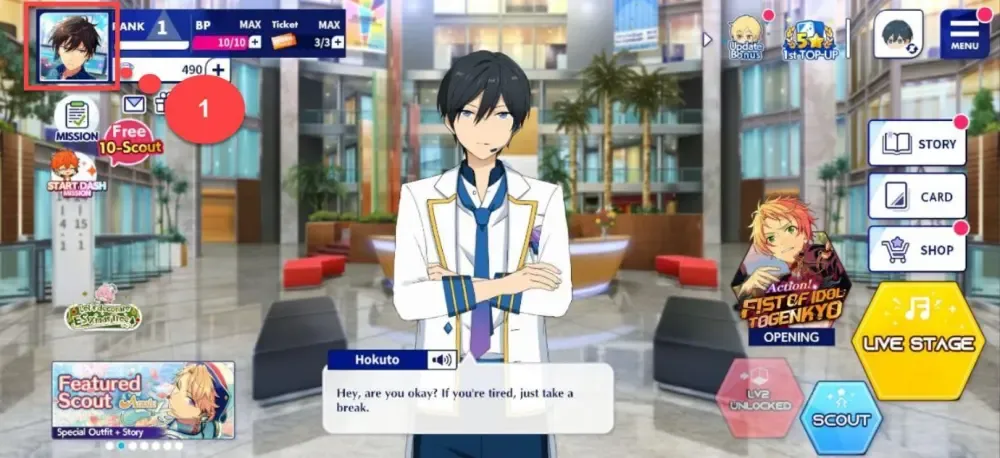
Step-by-Step Instructions:
- Launch Ensemble Stars Music on your mobile device.
- From the main home screen, tap your Profile Avatar or Character Icon in the top-left corner.
- In the profile overview window, locate your Character Name displayed at the top.
- Look below your name or on the bottom section of the profile card to find your numeric User ID (UID).
- Tap the small Copy icon next to your UID to copy the exact number to your clipboard.
- Paste your User ID and enter your Character Name accurately on the BitTopup checkout page.
Double-check that all digits match your profile to prevent processing delays.
How to Check Your ES Points Balance In-Game
Unlike standard Diamonds, your ES Points balance is tracked inside the game service and account data settings rather than on the top HUD bar.
Follow These Steps to View Your Balance:
- Open the main menu by tapping the Menu button in the top-right corner of the home screen.
- Select Data ROOM from the menu options.
- Tap on Customer Service or the account information tab.
- Your current ES Points total will be displayed clearly on the balance summary screen.
After a recharge, your balance updates on this screen. When you visit the in-game Shop, you can select ES Points as your payment method at checkout if your balance covers the full price.
Safety and Security: Why Passwordless UID Recharge Is Safer
Account safety is essential when purchasing digital gaming goods. BitTopup uses direct player UID routing, which offers distinct security advantages:
- No Password Required: You never share your login credentials, email password, or account transfer codes.
- No Account Sharing: Your game account is never accessed by a third party, eliminating the risk of unauthorized item usage or profile alterations.
- Reduced Risk of Account Locks: Direct credit methods use standard server-side delivery, keeping your account compliant with game terms.
- Encrypted Checkout: Every transaction on BitTopup is processed through encrypted payment channels to safeguard personal financial data.
Troubleshooting Common Ensemble Stars Music Top Up Issues
If your ES Points do not appear immediately after completing an order, follow these troubleshooting steps:
- Restart the Game Client: Fully close the Ensemble Stars Music app from your device's recent apps screen, then reopen it to force a server refresh.
- Check the Data ROOM: Navigate to Menu > Data ROOM > Customer Service to verify if the ES Points have loaded into your balance even if no pop-up notification appeared.
- Verify Submitted UID: Check your BitTopup order receipt to confirm that the User ID and Character Name entered during purchase match your actual account.
- Check Order Status: Ensure your payment was successfully processed and that your BitTopup order status shows as completed.
- Contact Customer Support: If your points have not arrived after restarting the app, submit your BitTopup Order ID and in-game User ID to BitTopup customer support for immediate assistance.
Frequently Asked Questions
What is the conversion rate of ES Points in Ensemble Stars Music?
The conversion rate is fixed at 100 ES Points per 1.00 USD in value. When purchasing items in the game shop, packs priced at $0.99 cost 100 ES Points, packs priced at $4.99 cost 500 ES Points, and packs priced at $9.99 cost 1,000 ES Points.
How do I check my ES Points balance in Ensemble Stars Music?
To check your balance, tap Menu from the main home screen, select Data ROOM, and tap Customer Service. Your total available ES Points balance will be displayed on the account overview page.
Where can I find my Ensemble Stars Music User ID and Character Name?
Tap your Profile Avatar in the top-left corner of the game's home screen. Your Character Name is shown at the top of your profile card, and your numeric User ID is listed below it with a copy button next to it.
Do I need to provide my game account password to recharge ES Points?
No. BitTopup only requires your numeric User ID and Character Name to process your top up. You never need to provide your password or transfer credentials.
Can I buy in-game items that cost more than my available ES Points?
No. In Ensemble Stars Music, you cannot split payments between ES Points and other payment methods. Your ES Points balance must equal or exceed the total price of the item you want to purchase.
What should I do if my ES Points are not credited immediately?
First, restart your game client completely and check your balance under Menu > Data ROOM > Customer Service. If the balance has not updated, locate your Order ID on your BitTopup account and contact BitTopup customer support with your User ID for quick verification.