

Goddess of Victory: Nikke HK/MO/TW Top Up on BitTopup
Acquiring gems for Goddess of Victory: Nikke on the Hong Kong, Macau, and Taiwan (HK/MO/TW) server requires a direct and reliable recharge method. BitTopup provides a direct Player ID recharge service that credits your account without requiring login credentials or password sharing. Whether you want to pull for limited-rate Pilgrims, secure seasonal recruit banners, expand your Synchro Device, or purchase event passes, direct top-ups ensure your Charge Gems arrive quickly.
Follow these steps to complete your top-up on BitTopup:1. Select your desired gem package or pack denomination from the product catalog above.2. Enter your numeric Nikke Player ID accurately into the required input field.3. Verify that your game client is set to the Hong Kong, Macau, and Taiwan (HK/MO/TW) regional server.4. Proceed to checkout and select your preferred payment method from the available options.5. Complete the payment. BitTopup processes the delivery directly to your in-game account balance.
Regional Compatibility: HK/MO/TW Client Requirements
Goddess of Victory: Nikke operates across distinct regional publishing clients. The HK/MO/TW version serves players registered on the dedicated Hong Kong, Macau, and Taiwan server cluster, which is distinct from the Global, North America, Japan, Korea, and Southeast Asia (SEA) servers.
Before placing an order, confirm the following client indicators:- App Client: You installed the Traditional Chinese client distributed for Hong Kong, Macau, and Taiwan.- In-Game Server Selection: Your commander account was registered under the HK/MO/TW regional cluster.- Account Routing: Player IDs on the HK/MO/TW server route exclusively to regional databases.
If your commander profile resides on the Global, NA, JP, KR, or SEA servers, top-up orders submitted on an HK/MO/TW product listing cannot reach your profile. Always match your client build with the corresponding regional product page on BitTopup.
How to Locate Your Nikke Player ID In-Game
You do not need to share account passwords, email logins, or social account tokens to recharge. All orders process using your public in-game Player ID.
To find your Nikke Player ID:1. Open Goddess of Victory: Nikke on your mobile device or PC client.2. Complete the title screen login and enter the main Lobby.3. Look at the upper-left corner of the main lobby screen and tap your Commander avatar icon.4. In the profile overview window, locate the numeric string labeled Player ID (or Member ID) displayed directly beneath your commander name.5. Tap the small copy icon next to the number to copy your ID directly to your clipboard.6. Paste the exact digits into the Player ID field on the BitTopup checkout page.
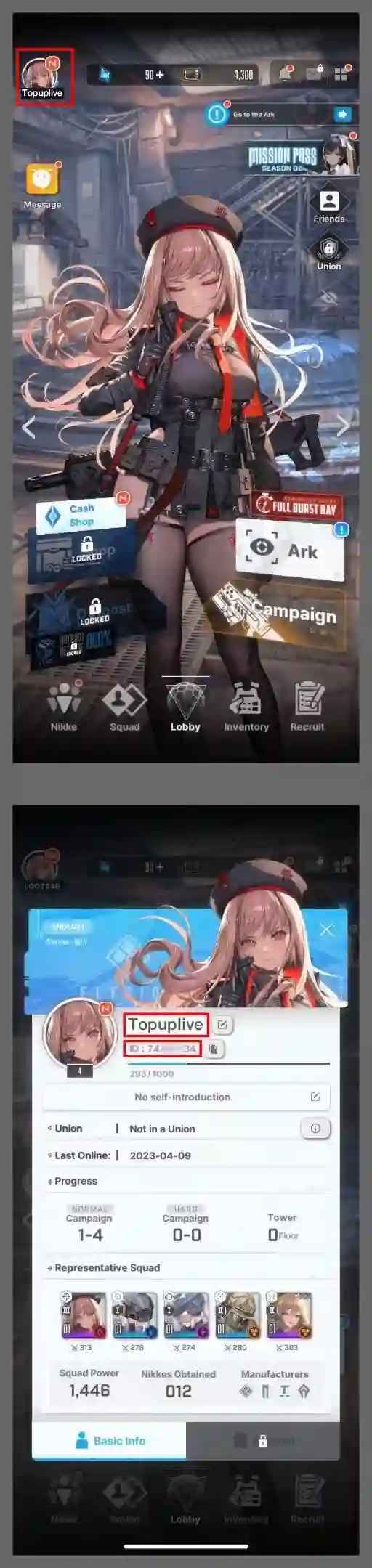
Always double-check that you copied the complete number string without missing digits or including extra spaces.
Available Nikke Gems and Pack Denominations
Nikke top-ups provide Charge Gems, the premium currency required for high-value banner pulls and exclusive shop bundles. When topping up via BitTopup, your order credits the exact gem tier selected.
| Package Tier | Primary In-Game Usage | Delivery Method | Verification Requirement |
|---|---|---|---|
| Small Gem Packs (60 - 320 Gems) | Daily refreshes, Outpost wipeouts, shop resets | Direct Account Credit | Player ID (HK/MO/TW) |
| Medium Gem Packs (720 - 2,300 Gems) | Multi-pulls on Ordinary and Pick-Up recruit banners | Direct Account Credit | Player ID (HK/MO/TW) |
| Large Gem Packs (4,200 - 6,200 Gems) | Limited event pulls, Pilgrim rate-up banner reserves | Direct Account Credit | Player ID (HK/MO/TW) |
| Value Bundles & Special Packs | Event passes, upgrade materials, synchro expansions | In-Game Mail / Inventory | Player ID (HK/MO/TW) |
Note: Exact live prices in your local currency are displayed directly on the BitTopup checkout selection screen.
In-game gems split into Paid (Charge) Gems and Free Gems. Guaranteed recruitment banners and specific cosmetic items require Paid Gems, which you receive directly through these top-up packages.
Account Security: Safe Top-Ups with No Password Required
Account security is essential for commander accounts with valuable Nikke rosters and heavy gear investments. BitTopup uses a direct Player ID delivery system designed to keep your account safe:- No Password Requests: BitTopup will never ask for your account password, email access, Google Play login, Apple ID, or third-party social tokens.- Zero Account Takeover Risk: Because transactions only require your public ID, your login session remains uninterrupted on your device.- Automated Processing: Purchases are transmitted via automated balance distribution systems directly to the game server.- Data Privacy: Your Player ID is strictly used to fulfill the recharge order and is never stored for unauthorized account actions.
Troubleshooting Nikke Top-Up Delivery and Common Issues
Recharge orders typically credit your account immediately after payment confirmation. If you experience a delay, check these troubleshooting steps:
- Restart the Game Client: Completely close Goddess of Victory: Nikke on your mobile device or PC launcher. Relaunch the game to force a server synchronization with your updated gem balance.
- Check In-Game Mail: Certain special packs, bonus gems, or promotional materials arrive in your in-game mailbox rather than auto-adding to the header currency counter. Check the Mail icon in the top right.
- Verify Player ID Accuracy: Check your order receipt in the BitTopup user center. Confirm that the Player ID you submitted matches your in-game profile number exactly.
- Confirm Server Region: Ensure your game account is on the HK/MO/TW server and not on Global, SEA, or JP.
- Check Payment Status: Confirm that your chosen payment method completed the transaction and generated a confirmation invoice.
- Contact BitTopup Support: If your balance does not update within a few minutes, contact BitTopup customer support with your order ID, transaction screenshot, and Player ID. The support team will verify the queue status and assist immediately.
Frequently Asked Questions
What is the HK/MO/TW version of Goddess of Victory: Nikke?
The HK/MO/TW version is the dedicated regional release of Goddess of Victory: Nikke tailored for players in Hong Kong, Macau, and Taiwan. It operates on its own dedicated regional server infrastructure with Traditional Chinese localization. Accounts on this server are distinct from Global, NA, JP, KR, and SEA servers.
How do I find my Goddess of Victory: Nikke Player ID?
Open the game, enter the lobby, and tap your Commander profile avatar in the upper-left corner. Your Player ID is the numeric string shown directly beneath your nickname. Tap the copy icon next to the number to copy it for your recharge order.
Do I need to provide my Nikke account password to top up on BitTopup?
No. BitTopup only requires your numeric Player ID to send gems and packs to your account. You will never be asked for passwords, login verification codes, or personal account credentials.
Can I top up Global or SEA servers with this HK/MO/TW package?
No. This product listing is strictly compatible with the HK/MO/TW regional server. If your account is registered on the Global, SEA, Japan, Korea, or North America servers, please navigate to the corresponding regional product page on BitTopup to ensure your gems deliver correctly.
What should I do if my Nikke gems do not reflect immediately after purchase?
First, close the Nikke app completely and reopen it to refresh your server connection. Next, check your in-game mailbox for delivered packages. If the gems still do not show, check your BitTopup order history to verify your submitted Player ID, then contact BitTopup customer service with your order details for assistance.
Where can I redeem Nikke CDKey gift codes in 2026?
To redeem a CDKey gift code in 2026, log in to Goddess of Victory: Nikke, navigate to the Lobby, and tap the Bell (Notice) icon in the top-right corner. Select the Event Notice tab, scroll down to the CDKey Redemption Portal, tap it, and paste your code along with your server details to receive rewards in your mailbox.