Need UC for Elite Royale Pass or a cleaner sight skin? Buy PUBG Mobile UC on BitTopup by Player ID. Delivery lands in seconds.
PUBG Mobile 4.5 3 Finger Claw Settings (Gyro vs Non-Gyro)
Updated on 2026-08-13: numbers and share codes recut for Version 4.5.
Setup | Who it fits | Gyro mode | Share code | Start here |
|---|---|---|---|---|
3-finger + gyro | Ranked grind, AR sprays, 90Hz+ phones | Always On |
| Gyro table below |
3-finger + non-gyro | Older phones, shaky sensors, you play lying down | Off |
| Camera + ADS tables below |
Paste the matching code, then test it in Training Ground before ranked.
Import a code, then spend 10 minutes with an M416 (compensator + vertical foregrip + tactical stock). Codes break after some patches. If the import fails, type the tables by hand.
Lock graphics to Smooth and the highest FPS your phone holds. Unstable frames fake a bad sensitivity.
If you already run 4-finger, use the 4-finger claw + gyro guide instead of shrinking this HUD.
3 Finger Claw Layout (Classic TPP)
Left index fires. Left thumb walks. Right thumb aims, peeks, and changes stance. You spray while you still drag the camera.
Button | Place it | Size | Finger |
|---|---|---|---|
Fire | Top-left corner | 140–160% (go up to ~220% if your index misses taps) | Left index |
Right fire | Off | n/a | n/a |
Joystick | Bottom-left | Default | Left thumb |
Sprint | Above the joystick | Default | Left thumb |
ADS / Scope | Mid-right | ~100% | Right thumb |
Peek left / right | Above ADS | ~100% | Right thumb |
Jump / crouch / prone | Far-right stack, separate (do not merge crouch + prone) | 100–120% | Right thumb |
Open / Rescue / Drive / Get In | Center cluster | 80–100% | Either thumb, only when you need them |
Fire sits top-left for the left index. The right fire button stays off so you do not double-tap.
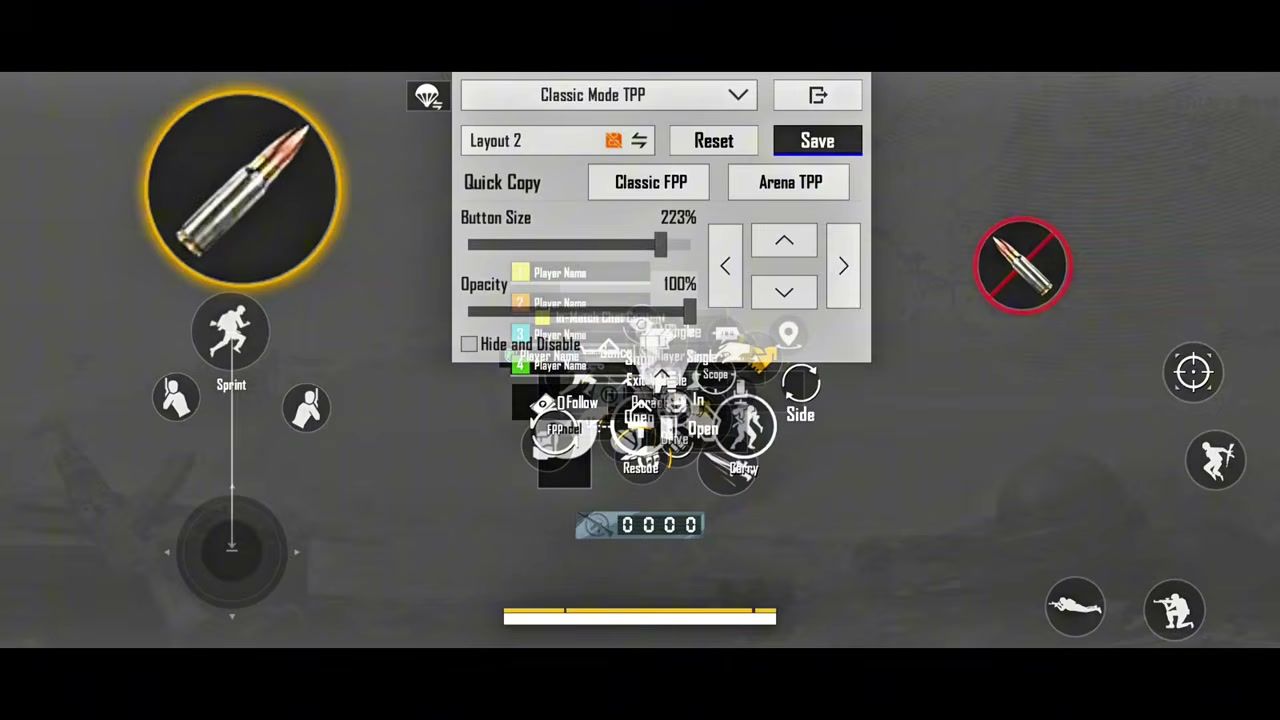
Copy this into Layout 2 so you keep a fallback slot. Save Classic TPP, then Quick Copy to Classic FPP and Arena TPP so the claw does not reset when you switch modes.
Control toggles that match this HUD:
Scope Mode: Tap
Camera Rotation while ADS: On
Quick Scope Switch: On
Canted Sight: Tap to Switch
Peek: On, Peek Mode: Hold
Lean and Open Scope: On (non-gyro)
Jump/Climb: Merge
Merge Crouch and Prone: Off
Firing Mode Button Display: Merge
Reload Interrupt: Fire Interrupt
Aim Assist: On
Auto Jump: Off
Control Style: Modern
Ninja Run and Chakra sit away from fire and ADS. One missed index tap in a 4.5 close fight costs more than a late jutsu.
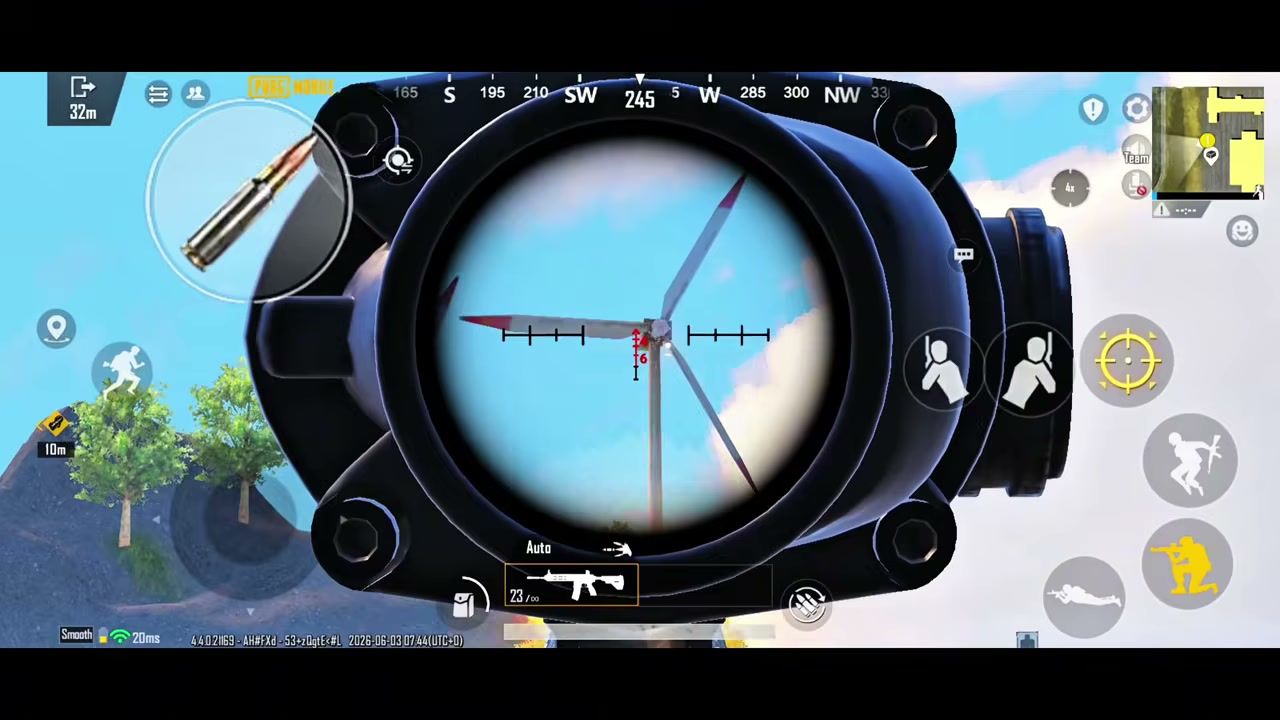
Non-Gyro Sensitivity (3 Finger Claw)
Gyro stays Off. Your right thumb pulls the spray down. Camera stays high for hip-fire turns. ADS on scopes stays low so a full mag does not climb off a 50 m dummy.
Scope | Camera | ADS |
|---|---|---|
TPP No Scope | 130% | 130% |
FPP No Scope | 130% | 130% |
Red Dot / Holo / Iron / Canted | 45% | 55% |
2x | 25% | 30% |
3x / Win94 | 20% | 30% |
4x / VSS | 10% | 20% |
6x | 14% | 21% |
8x | 9% | 25% |
Free Look: TPP (character, vehicle) 120%, parachuting 120%, FPP 84%.
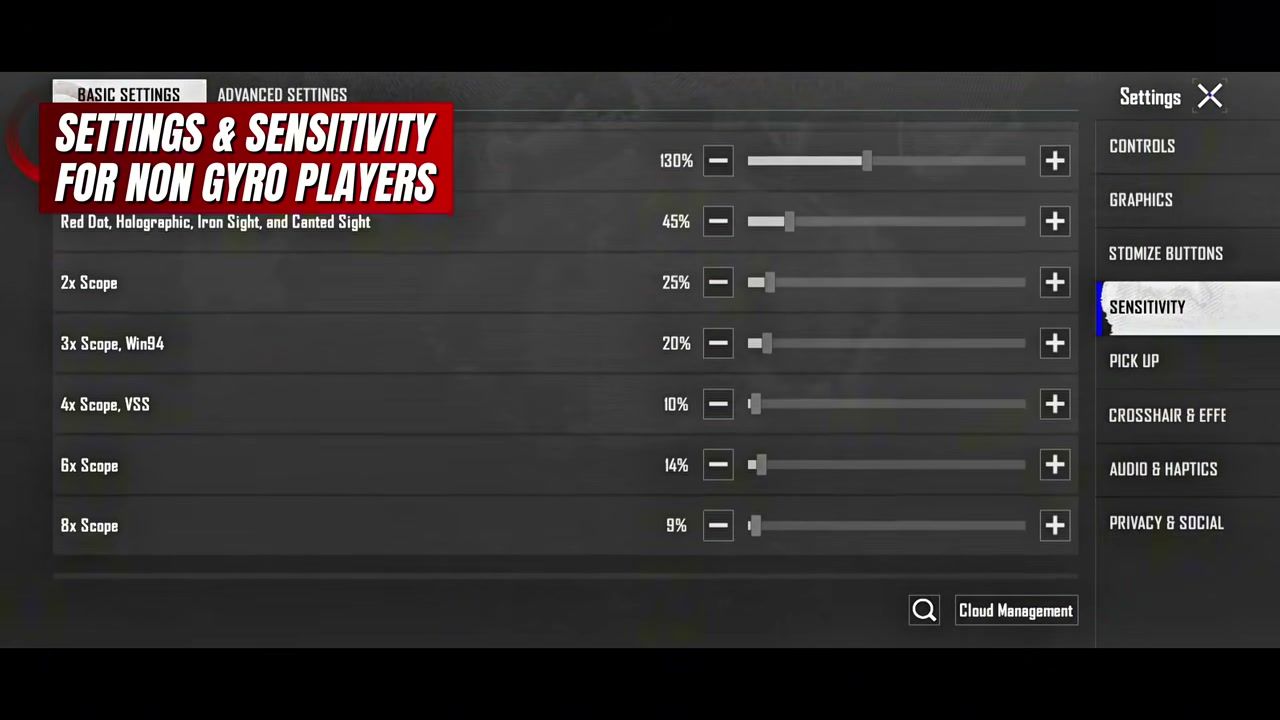
If the first 10 rounds of an M416 still climb at 25 m, add 5% ADS on Red Dot. If the reticle dips under the dummy, cut 5%. More non-gyro scope ranges live in the zero recoil non-gyro guide.
Gyro Sensitivity (Always On)
Set Gyroscope to Always On. Reverse Off. Throwables Gyro Aiming Off. You tilt for vertical recoil. The right thumb only corrects horizontal drift.
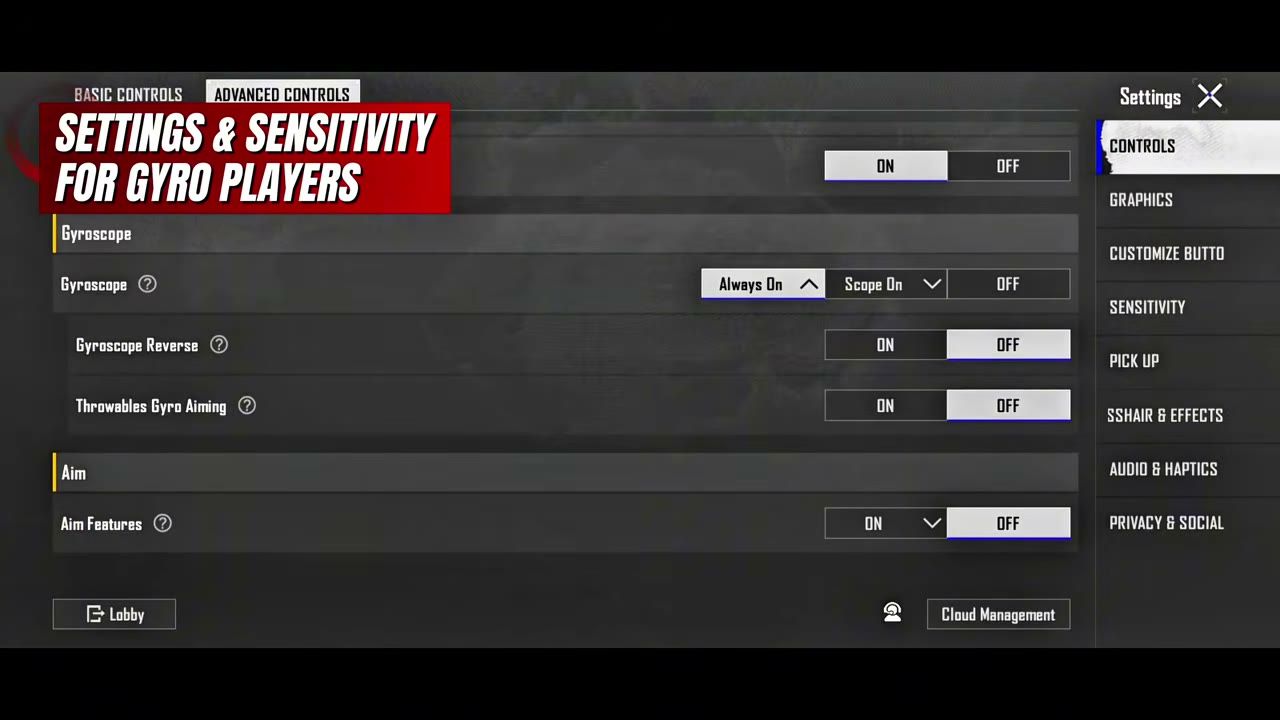
Scope | Gyro | ADS Gyro |
|---|---|---|
TPP No Scope | 280% | 280% |
FPP No Scope | 275% | 275% |
Red Dot / Holo / Iron / Canted | 270% | 270% |
2x | 260% | 265% |
3x / Win94 | 120% | 135% |
4x / VSS | 110% | 135% |
6x | 120% | 141% |
8x | 70% | 85% |
Close-range gyro stays high. 3x and above drop so a small tilt does not throw the reticle.
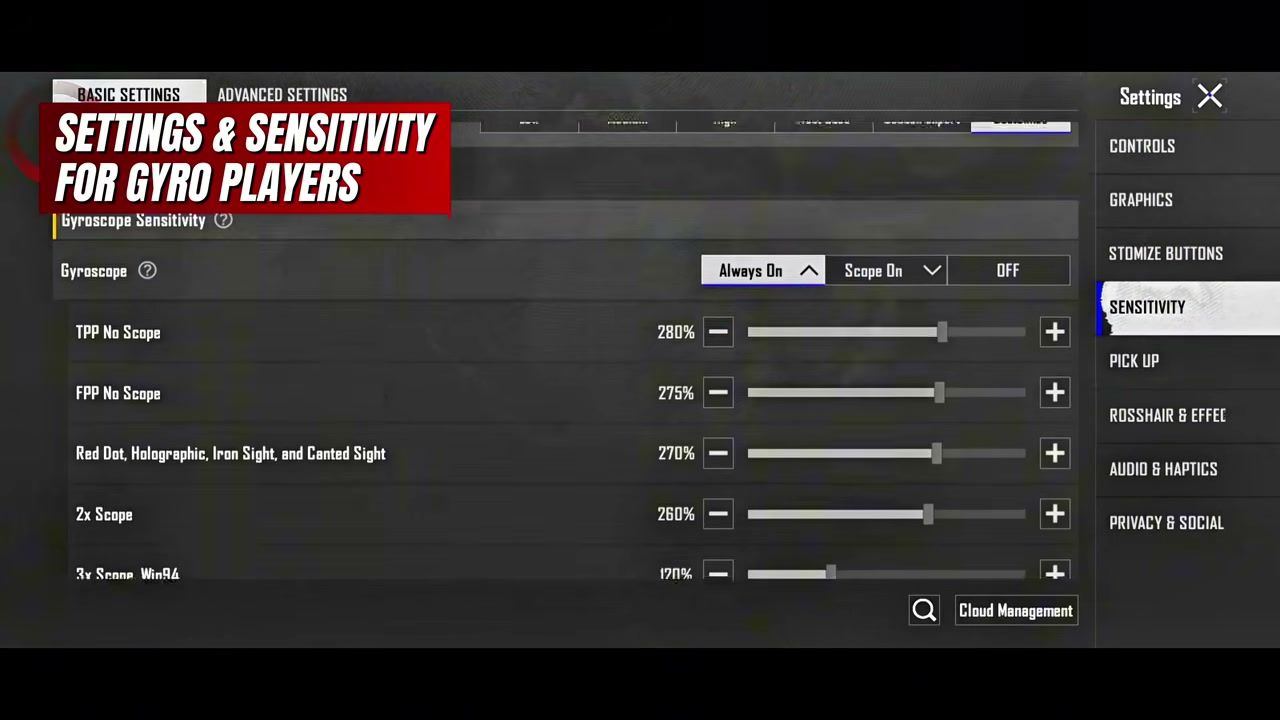
Calibrate on a table before ranked. Disable system auto-rotate. New to tilt aim? Start on Scope On for a week, then flip Always On. Full gyro ranges by device sit in the gyroscope sensitivity guide.
How to Apply These PUBG Mobile 4.5 3 Finger Claw Settings
Open Settings → Customize Buttons → Classic Mode TPP → Layout 2. Place fire top-left, kill the right fire button, stack peek + ADS on the right, dump Open/Rescue/Drive into the center.
Settings → Controls. Match the toggle list above. Gyro players set Gyroscope to Always On. Non-gyro players leave it Off.
Settings → Sensitivity. Paste
1-7638-4812-8896-9062-411(gyro) or1-7638-4812-8896-9062-410(non-gyro) via Cloud / Share Code. If the code rejects, type the tables.Graphics → Smooth, then the highest stable frame rate. Close background apps. A 60 FPS lock beats a 90 FPS drop mid-spray.
Training Ground: M416, compensator, vertical grip, tactical stock. Spray a wall at 10 m, 25 m, 50 m. Then track a moving dummy with Red Dot, 3x, and 4x. Change one slider by 5% at a time.
Play TDM for two or three days before ranked. Week 1 feels worse because the grip is new.
Ready-made claw codes for 4-finger and 6-finger live in PUBG Mobile claw layout codes if this HUD still fights your hands.
Train It, Then Spend UC Where It Matters
10 minutes of wall sprays before you queue. Same gun. Same attachments. Same distances.
Crouch during mid-range sprays. Prone for long 6x/8x taps. Stance cuts vertical kick before sensitivity does.
AKM and Beryl need 5–10% less ADS (non-gyro) or a stronger downward tilt (gyro) than the M416 baseline.
SMGs can take 5–10% more Red Dot ADS for room clears on Sanhok and Livik.
Skins with a cleaner iron sight help more than another 2% on a slider. Elite Royale Pass still returns UC at Level 100, so the pass is the first buy. How to top up PUBG UC on BitTopup: copy your 10-digit Player ID, pick a pack, pay. No password. The cheap UC and Royale Pass guide lists pack math if you are stocking Elite Plus.
FAQ
What is the best 3 finger claw layout for PUBG Mobile 4.5?
Fire top-left for the left index, joystick bottom-left, ADS and peek on the right, right fire disabled. Save it as Layout 2 in Classic TPP and Quick Copy to FPP and Arena. Button size on fire: 140–160% for most phones, larger if your index slips.
Should I use gyro or non-gyro with 3 finger claw?
Gyro if your phone has a stable sensor and you can practice tilt for a week. Always On plus the 280% → 70% cascade holds AR sprays with less thumb travel. Non-gyro if the sensor drifts, you play in bed, or you already drag recoil by habit. Both share the same HUD.
What is the best zero recoil sensitivity for PUBG Mobile 4.5?
There is no single code that fits every panel. The 4.5 starting points above (gyro code…-411, non-gyro…-410) are built for 3-finger on a phone. After import, test Red Dot and 3x on M416 at 25 m. Climb = raise ADS or gyro 5%. Overshoot = cut 5%.
How long does 3 finger claw take to learn?
TDM for 30–45 minutes a day. Most players drop for a few days, return to baseline in week 2, and start winning close fights in week 3. Skip ranked on day one.
Do I need a new layout after the 4.5 Ninja Run update?
Keep the claw. Move Ninja Run and Chakra off fire, ADS, and peek. Faster movement in 4.5 punishes a cluttered right thumb more than it punishes old camera numbers.
Conclusion
PUBG Mobile 4.5 3 finger claw settings work when the HUD, the gyro switch, and the scope cascade agree with each other. Import the matching code, spray the M416 at 25 m, then change one slider. Bookmark this page for the next patch. When you need UC for the pass or a cleaner iron sight, top up PUBG Mobile UC on BitTopup.