Short answer (November 2026): set Acceleration to Fixed Speed, put phone camera at 60–80% (tablet 45–65%), keep Firing Sensitivity 15–25% below camera, and step every scope down from the red dot. Import a creator’s sensitivity code only as a starting point, then prove it in training or the Duel mode before Ranked.
Checked against the official 1 September, 22 September and 20 October 2026 update notes. None of them changed the sensitivity sliders; the October patch changed MP7, AUG, Bizon and QBZ95 handling, so retest those guns.
Blood Strike sensitivity starter (November 2026)
Layer | Start here | Notes |
|---|
Acceleration | Fixed Speed | Set this before any other slider. Dynamic accel breaks conversion and muscle memory |
Global Sensitivity Sync | OFF while you build | Turn ON later if you want one slider to scale every scope |
FOV / FOV style | 100–120 / Associated | 120 has been in the client since 29 August 2024. Associated also scales the ADS picture |
Camera (phone) | 60–80% | Small phones sit high. 6.7-inch and up sit nearer 60% |
Camera (tablet) | 45–65% | More swipe travel on a 10-inch panel |
Firing | 15–25% below camera | Steadier sprays. Snipers go even lower |
Iron / Red Dot | Near camera | Raise this first if close fights feel sticky |
2X–4X | Step down from red dot | Keep the cascade |
6X–8X | Slowest | High mag multiplies every twitch |
Gyro (if used) | 20–30% below camera | Deadzone often lands high (80+) until drift stops |
PC mouse | 800 DPI, eDPI 2000–6000 | eDPI = DPI × in-game. Mobile % is a different scale. Do not mix them |
Save the set in Plan Management. Phone, tablet, FPS Ranked, and BR-TPS each get their own profile. Combat and graphics toggles that sit next to these sliders live in the Blood Strike best settings chart.
What still applies after 2025
The September 4, 2025 client added Global Sensitivity Sync and a dedicated Firing Sensitivity row. Those toggles are still there. Several claims around them are stale.
Stale claim | Fact (November 2026) |
|---|
120 FOV is a Q4 2025 feature | NetEase raised the FOV cap to 120 on 29 August 2024 |
You will “soon” need a FOV retune | Associated FOV has been in Settings → Graphics & Audio → Graphics → Basic since 18 July 2024. If you already sit at 120 Associated, you already paid the retune |
Pro eDPI is 200–400 | That band is Valorant-scale. Blood Strike PC starts nearer 2000–6000. 800 DPI × 5 = 4000 eDPI |
Overwatch 2.17 = Blood Strike 10 | No official converter publishes that pair. Treat any cross-game number as a first guess, then prove it in training |
Slide-scope speed “fix incoming” | If slide-into-ADS feels faster than walk-ADS, leave camera alone. That is a movement state |
Patches since August that should move your sliders or your testing:
20 October 2026 (notes): MP7 reloads faster and Heavy Trigger adds +1 damage; AUG upper-chest damage 23 → 25 with less drop-off; Bizon reloads faster; QBZ95 AP Magazine trades body damage for headshot damage. TPS mode now fades your Striker when the camera gets close.
22 September 2026 (notes): Kar98k level cap 100 and the Competition Cheek Pad (better hip-fire accuracy and mobility). New Overdrive mode.
1 September 2026 (notes): TPS gained a separate “No ADS” turning sensitivity, and the new Duel mode (Apex Arena) is a clean 1v1 aim check.
11 August 2026: AK47 level 100 + M-LOK Barrel, SVD recoil cut, Vector hip-fire buff, QBZ95 and P90 tweaks. Still live.
How to set Blood Strike sensitivity
Open lobby gear → Settings → Sensitivity.
Set Acceleration to Fixed Speed. Leave it there.
Confirm FOV under Settings → Graphics & Audio → Graphics → Basic. Ranked phones hold 100–120. Associated keeps side vision while ADS. Independent if the ADS picture feels too wide.
Turn Global Sensitivity Sync OFF.
Set camera from the table. Phone 70% is a usable middle. Tablet 55%.
Set Firing 20% below camera. Camera 70 → Firing 56. Camera 5 on PC → Firing 4.
Copy camera onto iron / red dot. Drop 2X–4X. Drop 6X–8X again.
If you use gyro, start 25% below camera and raise deadzone until the reticle sits still on a table.
Save the profile in Plan Management. Name it with device + FOV + FPS/TPS.
Warm up in training, then run Deathmatch or a short BR. Change one slider by 5% at a time.
Controller and Tactical Stance sit on the Slide and Controller tabs. Linear Aiming Response stays Linear or Dynamic. Save that profile separately.
PC mouse users should lock Windows pointer acceleration off, then pick DPI on the mouse (400–1600, 800 is the usual start) and a moderate in-game value. Raise DPI on a cheap sensor and you add smoothing. Raise in-game on a good sensor if a 180° swipe undershoots.
Video walkthrough: MEHRAB goes through every sensitivity option in the current Blood Strike client (September 2026), including acceleration and sensitivity switching.
How to copy or import a Blood Strike sensitivity code
Blood Strike has had built-in share codes since the 9 January 2025 update: Custom Controls and Sensitivity Settings can both be shared and imported from Plan Management.
Lobby gear → Settings → Sensitivity.
Open Plan Management and pick an empty plan slot, so your current set stays safe.
Choose Import and paste the code exactly as written (no spaces before or after).
Save, then check that Acceleration is still Fixed Speed and that FOV matches the creator’s FOV.
To share your own set, open the same plan and copy its code.
Codes usually look like NA/SA-SENS-…-1-1, EU-SENS-… or ASIA-SENS-…; HUD layouts use …-HUD1-… and are imported from the Custom Controls screen, not from Sensitivity. If a code fails, it was most likely made on another server region or mistyped. A pro’s code was tuned for their device, FPS and FOV, so treat it as a first draft and adjust 5% at a time.
Camera, firing, ADS, and scopes
Camera is look speed when you are not holding fire. Firing Sensitivity is look speed while the gun is speaking. You acquire with camera. You finish the spray with firing.
Hip fire | ADS start | Use |
|---|
1.00 | 0.80 | Iron / red dot |
1.00 | 0.70–0.75 | Mid scopes, most ARs |
1.00 | 0.60 or lower | 6X–8X |
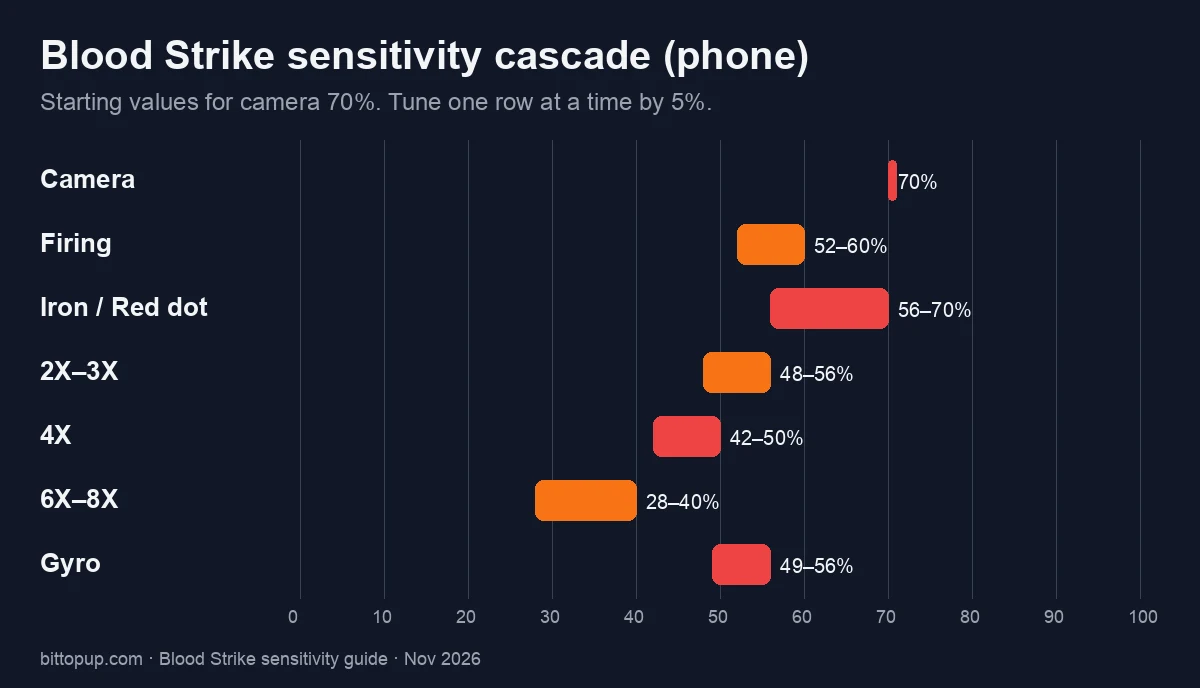
Example on a percent camera: hip 70, red dot 56–70, 4X nearer 42–50, 8X nearer 28–40.
Example on a PC camera of 6: ADS 4.2–4.5, firing 4.5–5.1 (15–25% under camera).
Raise camera and firing 10–20% if you just jumped FOV from 90 to 120. Higher FOV shrinks distant heads. Official wording: Associated first-person FOV also changes the size of the aiming sight.
Battle Royale can sit a few points slower than Deathmatch or Squad Fight. Close-range loadouts allow a higher red dot. Long sightlines want a slower 4X and a slower firing value.
Touch, gyro, and BR-TPS
Touch does the big turn. Gyro does the last centimeters and the vertical pull.
Calibrate gyro on the surface you actually play on: Settings → Sensitivity → Gyro → Calibrate. Heat drifts the sensor. A warm phone after two Ranked games is a different device than the lobby table.
Setup | Touch | Gyro |
|---|
Phone, thumbs only | Camera 60–80% | Off |
Phone, gyro assist | Camera 60–75% | 20–30% below camera |
Tablet | Camera 45–65% | Same gap, or off if the panel already gives you travel |
Aggressive entry | Higher touch, light gyro | Fast 180s |
Long-range AR / DMR | Moderate touch, stronger gyro | Holds 4X |
Third-person (TPS) parks the camera behind the Striker, so the same camera value often feels faster than FPS. Since the 1 September patch TPS has its own No ADS turning sensitivity: set that first (start 5–10% under your FPS camera), clone the FPS profile in Plan Management for everything else, and never overwrite the FPS slot.
Controller: keep Linear Aiming Response on Linear or Dynamic, and save a separate controller plan. Since 20 October, pushing the left stick into the trigger range starts Tactical Sprint automatically (Controller Auto Sprint), so you no longer need a sprint click while tuning look speed.
Prove the set (training, then Deathmatch)
A share code or a copied file does not fit your DPI, your panel, or your FOV. The pass mark is a 10-round burst that stays on a 50 m dummy.
Drill | Suggested gun | Pass mark |
|---|
Hip-fire track | Vector (hip-fire buff on 11 August) | Crosshair stays on the torso |
10-round burst, 25 m then 50 m | AK47 with M-LOK Barrel, or your Ranked AR | Group tightens as distance grows |
Hold on a moving dummy | Red dot | You correct with firing, not a second swipe |
180° turn | No scope | You stop on the same wall mark |
Long hold | SVD (recoil cut on 11 August) | First shot on target. If you still yank, your old SVD pull is too hard |
Use Duel (Apex Arena, added 1 September) for clean 1v1 tracking with no third parties, Team Deathmatch or Free For All for target switching, and Ranked BR as the long-range check. Lock the profile for 50 games or a week of Ranked before a second edit. A 5–10% nudge beats a 25% rewrite.
Frames fake a bad slider. Hold Extreme FPS if the device can. Drop quality before you drop FOV below 90. Low-end cut lists sit in the 60+ FPS setup.
Mistakes that waste a week
Tweaking after one bad lobby. The slider is fine. Your hands are still on yesterday’s number.
Global Sync ON while you still have one scope that overflicks. Sync scales the mistake.
Pasting a PC 3–8 file onto a phone 60–80% slot.
Raising camera to “fix” slide-scope or ping. Those are movement and netcode.
Skipping Fixed Speed, then blaming a converter.
One profile for FPS Ranked and BR-TPS.
Hardware still matters. A worn mousepad adds jitter you will call “high sens.” A thick screen protector adds dead zones. Wireless mice are fine if polling stays at 1000 Hz and the dongle is close. Frame drops below 60 make the same slider feel late.
Gold after the sliders work
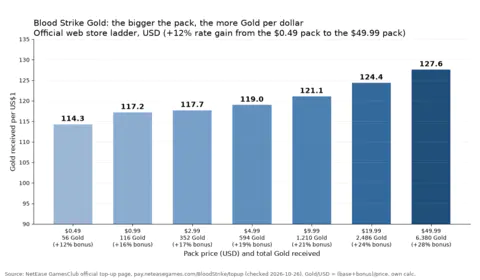
Skins do not change damage. A cleaner sight on the gun you already spray is the one cosmetic that shows up in the 50 m drill. The current Strike Pass, Bunny Force, runs 15 October–14 November 2026 and refunds 520 Gold at max level (official notes).
If you are short for the next pass, Blood Strike Gold on BitTopup tops up Global accounts with your UID only (Settings → Account → copy UID). No password.
FAQ
What Blood Strike sensitivity should I use right now?
Phone camera 60–80%, tablet 45–65%, firing 15–25% below camera, Fixed Speed, FOV 100–120 Associated. PC starts at 800 DPI and eDPI 2000–6000. Prove it with a 50 m 10-round burst, then lock the profile.
Should I turn on Global Sensitivity Sync?
Leave it OFF while you set each scope. Turn it ON after the cascade feels even and you only want one slider to scale the rest.
What should Firing Sensitivity be versus Camera?
Start 15–25% lower. Camera 70 → Firing 52–60. Camera 5 → Firing 3.75–4.25. Snipers go lower than assault rifles.
Does 120 FOV break my sensitivity?
Only if you just left 90. NetEase shipped the 120 cap in August 2024. Raise camera and firing 10–20% after that jump. Associated also shrinks or grows the sight picture.
Why does a converted sensitivity from another FPS feel slow?
Fixed Speed is off, or the converter used a different FOV and a different slider scale. Converted values are a first spawn. Many players end 20–60% above the import.
How often should I change sensitivity?
Keep the current set for 50 Ranked games or a week. Edit 5–10% after a patch that names your gun (20 October: MP7, AUG, Bizon, QBZ95) or after you switch FOV, device or TPS.
Does a Blood Strike sensitivity generator or “hacker” sensitivity work?
No setting aims for you. “Generators” only output numbers in the usual 60–80% camera range, and any app or site that asks you to install an APK or log in with your game account is a scam. “All red” headshots come from a lower Firing value and a steady red-dot cascade, not from a secret number.
Is the sensitivity different on Android, iPhone and PC?
Phone and tablet use the same percent sliders on Android and iOS; screen size matters more than the brand, so a Samsung tablet sits nearer 45–65% and a small phone nearer 70–80%. PC uses mouse DPI × in-game value (eDPI), a different scale. Do not paste a PC plan into a phone slot.
Conclusion
Blood Strike sensitivity settings work when Fixed Speed, FOV, camera and firing agree, and when you retest after a combat patch. Start from the November 2026 table, or import a creator code into a spare Plan Management slot, then prove it with a 50 m burst and a few Duel rounds. We update this page after each NetEase version update.
Sources