


HAIKYU!! FLY HIGH SEA Top Up Overview
HAIKYU!! FLY HIGH is the officially licensed 3D volleyball card RPG that brings the intense matches and tactical team-building of the iconic anime to mobile devices. On the Southeast Asia (SEA) server, competing in high-tier leagues, clearing training camps, and dominating tournament brackets requires building a balanced lineup of elite spikers, setters, blockers, and liberos.
Star Gems serve as the premium currency in HAIKYU!! FLY HIGH SEA. Players use Star Gems to purchase Recruit Tickets, reset daily stamina limits, acquire exclusive growth materials, and unlock limited-edition character banners. BitTopup provides a direct recharge service for HAIKYU!! FLY HIGH SEA players, allowing you to top up Star Gems, Monthly Passes, and special resource packages using only your numeric Player ID.
How to Recharge HAIKYU!! FLY HIGH SEA Using Player ID
Recharging your account on BitTopup takes only a few simple steps. The system processes your order directly to the game server via your account UID, eliminating the need for login credentials.
- Select the Star Gems denomination, Monthly Pass, or package you want to purchase from the catalog.
- Enter your Player ID in the required account field.
- Verify that your Player ID is entered accurately to avoid delivery delays.
- Select your preferred payment option on the live checkout screen.
- Complete the payment process.
- Open HAIKYU!! FLY HIGH SEA on your mobile device. Your Star Gems or items will be credited directly to your account or delivered to your in-game mailbox.
Where to Find Your HAIKYU!! FLY HIGH Player ID in-Game
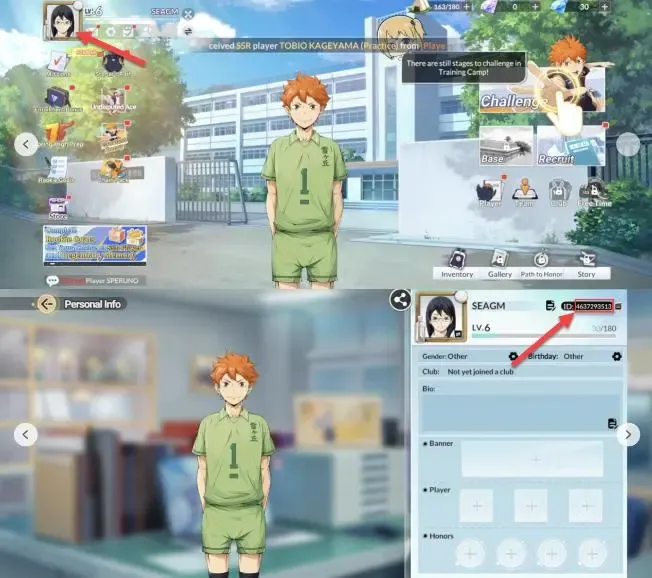
Your Player ID (UID) is a unique sequence of numbers assigned to your game profile on the SEA server. Follow these steps to find and copy it:
- Launch HAIKYU!! FLY HIGH SEA on your device and log in to your account.
- On the main lobby screen, tap your Avatar / Profile Icon in the top-left corner.
- In the profile summary window, locate the Player ID string displayed below your nickname.
- Tap the Copy icon next to the number to copy your UID directly to your clipboard.
- Paste this number into the Player ID input field on BitTopup.
Star Gems, Monthly Passes, and Level Up Bundles Breakdown
Understanding the role of each purchasable item helps you manage your progression and resource allocation effectively.
| Item Type | Primary Utility | Best Used For |
|---|---|---|
| Star Gems | Premium currency convertible into Recruit Tickets and Diamonds. | Limited character banners, event draws, and stamina refills. |
| Monthly Pass | Delivers an upfront Star Gem bonus plus daily Diamond claims for 30 days. | Long-term account growth and steady summon accumulation. |
| Level Up Bundles | Unlocks milestone rewards as your team account level advances. | Accelerated training materials, EXP items, and large lump-sum currency. |
| Resource Packs | Direct bundles containing Training Drinks, Coins, and Skill Manuals. | Fast-tracking specific player promotions and breakthrough ranks. |
Star Gems vs. Diamonds
Star Gems are the paid currency acquired through direct top-ups. Diamonds can be earned through gameplay achievements, daily missions, and match progression. While both can be used for standard store purchases and basic summons, limited-time rate-up events and select premium shop bundles require Star Gems directly or convert from Star Gems at a 1:1 ratio.
SEA Server Compatibility and Supported Regional Accounts
This top-up service is dedicated to players operating on the HAIKYU!! FLY HIGH SEA regional server. Supported regions across Southeast Asia include:
- Malaysia
- Singapore
- Philippines
- Indonesia
- Thailand
- Vietnam
Before placing your order on BitTopup, ensure that your client is the Southeast Asian version. Recharges submitted with Player IDs belonging to the Japanese, Korean, or Global server instances cannot be completed on the SEA server channel. If you downloaded your client from a SEA-specific Google Play Store or Apple App Store region, your account is fully compatible.
Safe Checkout Practices: Zero Password Requirement Guarantee
Account safety is essential when purchasing mobile game currencies. BitTopup operates with a strict zero password policy for HAIKYU!! FLY HIGH SEA top-ups.
- No Account Sharing: You never need to supply your login email, Google account, Apple ID, or password.
- Direct UID Routing: Orders are processed through official game ID parameters, keeping your personal login credentials completely private.
- Secure Payment Channels: All transactions are handled through encrypted payment gateways with transparent pricing listed at checkout.
- No Risk of Account Compromise: Because no third party logs into your device profile, your account avoids unauthorized access and location-flagging risks.
Optimizing Star Gems for the Gacha Recruitment Pity System
Recruiting top-tier players such as Shoyo Hinata, Tobio Kageyama, Toru Oikawa, Yu Nishinoya, and Kenma Kozume is the core goal of competitive team building. Managing your Star Gems effectively around the game's recruitment mechanics ensures you do not waste resources.
How the Recruitment Pity System Functions
- Banner Pity Counters: Limited-time recruitment banners feature a dedicated pity counter. Reaching the pity threshold guarantees an SSR or UR player drop.
- Banner Carryover Rules: Check the active banner details in-game to see if pity counts carry forward to consecutive banner cycles or if they convert to event tokens.
- 10-Pull Efficiency: Performing 10-pull batches often provides guaranteed SR or higher member drops compared to single pulls, maximizing the value of your converted Star Gems.
- Stamina vs. Summons: While recruiting top players is exciting, allocating a small fraction of Star Gems daily toward stamina refreshes ensures you have the training resources required to level up, evolve, and equip your newly recruited roster.
Why Choose BitTopup for HAIKYU!! FLY HIGH SEA Recharges
BitTopup provides a straightforward, dependable purchasing experience tailored for HAIKYU!! FLY HIGH players:
- Transparent Pricing: Check the exact cost on the live checkout interface before confirming your purchase.
- Fast Order Processing: Direct UID routing delivers your Star Gems straight to your account swiftly after payment completion.
- Player-First Support: If you ever experience issues with ID entry or order delivery, the BitTopup customer support team is available to verify order logs and assist you.
Frequently Asked Questions
How do I find my Player ID in HAIKYU!! FLY HIGH SEA?
Tap your avatar icon in the top-left corner of the main lobby screen. Your Player ID is the numeric code located directly beneath your player name. Tap the copy icon next to it to copy the ID directly to your clipboard.
Do I need to share my password or account login to recharge?
No. BitTopup only requires your numeric Player ID. You should never share your password, Google account, Apple ID, or social logins with anyone.
In which countries is the HAIKYU!! FLY HIGH SEA server available?
The SEA server supports players in Southeast Asian countries including Singapore, Malaysia, the Philippines, Indonesia, Thailand, and Vietnam. Make sure your game account was registered on the SEA server before ordering.
What can I purchase with Star Gems in HAIKYU!! FLY HIGH?
Star Gems can be used to purchase Recruit Tickets for limited and standard character banners, replenish stamina for story and challenge stages, buy character growth packs, and acquire exclusive items in the in-game shop.
How does the recruit pity system work in Haikyuu Fly High?
The recruitment system guarantees higher-tier character drops after a specified number of pulls on rate-up and standard banners. Reaching the maximum pity threshold guarantees the featured SSR/UR unit. Tracking your pull count helps you plan your Star Gem conversions efficiently.
What should I do if my HAIKYU!! FLY HIGH recharge does not appear immediately?
First, restart the game app completely and check your in-game mailbox as well as your Star Gem balance. If the currency does not appear after a short wait, check your BitTopup order history to confirm your payment went through and verify that the Player ID submitted was correct. You can contact BitTopup customer support with your order number for fast verification.