



Habi Chat Top Up: Direct and Secure In-App Coin Recharges
Habi Chat is an interactive voice chat and social entertainment platform that brings users together through dynamic group voice rooms, real-time messaging, and interactive mini-games. In-app coins serve as the central currency that powers room interactions, host support, and social participation across the platform.
BitTopup provides a direct recharge service for Habi Chat users worldwide. By entering only your numeric Player ID, you can top up your coin balance quickly and safely without sharing private login credentials. Whether you want to send special gifts to your favorite room hosts, participate in room activities, or play interactive games like Ludo, topping up your account gives you immediate access to all premium platform features.
What Are Habi Chat Coins and Their In-App Uses
Habi Chat coins are the primary virtual currency used within the Habi Chat ecosystem. Having a balance of coins allows users to actively engage in voice rooms, support creators, and personalize their profiles.
Key In-App Uses for Habi Coins
- Virtual Gift Sending: Express appreciation to broadcasters, room owners, and friends by sending animated gifts ranging from simple tokens to full-screen dynamic animations.
- Voice Room Customization: Purchase exclusive room entrance effects, dynamic microphone rings, custom chat bubbles, and themed room backgrounds that make your presence stand out.
- Interactive Mini-Games: Use coins to join in-room casual games, such as Ludo, lucky wheel spins, and party challenges with other participants.
- Profile and VIP Upgrades: Unlock exclusive profile badges, higher level statuses, and special social privileges that increase your visibility in popular voice rooms.
| Coin Feature | Purpose in Habi Chat |
|---|---|
| Animated Gifting | Support room hosts and boost engagement rankings |
| Room Entrance Effects | Display custom visual banners when joining voice rooms |
| Mini-Game Stakes | Participate in interactive party games like Ludo |
| VIP Profile Badges | Display exclusive account tiers and special chat styling |
How to Find Your Habi Chat Player ID
To ensure your recharge arrives at the correct account, you need to provide your exact Habi Chat Player ID. The Player ID is a unique numeric identifier assigned to your profile upon registration.
Follow these steps to locate your Player ID inside the app:
- Open the Habi Chat application on your mobile device.
- Tap the Me (Profile) icon located in the bottom-right corner of the main screen.
- Locate your numeric Player ID displayed directly beneath your profile picture and nickname.
- Tap the copy icon next to the ID number to copy it directly to your clipboard.
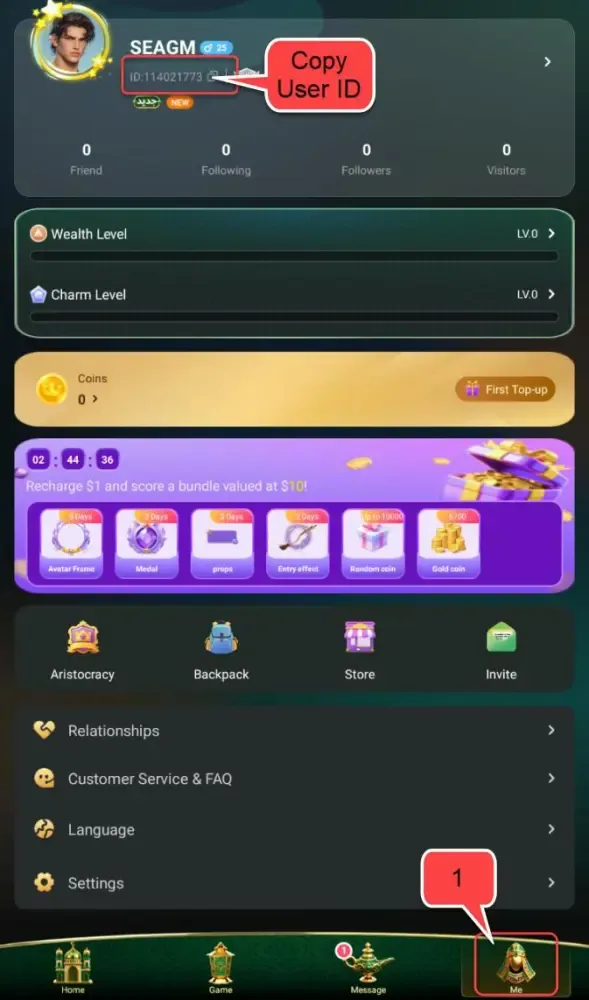
Double-check that you copy the full sequence of digits. Do not use your custom nickname or room ID, as recharges require the unique account Player ID to route coins accurately.
How to Recharge Habi Chat Coins on BitTopup
Recharging your Habi Chat account on BitTopup is straightforward and requires only your Player ID.
Step-by-Step Top-Up Guide
- Select Package: Choose the Habi Chat coin denomination that matches your needs from the available options on the product page.
- Enter Player ID: Paste your copied Habi Chat Player ID into the designated input field.
- Verify Information: Check the numeric ID carefully to avoid sending coins to an incorrect account.
- Choose Payment Channel: Select your preferred payment method from the available checkout options shown on the payment screen.
- Complete Payment: Follow the on-screen instructions to finalize the transaction securely.
- Receive Coins: Once payment confirmation is received, the coins are credited directly to your Habi Chat account balance.
Why Choose BitTopup for Habi Chat Recharges in 2026
BitTopup focuses on providing a safe, reliable, and user-friendly top-up experience for digital entertainment and voice chat apps.
- Account Security First: You never need to share passwords, verification codes, or third-party social login details. Recharges are processed strictly through your public Player ID.
- Transparent Live Pricing: Current package prices and currency conversions are clearly displayed directly on the live checkout interface before you pay, with no hidden charges.
- Global Accessibility: BitTopup accommodates international users with multiple payment channels suitable for regional and global transactions.
- Reliable Customer Service: A 24/7 customer support team is available to help verify transactions, track orders, and assist with recharge inquiries at any time.
Supported Payment Methods and Safe Checkout Process
BitTopup utilizes encrypted payment processing channels to protect your sensitive financial data during every purchase. When you proceed to checkout, the system presents all available payment options valid for your region, including major credit/debit cards, e-wallets, and regional payment solutions.
All transactions are processed through verified gateways that comply with global security standards. Because the platform operates entirely through direct ID top-ups, your personal Habi Chat account credentials remain safe on your device at all times.
Troubleshooting Common Habi Chat Top-Up Issues
If you experience an issue during or after your recharge, review the solutions below:
1. Balance Did Not Update Immediately
App balance displays can sometimes experience a brief synchronization delay. Try closing the Habi Chat app completely from your device's background app switcher and reopening it. Check your in-app wallet history to confirm the updated total.
2. Incorrect Player ID Entered at Checkout
If you entered an incorrect Player ID that corresponds to another active user, completed orders cannot be reversed. If the ID entered does not exist in the system, the transaction may fail or hold. Contact BitTopup 24/7 customer support immediately with your order reference number so our team can check the dispatch status.
3. Payment Completed but Order Shows Pending
In rare cases, bank authorization may take a few minutes to transmit confirmation to our system. If your account has been debited but the order remains pending, wait a brief moment and refresh your order tracking page. If the status does not update, reach out to customer support with your payment receipt for verification.
4. Recharging Coins for Friends
You can send Habi Chat coins directly to friends or family members. Simply obtain their numeric Player ID from their profile page and enter it into the Player ID field on BitTopup. The coins will be delivered directly to their account upon payment completion.
Frequently Asked Questions
Where can I find my Habi Chat Player ID?
Open Habi Chat, tap the Profile (Me) tab in the bottom-right corner, and look right below your display name and profile picture. You will find your unique numeric Player ID with a copy button next to it.
Do I need to provide my Habi Chat password to recharge?
No. BitTopup requires only your Habi Chat Player ID to process coin recharges. You should never share your account password, email credentials, or verification codes with anyone.
What can I use Habi coins for in the app?
Habi coins are used to send animated virtual gifts to voice room hosts, purchase personalized entrance effects, customize chat bubbles, participate in interactive room games like Ludo, and unlock VIP privileges.
How long does it take to receive Habi coins after payment?
Coins are credited to your Habi Chat balance automatically once payment verification is confirmed by the payment gateway. In most cases, the process completes shortly after payment confirmation.
Can I top up Habi Chat coins for a friend?
Yes. You can top up an account for a friend by entering their specific Player ID instead of your own during the order process. Confirm the ID digits with them beforehand to ensure accurate delivery.
What should I do if I entered the wrong Player ID during recharge?
If the entered Player ID belongs to a valid account and the order is already processed, the transfer cannot be recalled. If the order has not yet been completed, contact BitTopup customer support immediately with your order number to request assistance.