

UniPin Voucher MY Top Up: Overview and Supported Games
UniPin Voucher MY is an official prepaid digital gaming card used to reload game currencies, premium passes, and digital entertainment services across Malaysia. By purchasing a digital voucher code, players can quickly fund their accounts without linking personal bank details or credit cards directly to gaming stores.
UniPin vouchers can be redeemed directly on partner game top-up pages or applied to reload a personal UniPin Wallet in Malaysian Ringgit (MYR). This makes it one of the most flexible payment solutions for mobile, PC, and browser-based games in Southeast Asia.
Top Supported Games and Platforms
UniPin Voucher MY supports hundreds of gaming titles and digital platforms. Some of the most popular titles include:
- Mobile Legends: Bang Bang (MLBB): Purchase MLBB Diamonds, Twilight Passes, and Weekly Diamond Passes.
- Free Fire: Instantly reload Free Fire Diamonds to buy Elite Passes and character bundles.
- Genshin Impact & Honkai: Star Rail: Purchase Genesis Crystals, Oneiric Shards, and Blessing passes via official web portals.
- Ragnarok M: Eternal Love & Ragnarok Origin: Buy Big Cat Coins and premium monthly passes.
- Point Blank: Acquire PB Cash for weapons and gear upgrades.
- PUBG Mobile (UC): Top up Unknown Cash for Royale Passes and weapon crates.
- LifeAfter, Lords Mobile, MU Origin 3, and Dragon Raja: Fund premium in-game shops directly.
- UniPin Credits (UC): Top up your master UniPin account balance to spend flexibly across any game catalog title.
Available UniPin Voucher MY Denominations
BitTopup provides a comprehensive range of official UniPin Voucher MY denominations to match every gaming budget, from small micro-purchases to major seasonal event draws.
| Voucher Denomination (MYR) | Common In-Game Use Case | Delivery Format |
|---|---|---|
| MYR 5 | Micro-packs, starter supply boxes | Digital Serial + PIN |
| MYR 10 | Basic weekly packs, small diamond packs | Digital Serial + PIN |
| MYR 20 | Weekly Diamond Passes, battle pass tiers | Digital Serial + PIN |
| MYR 30 | Event ticket passes, monthly privilege cards | Digital Serial + PIN |
| MYR 50 | Seasonal Battle Passes, standard diamond bundles | Digital Serial + PIN |
| MYR 100 | Collector skin events, premium multi-draw packs | Digital Serial + PIN |
| MYR 300 | High-tier event pools, limited gacha pulls | Digital Serial + PIN |
| MYR 500 | Whale bundles, competitive guild packages | Digital Serial + PIN |
Note: Current live prices and instant stock availability are displayed directly in the selection table above on BitTopup.
Why Buy UniPin Voucher MY on BitTopup
When you buy UniPin vouchers online, speed, safety, and reliability are essential. BitTopup provides an optimized purchasing experience tailored for gamers:
- Instant Digital Code Delivery: Your Voucher Serial and PIN are generated immediately upon completed checkout and displayed on-screen, with an automatic backup sent to your email.
- Zero Account Sharing Required: You never need to hand over your game login credentials, passwords, or verification codes. You receive a standalone voucher code that you redeem yourself.
- Transparent Live Pricing: BitTopup shows clear checkout totals with no hidden processing surcharges.
- Secure Payment Processing: Choose from a wide selection of trusted local and international payment methods for complete transaction peace of mind.
- Dedicated Customer Support: Our customer support team is on standby to assist with order status checks, delivery confirmation, and basic redemption inquiries.
How to Buy UniPin Voucher MY on BitTopup
Getting your voucher takes only a few quick steps:
- Select your preferred UniPin Voucher MY denomination from the product list.
- Choose the quantity of vouchers you wish to purchase.
- Enter your active email address so your digital receipt and voucher codes can be sent immediately.
- Click Buy Now and select your preferred payment method on the secure checkout screen.
- Complete the payment. Your Voucher Serial and Voucher PIN will appear instantly on your order confirmation page.
How to Find Your Game User ID or UniPin Account Details
Before redeeming your voucher on a game's top-up page, you will need your in-game User ID and Server/Zone ID. If you choose to reload your UniPin wallet instead, you only need your registered UniPin account email.
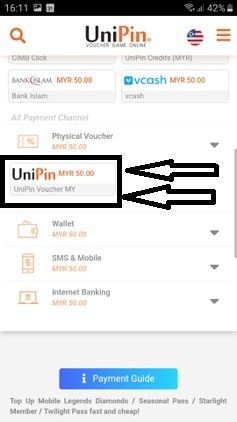
Follow these steps to find your Game User ID:
- Open your game on your mobile device or PC.
- Tap your Profile Avatar or Character Icon in the top corner of the main menu.
- Locate your User ID and Zone ID / Server ID on the Basic Info tab.
- For example, in Mobile Legends, your ID appears as
12345678 (1234). The first number is your User ID, and the number in parentheses is your Zone ID. - Copy or write down both numbers carefully before starting your voucher redemption.
How to Redeem UniPin Voucher MY Code Step-by-Step
You can use your UniPin Voucher in two ways: direct top-up to an individual game, or reloading your personal UniPin Wallet.
Method 1: Direct In-Game Top-Up (No UniPin Account Needed)
- Open your web browser and go to the official top-up portal for your game (or the game's official web store powered by UniPin).
- Enter your User ID and Zone ID / Server ID.
- Select the exact item, diamond pack, or credit denomination matching your voucher value.
- In the payment methods list, select UniPin Voucher (or Physical Voucher).
- Enter the Voucher Serial and Voucher PIN you received from BitTopup.
- Click Confirm or Submit. The items will be credited directly to your in-game inventory or inbox within seconds.
Method 2: Reloading Your UniPin Wallet (UniPin Credits)
- Visit the official UniPin website and log in to your Malaysia account.
- Click the + (Reload) icon next to your UniPin Credits balance.
- Select UniPin Voucher as your reload channel.
- Paste the Voucher Serial into the Serial field and the Voucher PIN into the PIN field.
- Click Submit. Your UniPin Credits (UC) balance will update immediately in Malaysian Ringgit (MYR), allowing you to spend it across any supported game on the platform at any time.
Understanding Voucher Serial vs. Voucher PIN
Every UniPin Voucher MY order contains two separate codes that serve distinct purposes:
- Voucher Serial (Serial Number): A public tracking identifier (often alphanumeric) used by the system to locate the specific voucher record in the database.
- Voucher PIN: The private, numeric security key that authorizes the transfer of credit.
When redeeming your code, ensure you paste each string into its designated field. Entering the Serial into the PIN box will cause a redemption error.
Malaysia Region Compatibility and Currency Rules
UniPin enforces strict regional restrictions on all digital vouchers:
- Malaysia (MYR) Accounts Only: UniPin Voucher MY codes are denominated exclusively in Malaysian Ringgit (MYR). They are valid only on Malaysia-registered game servers and Malaysia UniPin accounts.
- No Cross-Region Redemption: You cannot redeem an MY voucher on accounts registered to Indonesia (IDR), Philippines (PHP), Thailand (THB), Brazil (BRL), or other regional portals.
- Currency Conversion Policy: UniPin does not support automatic currency conversion between different country vouchers. Always ensure your game account or UniPin profile region is set to Malaysia before purchasing.
UniPin Voucher Expiration and Code Security Best Practices
- Prompt Redemption: UniPin vouchers typically have an extended validity period from their generation date, but it is best practice to redeem your code shortly after purchase to avoid accidental misplacement.
- One-Time Use: Each voucher PIN can only be redeemed once. Once submitted, the full face value is transferred permanently.
- Keep PINs Private: Treat your Voucher PIN like cash. Never share your PIN on live streams, social media groups, or public Discord servers. BitTopup staff will never ask you for your redeemed PIN.
Troubleshooting UniPin Voucher Redemption Errors
If you experience an issue while redeeming your UniPin code, check the following solutions:
- Error: "Invalid Serial Number or PIN": Double-check for typographical errors. Verify that no accidental spaces were copied at the beginning or end of the code. Ensure the Serial and PIN were not swapped.
- Error: "Voucher Region Mismatch": Ensure that the game server or UniPin account you are logged into is set to the Malaysia (MY) region. If your account is set to a different country, the system will reject an MYR voucher.
- Error: "Code Already Used": Check your in-game transaction logs or UniPin Credits history. If your web connection timed out during submission, the transaction may have processed successfully despite the browser error message.
- Error: "Payment Gateway Timeout": Game publisher gateways occasionally undergo server maintenance. Wait 10 to 15 minutes before attempting to re-enter your code on the portal.
Frequently Asked Questions
How do I redeem my UniPin Voucher MY code?
Go to the official UniPin website or your game's direct recharge portal, select UniPin Voucher as your payment option, enter your Game User ID (if required), and type in the Voucher Serial and Voucher PIN provided in your BitTopup order.
Can UniPin Voucher MY be used in other countries or currencies?
No. UniPin Voucher MY is region-locked to Malaysia (MYR). It cannot be redeemed on game accounts or UniPin wallets registered in Indonesia, the Philippines, Thailand, or other international regions.
Do UniPin Voucher MY codes expire?
UniPin voucher codes carry an issuer validity period (often 12 to 24 months), but we recommend redeeming your voucher promptly upon receiving it to prevent accidental loss or forgetting unused balances.
Which games and platforms support UniPin Voucher MY?
Supported games include Mobile Legends: Bang Bang (MLBB), Free Fire, Genshin Impact, Honkai: Star Rail, Ragnarok M, Point Blank, PUBG Mobile, Lords Mobile, and all games available through the official UniPin Malaysia catalog.
What is the difference between UniPin Voucher Serial and PIN?
The Voucher Serial is an identification code used by the system to locate the voucher, while the Voucher PIN is the secret authorization password required to release the credits. Both must be entered correctly during redemption.
What should I do if my UniPin Voucher code shows an error during redemption?
First, verify that your account region is set to Malaysia and that you have entered the Serial and PIN in their correct respective fields without extra spaces. If the issue persists, check your in-game balance to confirm the transaction did not already complete, or reach out to BitTopup customer support with your order number.