



The Moon in the Heart of Flowers and Mountains Ingot (TW) Top Up
Ingots are the primary premium currency in The Moon in the Heart of Flowers and Mountains (花亦山心之月), the ancient academy-themed narrative RPG. Players on the Taiwan, Hong Kong, and Macau server use Ingots to acquire Gold Leaves, purchase Flower Greetings for exclusive UR and SSR character banners, reset daily dungeon challenge counts, refill daily stamina, and purchase rare cultivation materials in the academy store.
BitTopup offers a direct top-up system tailored specifically for Taiwan (TW) server accounts. By using only your numerical Game ID, you can top up your account balance directly without sharing your private account passwords or third-party login credentials.
How to Recharge The Moon in the Heart of Flowers and Mountains Ingot (TW)
Follow these steps to complete your Ingot recharge on BitTopup:
- Select the Ingot denomination or package you wish to purchase from the catalog list above.
- Enter your numerical Game ID into the designated field.
- Verify that your account is registered on the Taiwan/Hong Kong/Macau (TW) server.
- Click the purchase button to proceed to the secure checkout screen.
- Select your preferred local or international payment method and complete the payment.
- Open The Moon in the Heart of Flowers and Mountains on your device to confirm your updated Ingot balance.
How to Find Your Game ID in The Moon in the Heart of Flowers and Mountains
Finding your Game ID is simple and requires only a few taps from the main game interface:
- Launch the The Moon in the Heart of Flowers and Mountains game client on your mobile device or emulator.
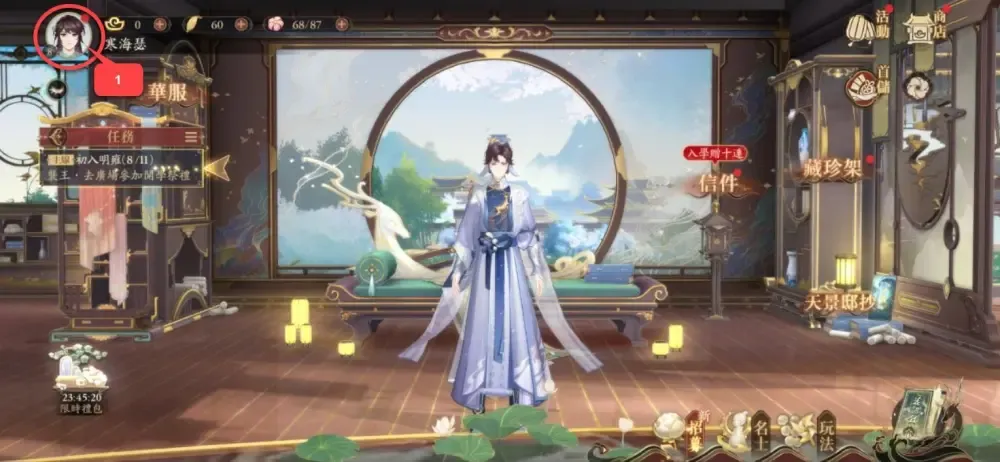
- Log into your Taiwan server account and enter the main courtyard screen.
- Tap your character avatar in the upper-left corner of the screen to open the scholar profile window.
- Locate your numerical Game ID displayed below your character name and academy title.
- Tap the copy icon next to the number string to copy your Game ID directly to your clipboard, preventing typographical errors.
Server Compatibility and Region Rules for TW Accounts
Before placing an order, confirm that your game installation matches the Taiwan / Hong Kong / Macau regional release. The Moon in the Heart of Flowers and Mountains operates distinct server architectures across different regions.
| Server Region | Top-Up Supported | Required ID Type | Account Database Isolation |
|---|---|---|---|
| Taiwan / Hong Kong / Macau (TW) | Yes | Numerical Game ID (TW Client) | Dedicated TW/HK/MO Server |
| Mainland China (CN) | No | CN Server UID | Dedicated CN Server |
| Global / Other Regional Servers | No | Global Client UID | Regional Global Servers |
Submitting a Game ID from a Mainland China or Global account will prevent the order from delivering successfully. Ensure your client was downloaded from the Taiwan App Store, Taiwan Google Play Store, or the official TW APK distribution.
Available Ingot Denominations and Packages on BitTopup
BitTopup provides multiple Ingot tiers designed to suit your in-game goals, from single gacha pulls to major seasonal recruitment campaigns. Available options include standard Ingot packs, special value bundles, and monthly privilege cards.
- Standard Ingot Packs: Direct currency injections to convert into Gold Leaves or spend on shop items.
- First-Purchase Bonuses: If your game account is eligible for in-game first-charge multipliers, the game automatically credits the promotional bonus Ingots upon successful recharge delivery.
- Real-Time Rates: Package pricing and regional currency conversions are updated continuously on the live BitTopup checkout interface.
Security and Password-Free Top-Up Protection on BitTopup
Account safety is a core priority when purchasing game currencies online. BitTopup utilizes a direct Game ID top-up mechanism that protects your personal data:
- Zero Password Requirements: You will never be asked for your account password, email login, Apple ID, Google Play credentials, or social media tokens.
- No Account Sharing: Your account stays entirely in your control. There is no need to transfer access to an external operator.
- Encrypted Processing: All transactions on BitTopup use industry-standard encryption protocols to protect your billing details.
- Publisher Compliance: Deliveries occur through standard top-up interfaces, safeguarding your account from penalties associated with unauthorized account modifications.
Troubleshooting Ingot Delivery and Order Status Verification
If your Ingots do not appear immediately after completing payment, use the following troubleshooting checklist:
- Restart the Game App: Close The Moon in the Heart of Flowers and Mountains completely and relaunch it. A fresh login forces the client to sync with the server database.
- Inspect the In-Game Mailbox: Certain event rewards, bundle items, and first-top-up milestone gifts are sent as attachments via the system mail menu rather than applied straight to the currency counter.
- Verify Submitted Game ID: Check your BitTopup order history to verify that the Game ID entered during checkout matches your in-game profile ID exactly.
- Check Payment Status: Confirm that your payment provider processed the charge successfully and that your order shows as completed in your BitTopup user center.
- Contact Customer Support: If your order status indicates completion but your balance has not updated after restarting, reach out to BitTopup customer support with your Order ID and Game ID for prompt resolution.
Frequently Asked Questions
How do I find my Game ID in The Moon in the Heart of Flowers and Mountains?
Tap your scholar avatar in the top-left corner of the main screen. Your numerical Game ID is visible directly underneath your name. Use the copy button next to it to copy the exact string.
Do I need to provide my account login password to recharge Ingots?
No. BitTopup requires only your numerical Game ID to process the top-up. Never share your password or verification codes with anyone.
Can I recharge this product if my account is registered on the CN or Global server?
No. This product catalog is strictly configured for accounts on the Taiwan, Hong Kong, and Macau (TW) server. Accounts on CN or Global versions are not compatible with this service.
How quickly will the Ingots be credited to my in-game account after checkout?
Recharges are processed automatically once payment verification is complete. In most cases, Ingots reflect on your account shortly after the transaction is confirmed.
What should I do if the recharged Ingots do not reflect in my balance?
Restart your game client to refresh the server connection, check your in-game mailbox for system deliveries, and confirm your order status on BitTopup. If you still need help, contact BitTopup customer support with your order details.
What payment methods are supported on BitTopup for this recharge?
BitTopup supports a wide variety of regional and international payment options, including major credit/debit cards, e-wallets, and online banking. View the live checkout page to see all payment channels currently available for your location.