

Google Play Gift Card (ID) Top Up: Digital IDR Balance for Android Apps and Games
A Google Play Gift Card (ID) is a prepaid digital voucher used to reload your Google Play balance in Indonesian Rupiah (IDR). Once redeemed, the funds link directly to your Indonesian Google Play account, allowing you to purchase premium Android games, apps, in-app purchases, digital books, movies, and cloud subscriptions without linking a personal credit card or bank account.
Players frequently use Indonesian Google Play codes to top up in-game currencies for titles such as Mobile Legends: Bang Bang (Diamonds), Genshin Impact (Genesis Crystals and Welkin Moon), Free Fire, PUBG Mobile, Roblox, and EA SPORTS FC Mobile. Because transactions deduct directly from your Google Play IDR wallet, gift cards offer a controlled, secure, and straightforward method for managing digital entertainment expenses.
Available Google Play Gift Card (ID) Denominations (IDR)
BitTopup provides a comprehensive selection of official Indonesian Rupiah digital vouchers to suit microtransactions, full game purchases, or large in-game event top-ups. Current live pricing and payment options are displayed directly on the selection panel above.
| Voucher Denomination (IDR) | Common Account & Game Uses | Target Region |
|---|---|---|
| 5,000 IDR | Basic micro-transactions, introductory packs | Indonesia (ID) |
| 10,000 IDR | In-game currency packs, small app purchases | Indonesia (ID) |
| 20,000 IDR | Weekly game passes, digital comic chapters | Indonesia (ID) |
| 50,000 IDR | Battle passes, mid-tier currency bundles | Indonesia (ID) |
| 100,000 IDR | Premium game purchases, monthly passes | Indonesia (ID) |
| 150,000 IDR | Major in-game event bundles, app subscriptions | Indonesia (ID) |
| 250,000 IDR | High-tier gacha pulls, diamond bundles | Indonesia (ID) |
| 500,000 IDR | Large currency crates, annual subscriptions | Indonesia (ID) |
Regional Restrictions: Google Play Indonesia Account Requirements
Google Play gift cards operate under strict geographic and currency restrictions. A Google Play Gift Card (ID) denominated in Indonesian Rupiah (IDR) can only be redeemed on a Google account configured specifically for the Indonesia region. Attempting to redeem an Indonesian code on an account set to the United States, Malaysia, the Philippines, or any other country will trigger a regional mismatch error.
How to Verify Your Google Play Account Country
Before purchasing or redeeming a voucher, ensure your Google account profile is set to Indonesia:
- Open the Google Play Store app on your Android device.
- Tap your profile icon in the upper-right corner.
- Select Settings, then expand the General menu.
- Tap Account and device preferences.
- Scroll down to the Country and profiles section and verify that Indonesia is active with a green checkmark.
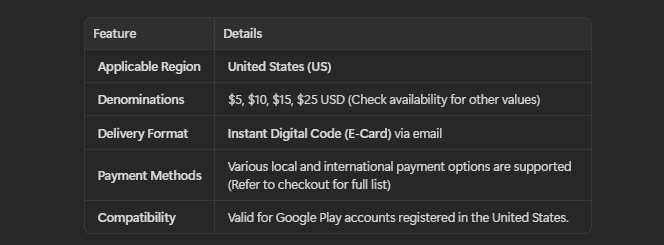
If your account is registered to another region, you must switch your Google Play country to Indonesia or create a dedicated Indonesian Google profile before applying the code. Google allows users to change their account country once per 365-day period.
How to Recharge Google Play Gift Card (ID) on BitTopup
Purchasing a digital voucher code through BitTopup is completely automated and requires no sensitive login credentials:
- Select Denomination: Choose the IDR amount you wish to add to your Google Play balance.
- Enter Delivery Information: Provide the email address where you want the digital redemption code and purchase confirmation sent.
- Select Payment Channel: Choose your preferred payment method on the checkout page.
- Complete Checkout: Follow the instructions on screen to finalize the transaction.
- Receive Your Code: Your alphanumeric digital gift card code will appear immediately on your order confirmation screen and will be sent to your email inbox.
Step-by-Step Guide: How to Redeem Google Play Codes on Mobile and PC
Once you receive your digital code from BitTopup, follow these steps to add the balance to your account.
Method 1: Redeeming on an Android Phone or Tablet
- Open the Google Play Store app on your device.
- Tap your profile icon in the top-right corner.
- Select Payments & subscriptions from the menu.
- Tap Redeem code.
- Enter the 16-character alphanumeric code received from BitTopup.
- Tap Redeem, then confirm the account details shown on the confirmation prompt. The IDR funds will immediately reflect in your Google Play balance.
Method 2: Redeeming via Desktop Web Browser
- Open your web browser and go to
play.google.com/redeem. - Ensure you are signed in to the specific Google account registered to Indonesia.
- Paste or type your digital voucher code into the input field.
- Click Redeem and confirm the transaction.
Method 3: Redeeming Directly During In-App Checkout
- Launch the game or application where you want to make a purchase.
- Proceed to the in-game store and select the item you want to buy.
- When the Google Play payment overlay appears, tap on the current payment method.
- Scroll down and select Redeem code.
- Enter your voucher code, confirm redemption, and complete your in-app purchase instantly.
Troubleshooting Common Google Play Gift Code Redemption Issues
If you encounter an error when applying your code, refer to the solutions below:
- Error: Currency or Country Mismatch (Geo-Lock): Google displays a message stating that the code cannot be redeemed in your country. Verify that your Google Play country is set to Indonesia and that your physical IP address / location does not conflict with Google's regional verification systems.
- Error: Code Already Redeemed: Check your Google Play transaction history under Payments & subscriptions > Budget & history. In most cases, the code was already successfully credited to your balance or to a secondary Google account logged in on the same device.
- Error: Invalid Code: Ensure you have not mistyped characters. Common errors include confusing the number
0with the letterO, or the number1with the capital letterI. - Error: We need more info to redeem your gift card: Google occasionally requests identity verification for anti-fraud measures. If prompted, submit the official proof of code purchase provided in your BitTopup order details to the Google Support form.
Benefits of Purchasing Digital Google Play Vouchers via BitTopup
- Zero Account Sharing: BitTopup delivers genuine digital alphanumeric voucher codes. You never need to share your Google password, email access, or personal login information.
- Instant Digital Delivery: Codes are processed automatically upon payment completion, giving you immediate access to your game funds.
- Wide Selection of Payment Methods: Complete your transaction securely using regional and international payment options available at checkout.
- 24/7 Customer Support: If you ever need order verification or have questions regarding code redemption, our customer support team is available around the clock to assist you.
Frequently Asked Questions
How do I recharge my Google Play gift card?
You do not recharge a physical card directly. Instead, buy a new Google Play Gift Card (ID) digital code from BitTopup, open the Google Play Store on your device, navigate to Payments & subscriptions > Redeem code, and enter the code to add fresh IDR funds to your account balance.
Can I use a Google Play Gift Card (ID) on an account outside Indonesia?
No. Google Play gift cards are region-locked. Indonesian Rupiah (IDR) gift cards can only be redeemed on Google accounts configured to the Indonesia Play Store. Attempting to use them in other regions will result in a country mismatch error.
Can I add money to an already used Google Play gift card?
No. Google Play gift card codes are single-use vouchers. Once a code is redeemed, its balance moves permanently into your Google Play wallet, and the voucher code expires. To add more funds, purchase an additional digital code on BitTopup.
Can I convert a Google Play gift card to cash or transfer to an e-wallet?
No. Google Play balances cannot be refunded, exchanged for physical cash, or transferred to third-party e-wallets or bank accounts. They can only be spent on digital items, apps, games, books, and subscriptions within the Google Play ecosystem.
How do I check a Google Play gift card balance?
To view your total available balance, open the Google Play Store app, tap your profile icon, and select Payments & subscriptions > Payment methods. Your current Google Play balance will appear at the top of the screen.
Can I buy a virtual Google Play gift card online?
Yes. BitTopup sells digital Google Play Gift Card (ID) vouchers online. You receive the official digital code instantly on your screen and via email, ready for redemption on any compatible Indonesian Google account.