



Ace Racer Top Up: Get Tokens Directly with Player ID
Fuel your garage and accelerate your performance on the track with an Ace Racer top up from BitTopup. Tokens serve as the premier currency in Ace Racer, giving you direct access to luxury supercars, high-tier modification parts, exclusive liveries, and limited-time Speedfest Supply Chests.
BitTopup provides a direct token recharge process that requires only your in-game Player ID and Server Region. You never have to share passwords, verify login codes, or risk your account credentials. Select your token pack, enter your account details, complete your payment, and watch your token balance update directly in your game profile.
What Are Ace Racer Tokens and How to Use Them
Ace Racer Tokens are the premium in-game currency used to unlock high-performance content that standard Gold or Gift Cards cannot access. Whether you want to pull for new concept cars or fine-tune an existing vehicle for competitive ranked matches, Tokens give you full control over your progression.
In-Game Token Utility Breakdown
- Speedfest Supply Chests & Blind Boxes: Use Tokens to purchase draw tickets for limited-run vehicles, legendary blueprints, and rare concept car releases.
- ECU & Vehicle Modifications: Convert Tokens to obtain specialized upgrade parts, tuning packages, and ECU chips needed to boost top speed, nitro duration, and drifting efficiency.
- Gold Coin Conversion: Instantly exchange Tokens for standard Gold when you need resources to complete vehicle level-ups and engine overhauls.
- Visual & Cosmetic Customization: Purchase exclusive car paints, racing liveries, wheel hub designs, neon light kits, and customized driver race suits.
- Battle Pass Tiers: Accelerate your seasonal pass progression by purchasing tier skips to claim milestone rewards ahead of schedule.
| In-Game Feature | Token Utility | Primary Benefit |
|---|---|---|
| Supply Chests | Direct purchase of draw tickets | Unlocks S-Tier concept and racing cars |
| Vehicle Tuning | ECU chips and mechanical parts | Maximizes vehicle stats and handling |
| Gold Exchange | Instant conversion to Gold Coins | Funds car leveling and skill upgrades |
| Visual Garage | Liveries, wheels, and light strips | Full aesthetic personalization |
| Driver Boutique | Custom race suits and accessories | Character cosmetic customization |
How to Find Your Ace Racer Player ID and Server Region
To ensure your Ace Racer tokens recharge goes to the correct garage, you must provide your exact Player ID and select your active Server Region during checkout. Follow these simple steps inside the game client:
- Launch Ace Racer on your mobile device and log in to your account.
- Tap your Avatar icon located in the top-left corner of the main lobby screen to open your Personal Profile.
- Locate your numeric Player ID displayed below your character name and profile information.
- Tap the small Copy icon next to the number to copy your Player ID to your clipboard.
- Note your current Server Region (such as Asia, Korea, Japan, North America, or Europe), which appears on your login screen and profile overview.
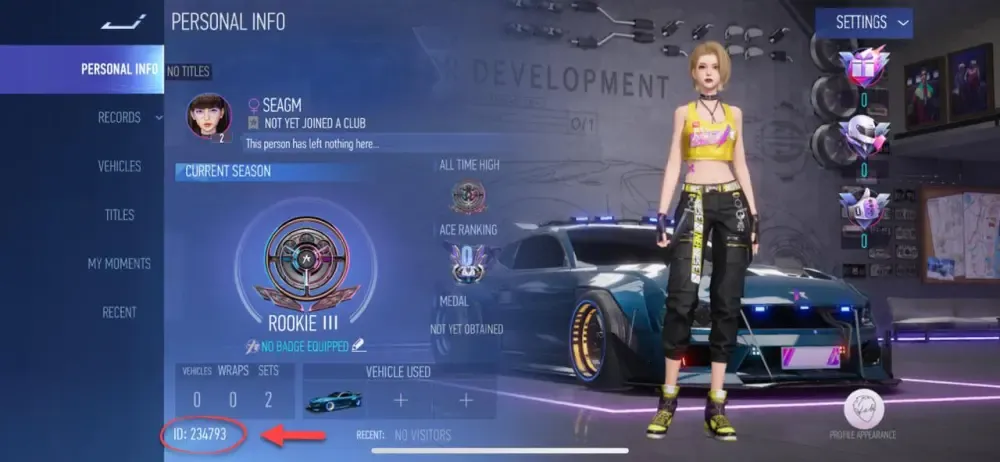
Paste this copied ID into the Player ID input field on BitTopup and select your matching server from the dropdown menu.
Supported Server Regions for Ace Racer Recharges
Ace Racer operates on dedicated regional servers to optimize matchmaking and latency for players worldwide. BitTopup supports direct token recharges across all active game servers.
| Server Region | Supported Territories | Verification Tip |
|---|---|---|
| Asia | Southeast Asia, South Asia, Oceania | Check region selector on client title screen |
| Korea | Republic of Korea | Match local game client version |
| Japan | Japan | Dedicated Japanese server build |
| North America | United States, Canada, Mexico | Displays on main login screen profile |
| Europe | Western, Central, and Eastern Europe | Displays on main login screen profile |
Selecting the correct server is mandatory. Player IDs are unique to their designated regional database, so matching your server ensures automated crediting without delivery delays.
Step-by-Step Guide to Recharge Ace Racer on BitTopup
Ordering your tokens through BitTopup takes only a couple of minutes:
- Select Token Pack: Browse the available token denominations on the BitTopup product page and choose the amount you want to purchase.
- Enter Player ID: Paste your numeric Ace Racer Player ID into the designated field.
- Select Server Region: Choose your active game server (Asia, Korea, Japan, North America, or Europe) from the list.
- Review Live Pricing: Check the checkout summary for current prices, applicable offers, and total payment.
- Complete Checkout: Pick your preferred payment method from the available options and confirm the transaction.
- Receive Tokens: Open your Ace Racer app. Your updated token balance will reflect directly in your account.
Account Safety: 100% Safe Player ID Recharges
Account safety is a top priority for every racer. Third-party top-ups that ask for your login email, social media credentials, or account passwords expose your data to theft and violate game security standards.
BitTopup uses a direct UID top-up model. This means:
- Zero Login Sharing: You never disclose passwords, two-factor authentication codes, or linked social accounts.
- Authorized Delivery Pathways: Tokens are delivered through direct game system crediting using your public Player ID.
- Anti-Ban Protection: Because no unauthorized access occurs on your account, your game profile remains fully compliant and secure.
- Encrypted Transactions: Every checkout on BitTopup is protected by industry-standard encryption protocols to safeguard your personal payment information.
Why Choose BitTopup for Ace Racer Token Top-Ups
BitTopup delivers a focused, reliable purchasing experience designed for mobile gamers:
- Direct System Crediting: Automated order processing routes tokens straight to your player profile without manual account takeovers.
- Full Global Server Coverage: Full support for Asia, Korea, Japan, North America, and Europe server selections.
- Clear Checkout Details: All token packs and live prices are shown upfront on the checkout screen with no hidden transaction fees.
- Multiple Payment Options: Complete your purchase smoothly with diverse regional and international payment methods.
- Dedicated Customer Support: Reach our support team 24/7 if you have questions about your order status or account details.
Troubleshooting Common Ace Racer Recharge Issues
If you experience any delay or issue with your token delivery, check these common causes:
- Incorrect Player ID Entry: If you entered a typo in your Player ID, check your payment confirmation against your in-game profile. If the ID does not exist, reach out to customer support immediately with your transaction receipt.
- Mismatched Server Selection: Selecting North America when your account is based on the Asia server can cause crediting failures. Always double-check your server before confirming payment.
- Client Refresh Delay: In some cases, the game client needs to sync with the server database. Close Ace Racer completely from your device app switcher and reopen it to refresh your balance.
- Network Sync: Ensure your device has a stable internet connection so the in-game store balance updates correctly.
Frequently Asked Questions
What are Ace Racer Tokens and what can I buy with them?
Ace Racer Tokens are the premium currency used to purchase Speedfest Supply Chest draws, unlock exclusive concept and real-world licensed vehicles, acquire ECU upgrade packages, purchase custom paints and liveries, and convert into in-game Gold.
How do I find my Ace Racer Player ID and Server?
Tap your profile avatar in the upper-left corner of the Ace Racer main menu. Your numeric Player ID is displayed under your player name with a copy button next to it. Your server region is shown on your initial game login screen and in your basic profile tab.
Do I need to share my Ace Racer game password for a recharge?
No. BitTopup requires only your public Player ID and Server Region. You should never share your game passwords, email credentials, or verification codes with anyone.
Which regional servers are supported for Ace Racer recharges?
BitTopup supports all active regional servers: Asia, Korea, Japan, North America, and Europe. Make sure to pick your specific server during checkout.
Can I recharge Ace Racer Tokens for a friend's account?
Yes. As long as you have your friend's correct Player ID and know their server region, you can enter their details at checkout on BitTopup to send tokens straight to their garage.
What should I do if my Ace Racer Tokens do not arrive immediately?
First, restart the Ace Racer application to force a fresh data sync with the game servers. If your tokens do not appear after a few minutes, verify your order status on BitTopup and contact customer support with your Order ID and Player ID for fast assistance.