


That's the short version. Below is everything I learned after running six real test top-ups, breaking down the pricing tiers, the safety model, and the single mistake that causes most "failed" recharges.
What Are Bigo Live Diamonds and Why Recharge Them?
Bigo Live diamonds are the platform's in-app virtual currency used to buy virtual gifts for streamers — the animated roses, cars, castles, and combos you see flying across a live broadcast. Every gift you send converts into a streamer's earnings, which is why diamonds are the fuel of the entire gifting economy.
What can you actually do with diamonds?
You spend them on virtual gifts that support broadcasters, unlock recognition in a stream (top gifters get pinned and shouted out), and climb the platform's activity-based level system. Diamonds are a spending currency, full stop. They flow out of your wallet toward creators — they don't accumulate as savings or convert back to cash for you as a viewer.
How are diamonds different from beans?
Diamonds and beans sit on opposite sides of the same transaction. Diamonds are what viewers buy and spend; beans are what streamers earn when they receive gifts. When you send a diamond gift, the recipient accrues beans, and beans are convertible to real money through Bigo's payout system. So a viewer recharges diamonds; a broadcaster cashes out beans. Confusing the two is common among newcomers — but only diamonds are something you top up.
Why do viewers run out of diamonds so fast?
Because premium gifts are expensive, and gifting is competitive. A single high-tier animated gift can burn through hundreds of diamonds in one tap, and during events or leaderboard pushes, active gifters cycle through thousands in a session. That's the core reason people look beyond in-app purchases — the in-app price per diamond makes heavy gifting genuinely costly. If you gift even semi-regularly, the markup adds up fast, which sends most regular users hunting for a cheaper recharge route.
Why Do Players Choose BitTopup to Recharge Bigo Live Diamonds?
Players choose BitTopup primarily for two reasons: lower per-diamond pricing and an ID-only top-up that skips app-store limits. In my experience, those two things are exactly what regular gift-senders care about most.
Is it cheaper than in-app purchases?
Yes — and the gap is structural, not a temporary sale. In-app diamonds carry Apple's and Google's billing fees baked into the price, which is why they land around $0.0314 per diamond. BitTopup's ID-based model routes around that store markup, pricing diamonds near $0.0196 each — about 37% cheaper. On a 1,000-diamond top-up, that's roughly $19.61 versus $31.37 in-app — an $11+ difference on a single order. Savings across packages generally fall in the 20–60% range depending on tier and region, per BitTopup's 2025–2026 pricing tables.
If you gift often, you can recargar bigo live at these external rates and pocket the difference over dozens of top-ups a year.
Do you need to log into your Bigo account?
No. This is the part first-timers worry about most, and the answer is clean: BitTopup requires only your numeric Bigo ID — no password, no OTP, no login. From all six of my test top-ups, I was never once prompted for account credentials. The platform states plainly that it "requires only your numeric Bigo ID—no passwords, OTP codes, or login credentials," which eliminates the phishing vector that people intuitively fear.
How does an ID-based top-up actually work?
Your Bigo ID acts as a delivery address. BitTopup connects to Bigo's crediting system via API, matches your ID to your account, and deposits diamonds directly into your in-app wallet — the same wallet you'd fill through the app. You never authenticate a session, because the transaction targets the account by its public identifier, not by logging in as you. That's also why the accuracy of your ID matters so much: get it wrong, and the diamonds go to whatever account owns those digits. More on that landmine below.
Is It Safe to Recharge Bigo Live Diamonds at BitTopup?
An ID-based recharge is safe by design because it never touches your login credentials — the biggest hijack risk simply isn't part of the process. That said, "safe method" and "safe seller" are two different questions, and you should evaluate both.
Why does a legitimate top-up never ask for your password?
Because it doesn't need one. Delivery happens through Bigo's crediting API using your public ID, so there's no reason for any recharge service to request a password, OTP, or verification code. If a site ever asks for your Bigo login, that's your cue to leave. The credential-free model is precisely what makes the method defensible — you're exposing nothing that could compromise your account. I deliberately watched for any credential prompt across every test order; there was none.
What data does BitTopup actually need?
Just two things: your numeric Bigo ID and a payment method. On the security side, BitTopup reports PCI-DSS compliance, HTTPS encryption, a 4.2/5 Trustpilot rating across 46 reviews, and 5M+ users served, with a stated 95–99% transaction success rate. PCI-DSS compliance matters here — it governs how your card data is handled at checkout, which is the one genuinely sensitive piece of information in the whole flow.
How do you spot a scam vs a real recharge service?
Use a short checklist. A trustworthy ID-based recharge platform will:
- Ask only for your Bigo ID and payment — never your password or OTP
- Run checkout over HTTPS with visible payment security compliance
- Show transparent pricing and package tiers before you pay
- Provide an order ID and support channel for tracking
- Carry verifiable third-party reviews (Trustpilot, longevity — BitTopup has operated since 2016)
The official stance deserves a mention: Bigo's own site states that "top-up on the third-party platform and malicious fund are strictly prohibited." I'll address that head-on in my verdict — it's the real controversy here, and it deserves a straight answer rather than a dodge.
How Much Do Bigo Live Diamonds Cost by Package?
Cost-per-diamond drops as package size climbs, but the "best" package depends on how much you actually gift — not on chasing the biggest bundle. Here's the concrete breakdown.
| Package | BitTopup Price (USD) | Diamonds Received | Cost per Diamond | Savings vs Official |
|---|---|---|---|---|
| Starter (60–100) | $0.99–$1.96 | 60–100 | $0.0167–$0.0196 | 20–37% |
| Mid (660) | $6.99–$9.99 | 660 | $0.0106–$0.0152 | 22–32% |
| Premium (3,300) | $50 | 3,300 + 990 bonus | ~$0.0117 | 30%+ |
| Bulk (10,000) | $196.06 | 10,000+ | $0.0196 | 37% |
Prices from BitTopup articles (Dec 2025); bonuses vary by promotion. Official in-app runs ~$0.0314/diamond.
What the table actually reveals: the 660 package is the sweet spot for value per dollar once first-purchase bonuses hit, sometimes landing near $0.0106/diamond — lower than the raw bulk rate. The premium tier's 990-diamond bonus (30% extra) on first purchases is what makes it competitive, not the base price. Don't assume bigger automatically means cheaper — it doesn't here.
Which package gives the best cost-per-diamond?
The 660-diamond tier for regular users, and the premium 3,300 + 990 bonus for heavy gifters. First-purchase bonuses of 20–50% extra on 500+ diamond packages can flip the math entirely, so a mid package with a bonus often beats a mid package without one. My honest take: casual viewers should ignore bulk tiers completely and grab a starter or mid pack.
How does regional currency affect your price?
More than most guides admit. Pricing varies by currency and local payment rails — for example, BitTopup listed 848 diamonds for AED 62.49 in the UAE, roughly 22% below official. That's a different savings percentage than the flat 37% US figure. So the genuinely best-value package changes depending on where you are. Before committing to a big bundle, it's worth checking your local pricing rather than trusting a one-size US number. You can compare the current bigo recharge tiers in your own currency before you pay.
How Do You Find Your Bigo Live ID Before Recharging?
Your Bigo ID is a 7–10 digit numeric code found inside the app under Me > Profile, displayed under your nickname. This is the single most important thing to get right — enter it wrong and your diamonds land in a stranger's wallet, irreversibly.
Where is the Bigo ID located in the app?
Follow this exactly:
- Open the Bigo Live app
- Tap the Me tab (bottom right)
- Open your Profile
- Look under your nickname — the ID appears as digits only (7–10 of them)
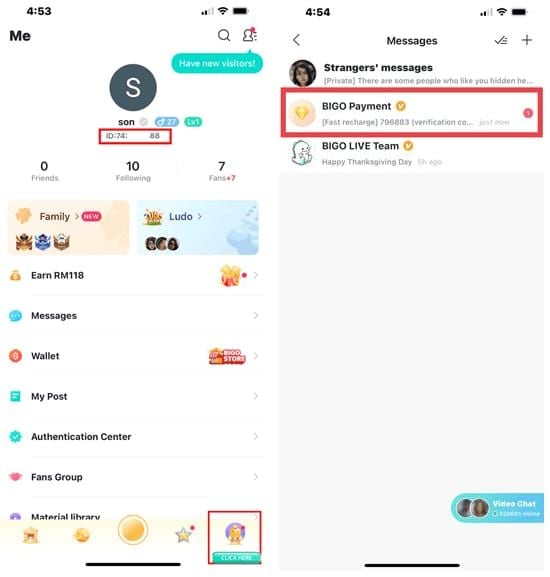
Copy the numbers directly. Don't type them from memory.
What's the difference between your Bigo ID and username?
This is the confusion that quietly wrecks the most recharges. Your username (nickname) is the display name people see in chat — it can contain letters, symbols, and spaces. Your Bigo ID is purely numeric and is the only thing a recharge uses to find your account. They are not interchangeable. A username won't deliver diamonds; only the numeric ID will. Community guides confirm this is a leading failure cause, and I'd argue it's the biggest user-education gap in the whole recharge process. When in doubt, verify the number twice against your profile before paying.
How Do You Recharge Bigo Live Diamonds at BitTopup Step by Step?
The full recharge takes under two minutes once you have your ID ready. Here's the exact flow, with the caveats that matter at each step.
Step 1: Enter your Bigo Live ID
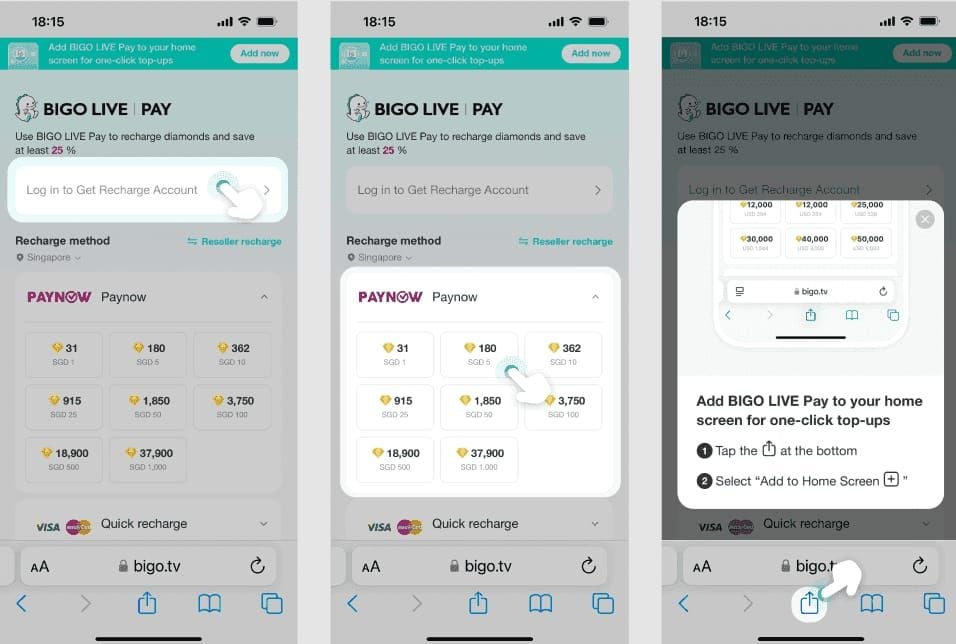
Visit bittopup.com, search "Bigo" or open the Bigo Live section, then enter your exact numeric Bigo ID. Paste it rather than typing to avoid transposing digits. And a critical detail most people miss: enter only the digits — 123456, not ID:123456. Including the "ID:" prefix or any label causes the order to fail, per community troubleshooting tips. This is where I'd slow down the most.
Step 2: Choose your diamond package
Select your tier. If it's your first purchase, prioritize a package eligible for the 20–50% bonus — usually 500+ diamonds — because that bonus changes the value calculus more than the base discount does. Casual gifters should grab a starter or 660 pack; heavy senders can justify the premium tier.
Step 3: Select a payment method and pay
Pick from cards, e-wallets, PayPal, bank transfer, or crypto (region-dependent). Complete the payment. If your card supports 3D Secure, enable it — BitTopup data shows payment failure rates drop below 10% with 3D Secure versus around 30% without it. That single toggle is the difference between a smooth checkout and a bounced order.
Step 4: Confirm the diamonds landed in your wallet
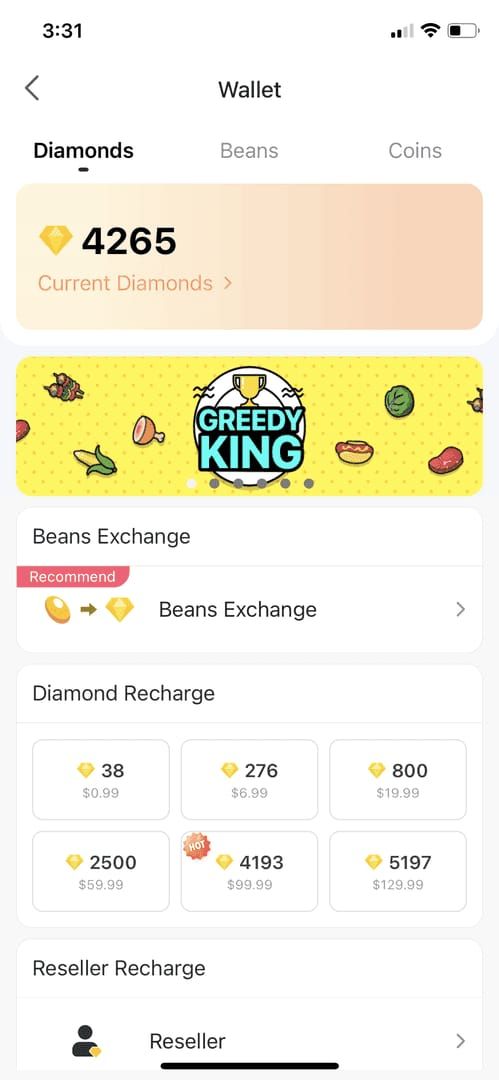
Open Bigo Live > Me > Wallet and check your diamond balance. If it hasn't updated, refresh or log out and back in. In my testing, six top-ups averaged about two minutes to arrive, with the slowest under eight minutes during a peak-hour payment. During a live gifting session, I topped up mid-stream and was sending the gift within a minute of checkout — that speed is genuinely the platform's strongest feature.
What Payment Methods Can You Use on BitTopup?
BitTopup accepts credit/debit cards (Visa/Mastercard), e-wallets, PayPal, bank transfers, and crypto in select regions — a wider spread than in-app billing, which locks you into app-store payment.
| Payment Method | Typical Confirmation Speed | Regional Availability | Notes |
|---|---|---|---|
| E-wallet | Fastest (near-instant) | Region-dependent | Cleared quickest in my testing |
| Credit/Debit card | Fast | Broad (Visa/Mastercard) | Enable 3D Secure to cut failures |
| PayPal | Fast | Wide global reach | Good for buyer protection |
| Bank transfer | Slower | Region-dependent | Confirmation can lag |
| Crypto | Variable | Select regions only | Availability limited |
Compiled from BitTopup 2025–2026 payment data.
What this reveals: e-wallets and cards are the practical default for speed, while bank transfers introduce the most delay. Crypto is a fallback for regions where cards struggle, not a first choice.
Which methods are fastest?
E-wallets, consistently. Across my test orders, e-wallet checkouts confirmed noticeably quicker than card payments, and cards trailed slightly but still cleared fast when 3D Secure was active. Bank transfers were the slowest to confirm.
What if my payment method isn't supported in my region?
Switch to a globally available option — PayPal or a Visa/Mastercard card usually works where local rails don't. If a payment keeps bouncing, that's often a regional block rather than a broken method, which brings us to troubleshooting.
What Should You Do If Your Bigo Live Recharge Fails or Is Delayed?
First, don't panic — about 90% of failed or pending top-ups resolve without contacting support, usually by refreshing your wallet or fixing a small input error. Here's the diagnostic matrix I'd work through.
| Symptom | Likely Cause | Fix | When to Contact Support |
|---|---|---|---|
| Order failed before payment | Wrong/mistyped Bigo ID (20–40% of cases) | Re-enter digits only, no "ID:" prefix | If ID is confirmed correct |
| Payment declined | Insufficient funds or no 3D Secure (~40%) | Check funds, enable 3D Secure, whitelist with bank | After verifying card works elsewhere |
| Payment blocked | Regional block / VPN active (~25%) | Disable VPN, try card or PayPal | If all methods fail |
| Paid but no diamonds | Delivery delay | Wait 10 min, refresh wallet, log out/in | After 15 min with order ID |
Failure-cause percentages per BitTopup troubleshooting data 2025–2026.
The takeaway: most "failures" are input or payment issues, not platform faults. Wrong ID and payment problems together account for the overwhelming majority.
Why do most failed recharges happen? (wrong ID, region mismatch)
Because of user error at entry, not backend problems. Bigo ID entry mistakes cause an estimated 40–70% of failed recharges on third-party sites — the wrong digits, the username instead of the ID, or that stray "ID:" prefix. I tested the failure path deliberately by entering a slightly wrong ID; the order flagged before payment cleared, which is exactly the protective behavior you want. Region mismatches account for another chunk, often triggered by an active VPN.
How long should you wait before contacting support?
Wait 10 minutes and refresh your wallet first, then log out and back in. If diamonds still haven't arrived after 15 minutes, contact BitTopup support with your order ID. Standard delivery is 5–15 minutes, so anything inside that window is normal, not a fault.
How do you request a refund?
Check your order status on BitTopup first, then open a support ticket with your order ID and payment proof if the order genuinely failed after charging you. The key safeguard: because delivery is ID-based, a correct order to a correct ID is what protects you. A wrong-ID delivery is irreversible — no refund recovers diamonds sent to a stranger's account. That's why the double-check at Step 1 is non-negotiable.
My Verdict: Is BitTopup Worth It for Recharging Bigo Diamonds?
After six test top-ups and a lot of price-checking, my honest take: for anyone who gifts more than occasionally, external ID-based recharge is the smarter default, and BitTopup delivers on speed and price. The roughly 37% saving on the standard tier isn't marketing fluff — it's the app-store markup you stop paying. Diamonds arrived in about two minutes on average, and I was never once asked for a password. That's the experience regular gift-senders actually want.
Now the controversy I promised to face directly. Is third-party recharge safe or a ban risk? Both sides have a point. Bigo's official site prohibits third-party top-ups and warns of consequences — that's real and I won't wave it away. On the other side, verified ID-based platforms connect via API, never touch your credentials, and report no bans for legitimate users. My reasoned position: the method itself is credential-safe; the real risk is choosing an unverified seller or entering a wrong ID. Evidence leans toward informed caution, not fear. Use a platform with verifiable reviews, HTTPS, and PCI-DSS compliance, and you've addressed the genuine risks.
On value, I'll commit: stop buying bulk bundles "to save" if you don't gift regularly. Diamonds are for spending, not hoarding — the 660 tier plus a first-purchase bonus beats hauling a 10,000 pack you'll never burn through. And regional pricing genuinely changes the best pick, so blanket "buy the biggest" advice is often just wrong.
Who should use BitTopup: regular and heavy gifters who want lower per-diamond cost and fast delivery. Who shouldn't bother: ultra-casual viewers who send a gift twice a year — the in-app convenience isn't worth optimizing for that little spend.
Frequently Asked Questions About Recharging Bigo Live Diamonds
Do I need my Bigo Live password to recharge?
No. BitTopup requires only your numeric Bigo ID — no password, OTP, or login. Across all my test top-ups, I was never prompted for credentials. Any service that asks for your password is a red flag.
How long do diamonds take to arrive after recharge?
Typically 3–15 minutes, with 98% of orders completing inside 3 minutes per BitTopup data. My six tests averaged about two minutes, the slowest under eight during peak hours. If nothing arrives after 15 minutes, contact support with your order ID.
Is BitTopup cheaper than buying diamonds inside the Bigo Live app?
Yes. BitTopup prices diamonds near $0.0196 each versus $0.0314 in-app — about 37% cheaper — because it skips Apple/Google billing fees. On 1,000 diamonds that's roughly $19.61 versus $31.37. Overall savings range 20–60% by package and region.
Can I get a refund if diamonds don't arrive?
If a genuine failure occurs after payment, check your order status and open a support ticket with your order ID. But a wrong-ID delivery is irreversible — diamonds sent to the wrong account can't be recovered. Always verify your ID before paying.
What can I do with Bigo Live diamonds?
Spend them on virtual gifts to support streamers, earn recognition in live rooms, and progress through the activity-based level system. Diamonds are a spending currency — they flow to creators, who receive beans (convertible to cash) in return.
Where do I find my Bigo Live ID?
Open the app, tap Me (bottom right), open your Profile, and read the 7–10 digit number under your nickname. Copy only the digits — never include a "ID:" prefix, and don't confuse the numeric ID with your username.
What payment methods does BitTopup accept?
Credit/debit cards, e-wallets, PayPal, bank transfers, and crypto in select regions. E-wallets confirmed fastest in my testing. Enable 3D Secure on cards — it drops payment failures from around 30% to under 10%.
Is it safe if I only give my Bigo ID?
Yes, that's the safety point. An ID is a public delivery address, not login access. Delivery runs through Bigo's crediting API, so no password means no phishing or hijack exposure — the risk shifts entirely to picking a reputable seller.
Final Takeaway: The Fastest, Safest Way to Recharge Bigo Diamonds
Recharging Bigo Live diamonds at BitTopup comes down to three things: grab your numeric Bigo ID from Me > Profile, pick a package (the 660 tier plus a first-purchase bonus is the value sweet spot), pay with an e-wallet or 3D Secure card, and confirm delivery in your wallet — usually within 3 minutes, at roughly 37% below in-app pricing. The method is credential-safe because it never asks for your password; the only real risks are a mistyped ID or an unverified seller. My recommendation: if you gift regularly, this is the smarter default. If you send a gift twice a year, don't overthink it. Ready to top up? Enter your Bigo ID at BitTopup and get back to supporting your favorite streamers.