Honkai: Star Rail (Version 4.6) takes about 116 GB on PC: 101.1 GB of game files plus one voice pack of 12.4–15.6 GB. On phones the store app is small (3.8 GB on iOS), and the full game is about 35–45 GB after in-game downloads. PS5 has no official figure; players report 100 GB or more.
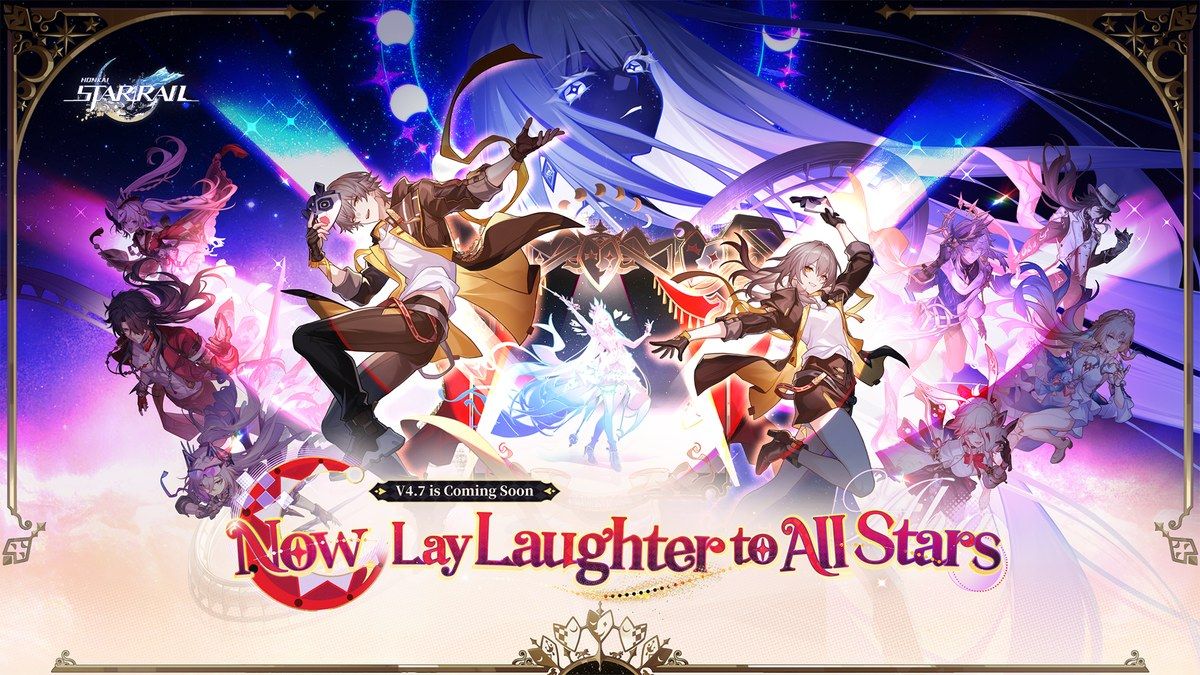
We checked these numbers on 2026-11-06 against HoYoPlay’s download data, the App Store, and HoYoverse’s update notes. Version 4.7 “Now, Lay Laughter to All Stars” arrives on 2026/11/11. Recent versions added about 2–6 GB on PC each, so plan for a little more after that.
How Big Is Honkai: Star Rail in 2026?
Older guides say 20 GB, 50 GB, or 82 GB. Those figures are from 2023–2025. The PC install has grown every version and passed 100 GB of game files in Version 4.6.
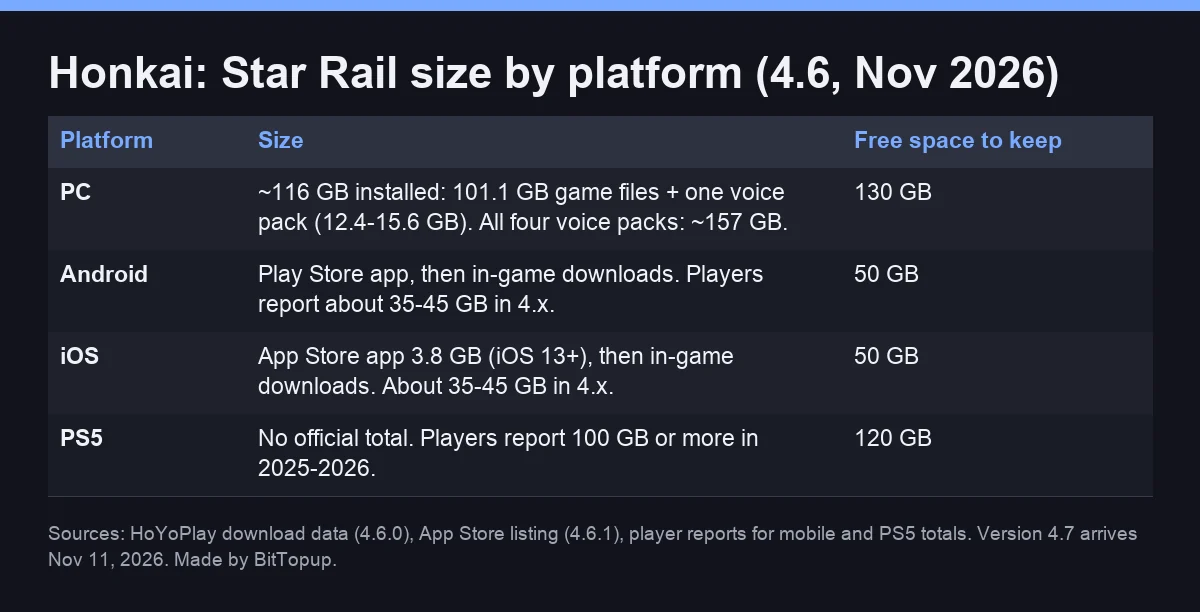
HSR size by platform (Version 4.6)
Platform | Size | Free space to keep |
|---|
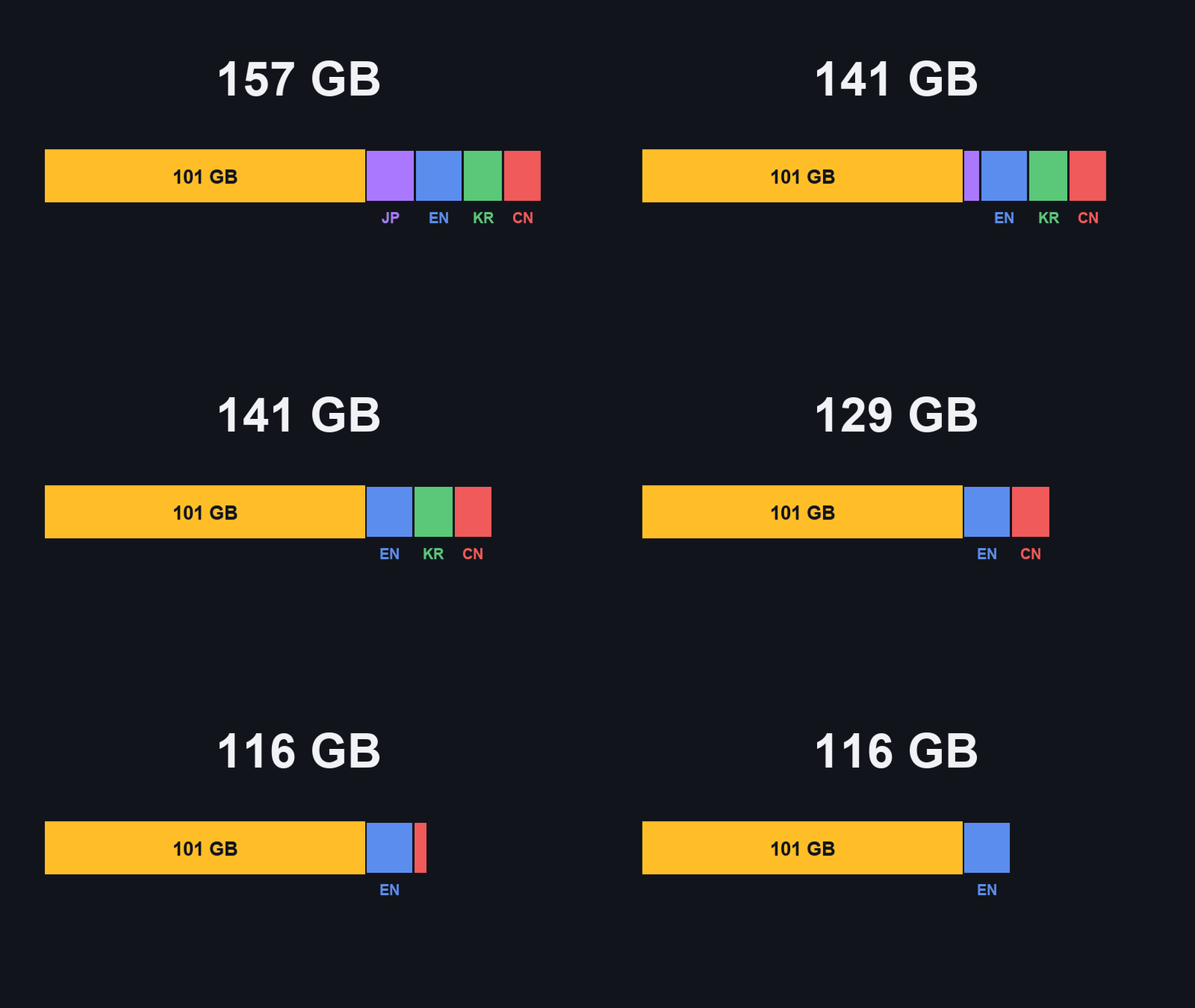
PC (HoYoPlay / Epic) | ~116 GB: 101.1 GB game files + one voice pack. All four voice packs: ~157 GB. | About 130 GB |
Android | Google Play app, then in-game downloads. About 35–45 GB in total (player reports, 4.x). | About 50 GB |
iOS / iPadOS | App Store app 3.8 GB (Version 4.6.1, iOS 13.0 or later), then in-game downloads. About 35–45 GB in total. | About 50 GB |
PS5 | No official total. Players report 100 GB or more in 2025–2026. | About 120 GB |
Download size vs installed size
The store number is not the game size. The iOS App Store lists 3.8 GB and the Android app is similar, but after you log in the game downloads the rest of its resources. On PC, a fresh HoYoPlay install downloads about 99 GB of compressed game files, which unpack to 101.1 GB, before the voice pack.
Honkai: Star Rail Size by Platform
Mobile size (Android and iOS)
Total on phone: HoYoverse no longer publishes a mobile total. Guides and player reports for 4.x range from about 35 to 45 GB, depending on voice language and how many past-mission resources you keep.
iOS: App Store size 3.8 GB, requires iOS 13.0 or later. HoYoverse’s supported minimum is iPhone 8 Plus; iPhone 11 or newer is recommended.
Android: recommended Snapdragon 870 / Dimensity 1300 / Kirin 9000 with 6 GB RAM, minimum Snapdragon 835 with 4 GB RAM, Android 9 or later. PowerVR GPUs (except Imagination D-Series) are not supported.
PC size (HoYoPlay and Epic)
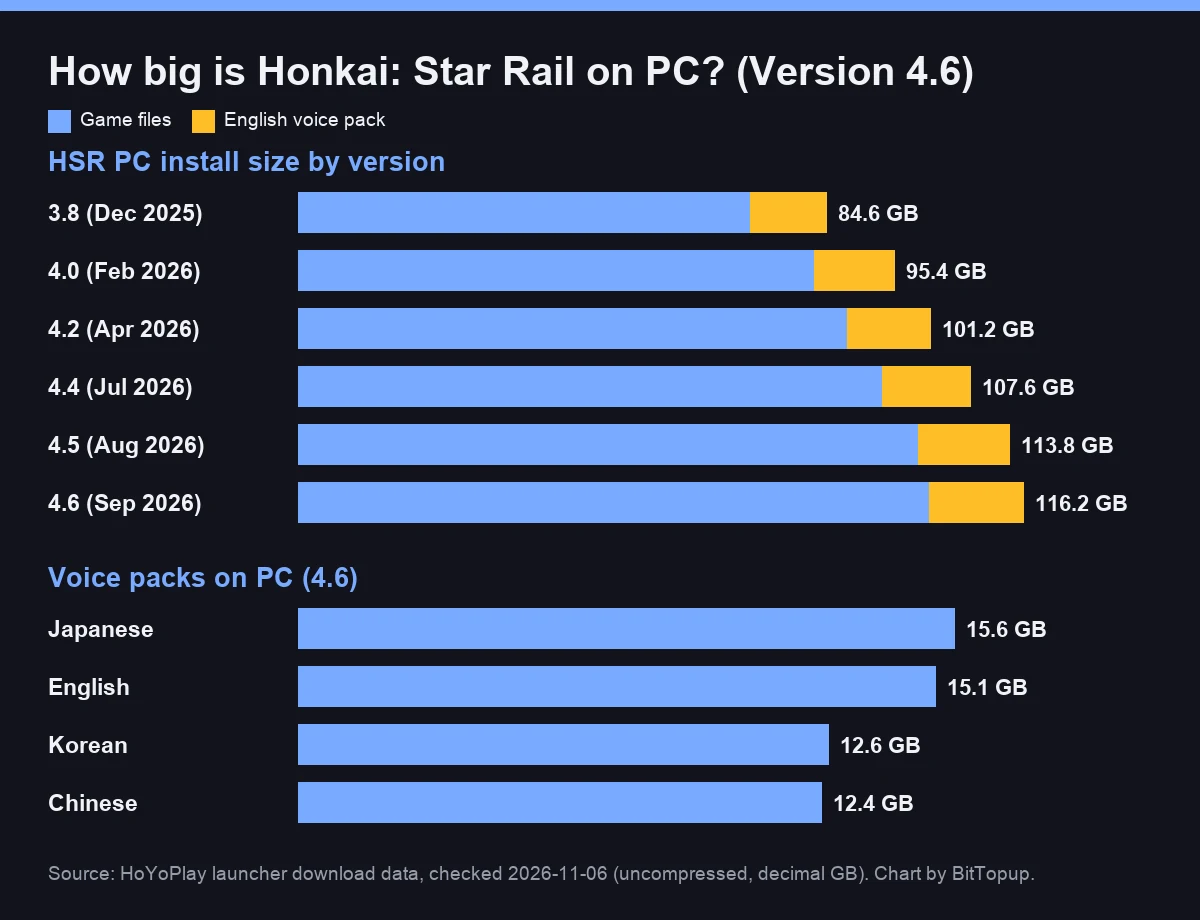
HoYoPlay’s download data for client 4.6.0 lists 101.06 GB of game files. Voice packs come on top:
Voice pack (PC, 4.6) | Size |
|---|
Japanese | 15.55 GB |
English | 15.11 GB |
Korean | 12.56 GB |
Chinese | 12.41 GB |
So a normal install is 113.5–116.6 GB. Windows Explorer will show about 108 “GB” for the English setup, because it counts in GiB. Official PC specs (from Version 4.0): minimum Intel Core i5, 8 GB RAM, GTX 1050; recommended Core i7, 16 GB RAM, GTX 1060 6 GB; Windows 10 64-bit.
SSD or HDD?
Use an SSD if you can. HSR loads a lot of data when you teleport or start a story scene, and a hard drive makes those loads slower. The bigger issue on PC is free space: keep the next update’s size spare on the same drive.
Update Sizes: What Each Version Adds
Recent update sizes
The 4.5 → 4.6 update on PC was 3.22 GB of game files plus 0.60 GB for the English voice pack (3.8 GB in total). The 4.6 pre-download on phones was about 2.2 GB. A new version arrives about every six weeks, and pre-download usually opens a few days before. On mobile you can’t play while it downloads.
How fast the game grows
PC game files grew from 72.4 GB in Version 3.8 (December 2025) to 101.1 GB in 4.6 (September 2026), about 29 GB in ten months. That is roughly 4 GB per version, and the jump to 4.0 alone added about 10 GB.
How to Make Honkai: Star Rail Smaller
Space-saving options in the game
Keep one voice pack. On PC each extra language costs 12.4–15.6 GB. HoYoverse also notes that the voice packs you install change how much space each update needs.
Delete Past Mission Resources. Open the in-game Phone → Settings → Account Settings. Available on mobile since 2.7 and on PC since 3.5. Mobile also has an auto-delete toggle.
Reinstalling a phone? Choose “Exclude Past Mission Resources” (since 3.5) so the game skips missions you already finished.
Text languages: since 4.3, updates only patch the text languages you have downloaded (Language Resource Management under Settings → Language).
HoYoverse doesn’t say how many GB the mission-resource options save. It depends on how far you are in the story.
Video (in English): how to use Delete Past Mission Resources to free up space on your phone.
Tips by platform
PC: install to the drive with the most space and keep about 130 GB free.
Phone: keep about 50 GB free so updates don’t stall. Don’t clear the app’s data to save space; it only deletes resources you will download again.
PS5: updates install automatically only when there is enough free space, so keep a margin after each version.
When Things Go Wrong
Install and update problems
“Insufficient storage”: free the update size plus 5–10 GB on the same drive, then retry.
Damaged or missing files (PC): use the repair option in HoYoPlay’s game settings before reinstalling.
Download stuck on a phone: keep the game in the foreground on stable Wi-Fi. Pre-download from the login screen before the update day.
Will I lose progress if I reinstall?
No. Your Trailblazer progress is stored on HoYoverse’s servers. Uninstalling only removes local files and settings.
Looking Ahead: Version 4.7 and Later
Version 4.7 launches on 2026/11/11 (one day earlier in the Americas). If it follows recent versions, expect another 2–6 GB on PC. Keeping 130 GB free on PC and 50 GB on phones leaves room for the next few updates.
Quick Answers to Common Questions
How many GB is Honkai: Star Rail?
About 116 GB on PC in Version 4.6 (101.1 GB game + one voice pack), and about 35–45 GB on phones once every resource has downloaded.
Why is Honkai: Star Rail 40 GB on my phone?
The store app is only 3.8 GB, but HSR downloads maps, story, cutscenes, and a voice language in-game. Every version adds more, so 35–45 GB is normal now. Deleting past mission resources and keeping one voice language bring it down.
How big is Honkai: Star Rail on PC?
101.06 GB of game files plus 12.4–15.6 GB per voice pack in 4.6. Keep about 130 GB free.
How big is Honkai: Star Rail on PS5?
Sony doesn’t list a current size. Players report 100 GB or more, so keep about 120 GB free.
Conclusion
Plan for about 116 GB on PC and 35–45 GB on phones, and keep one voice pack. If you are saving for the 4.7 banners, you can top up Oneiric Shards on BitTopup. Also playing ZZZ? Here is how big Zenless Zone Zero is.
Sources: HoYoPlay launcher download data (client 3.8.0–4.6.0 and the 4.6 patch); App Store listing (Version 4.6.1); HoYoverse system requirements post for Version 4.0 (HoYoLAB, 2026-01-04); official update notes for 2.7, 3.3, 3.5, 4.3 and 4.6 (hsr.hoyoverse.com); 4.7 announcement. Mobile and PS5 totals are player-reported ranges.