Short answer (checked 6 November 2026, live client OB55): a 3-finger claw HUD in Free Fire adds a second fire button in the top-left corner for your left index finger, keeps Gloo Wall next to the joystick for your left thumb, and leaves your right thumb on aim. To import a share code, open Settings → HUD → HUD Recommendation System, tap Use Share Code (bottom-left), paste the full code that starts with #FFHUDT, and tap Apply. Guides describe the same path for Free Fire and Free Fire MAX.
Free Fire 3-finger claw HUD codes (August 2026)
Updated on 2026-11-06: the live client is OB55 (Garena's OB55 patch notes are dated 10 September 2026). Garena has not announced a date for OB56 yet. If you are reading this after OB56 lands, re-test your code before ranked.
Garena does not publish or check community share codes, and a creator's name on a blog is not proof of who built a layout. Each code below is listed with where it currently appears, so you can judge it yourself. Paste one, and if the game says it is invalid, try the next row.
Layout | Share code | Good for | Check after import |
|---|
All-rounder | #FFHUDT7O3jjGFSltPo7eM
| BR and Clash Squad. Start here | A large fire button sits top-left, inside your left index finger's reach |
Mid / long-range control | #FFHUDT6O3jRoP1WVPo7eN
| AR fights and peeking | Scope and the index fire button do not overlap, so your finger never covers the crosshair |
Hybrid (PUBG-style spacing) | #FFHUDT6O3jlm5zV9Po7eN
| Players coming from other battle royales | Gloo Wall and grenade sit near the joystick, not inside the fire cluster |
Community most-liked 3-finger | #FFHUDT6O3jEmm9vhPo7eP
| A popular all-purpose claw from a player-voted list | Resize the top-left fire button to your hand before judging it |
Index fire, thumb camera | #FFHUDT6O3j8SCTkxPo7eM
| Players who want the right thumb only on aim and camera | Crouch is one short tap below the left fire button |
Where these are listed right now: rows 1–3 appear on BlankTextCopy's OB55 HUD page (updated 14 September 2026), and rows 1–2 also appear in FreeFireHub's 2026 layout guide. Rows 4–5 come from FreeFireMania's player-voted list, where row 4 was the most-liked 3-finger entry in October 2026, and Trucoman's October 2026 update.
Want a layout that really comes from a pro? Since OB52, Garena's own HUD Recommendation System (Settings → HUD) lets you browse and apply HUD presets shared by top players inside the game. Those are the only pro layouts Garena itself puts its name on, so look there before you trust any blog list, this one included.
Looking for the 4 Flag Gamer 3-finger code? We could not find a code posted on 4 Flag Gamer's own channel. Codes labelled "4 Flag" are fan reposts on YouTube and TikTok. The string most blogs call "4Flag HUD" (#FFHUDT6O3jjGFRltPo7eO) is listed by current guides as a 4-finger claw, not a 3-finger one (see Retired or mislabeled codes).
How to spot a broken or fake code:
Every code we found on current lists starts with #FFHUDT and is 22 characters long, including the #.
The four characters right after #FFHUDT are 6O3j or 7O3j, with a capital letter O, not the number zero. A page showing 603j has usually mistyped it.
A "code" that asks you to download an app or visit another page to unlock it is not a HUD share code.
How the 3-finger claw works
Your two thumbs keep moving and aiming. The third contact is your left index finger, hooked over the top-left edge of the phone onto a dedicated fire button. That split is the whole upgrade: you can shoot while your right thumb stays on the aim area, and your left thumb can drop a Gloo Wall without taking the crosshair off target.
On a 2-finger HUD your right thumb has to leave aim to fire, jump, or build. In close fights that short pause is often the difference between winning and losing the duel.
Setup | Fingers on screen | What you can do at once | Who it suits |
|---|
2-finger | Both thumbs | Move and aim. Firing, jumping or walling means lifting a thumb | New players, small phones |
3-finger | Both thumbs + left index | Move, aim and fire together; Gloo Wall without leaving aim | Most players moving up from thumbs |
4-finger | Both thumbs + both index fingers | Adds jump, crouch or scope on the right index | Players who already have 3-finger muscle memory, larger phones |
A simple starting split if you are coming from thumbs:
Left thumb: joystick, sprint, Gloo Wall, grenades
Left index: left fire button (top-left), crouch just below it, reload if you can reach it
Right thumb: aim drag, right fire button as a backup, scope, medkit, loot, character skill
The extra fire button belongs top-left, under your left index. If a "3-finger" code puts fire buttons in both top corners, it is a 4-finger claw.
Finger assignment and button zones
Place five controls before you touch anything else: joystick, index fire, scope, jump, crouch. Every other icon fits around that skeleton.
Finger | Main buttons | Size / opacity | Placement |
|---|
Left thumb | Joystick, sprint, Gloo Wall, grenade | Joystick small; Gloo Wall big enough to hit without looking | Bottom-left. Gloo Wall just above or inward of the joystick |
Left index | Left fire, crouch, optional reload or weapon swap | Fire large (around 80–90%) while you learn, then shrink it | Top-left corner. Crouch one finger-width below fire |
Right thumb | Aim area, right fire, scope, medkit, loot, skill | Right fire medium; rarely used icons at low opacity | Keep the lower right open for drag aim. Skill next to right fire |
Two settings to check before you blame the layout:
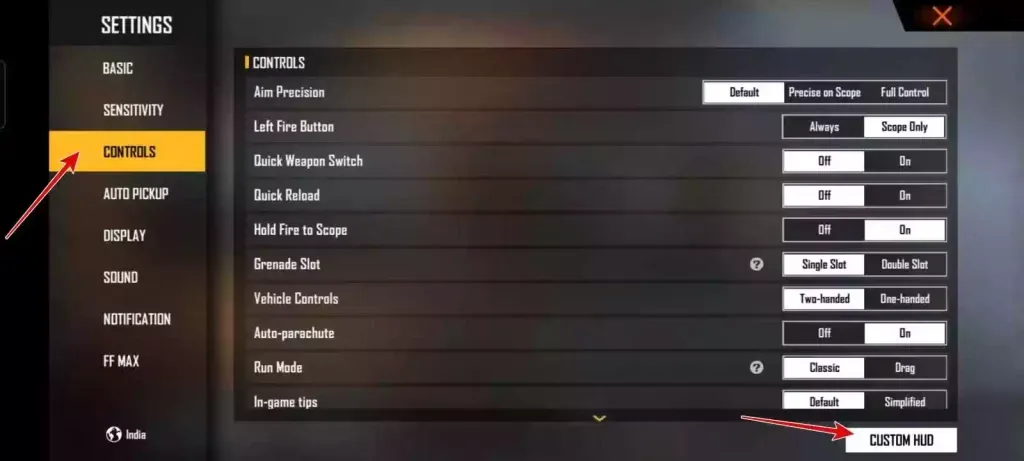
Settings → Controls → Left Fire Button: set it to Always. With the other option, the top-left fire button only shows while you are scoped, which breaks a 3-finger layout.
Movement wheel Fixed option (added in OB54): when it is on, the joystick stays in one place instead of following your left thumb. That helps if your Gloo Wall button sits right next to the joystick.
Keep Jump and Gloo Wall on different fingers, or at least far apart. If both sit under your left thumb, you will press the wrong one in a rush. A common split: Jump mid-left for the thumb, Gloo Wall a little higher or more inward, crouch with the index under fire.

On phones under about 6 inches, stay on 3-finger: a 4-finger claw on a small screen puts both index fingers over your view. After importing any code, move corner buttons slightly inward if your phone case or curved edges block them.
Why Gloo Wall speed matters in OB54
OB54 made Gloo Walls scarcer, and OB55 kept that and added more ways to destroy them. Placing a wall while you keep aiming is now worth more, and a 3-finger map does exactly that.
From the official OB54 patch notes (still in effect):
Gloo Walls gained from eliminations and loot boxes were unified to 1.
The Gloo Wall limit rises by 1 at each Gloo Maker level.
Skyler's skill options include one that locks onto Gloo Walls within 75 m for 15 seconds and one that damages walls over time.
Nero's plushie creates a space where nobody can place Gloo Walls.
M82B and SVD-Y shots now leave marks on Gloo Walls they shoot through.
New in OB55:
Clash Squad Flame Grenade: the flames melt Gloo Walls, dealing 100 damage every 0.5 seconds.
Kenta's reworked skill sends a tempest that passes through Gloo Walls.
During the Naruto collaboration, Chidori blocks the target from deploying Gloo Walls for 3 seconds, and Fireball Jutsu burns walls in range.
So you get fewer free walls and face more tools that delete them. Keep Gloo Wall on your left thumb, keep firing with your left index, and your right thumb never leaves aim.
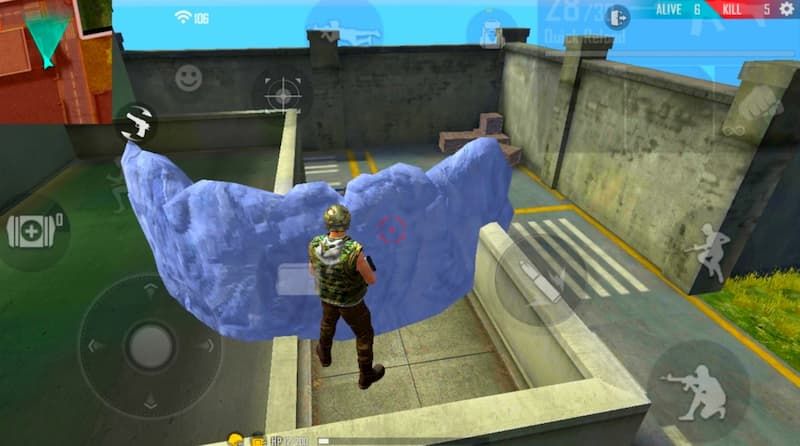
A quick self-test: in Training, walk sideways, place a Gloo Wall and keep the crosshair on a dummy. If your thumb has to cross half the screen or your aim drops, the button is still too far away. Move it closer to the joystick and repeat.
Use the speed to push stairs and airdrops, then re-wall right away. With one wall per elimination, the second wall is often your last one.
How to import a HUD code in OB54
The steps below are for OB55 and are the same as in OB54. Garena moved the share-code tool in OB52. Its notes say presets and share codes now carry both HUD and sensitivity, and you choose whether to sync the sensitivity when you apply one.
Open Free Fire (or Free Fire MAX) and tap the gear icon in the lobby to open Settings.
Open the HUD tab, then the HUD Recommendation System page.
Tap Use Share Code in the bottom-left corner.
Paste the full code, including #FFHUDT, with no spaces before or after it.
Tap Apply. When asked about the linked sensitivity, keep your own unless you want to replace it.
Check the layout, save it, then play a Training session before ranked.
Only see Controls → Custom HUD? Older videos and screenshots show that path. It still lets you move and resize buttons by hand, but the share-code box now sits on the HUD Recommendation page.
Android and iOS use the same code format. On a different screen ratio than the creator's phone, icons can shift slightly. That is normal: slide them into place instead of re-importing.
If the code will not apply:
Copy it again. A missing # or one missed character is the most common cause.
Check for a zero where a capital O belongs.
Try the next 3-finger row in the table. Do not switch to a 4-finger code just to "make it work".
Free Fire India and India-server codes: Garena launched Free Fire India as a separate app on 28 October 2026, and Free Fire MAX remains available alongside it. Garena says players can use the same account across both games, but it has not said whether HUD share codes move between them. The codes on this page use the same #FFHUDT format. If one will not apply in Free Fire India, ask a friend for a code exported from Free Fire India itself, or build the layout by hand from the button map above. "India server" in a video title usually just means the creator plays there. Garena does not label share codes by server.
Post-import verification checklist
Run this in Training, not in ranked.
Your left index reaches the top-left fire button without shifting the phone in your hand.
Crouch sits a short tap below that fire button, so you can crouch and fire in one motion.
Gloo Wall is a left-thumb tap from the joystick, and you can walk and wall without changing your grip.
Your right thumb has a clear drag area, and scope is near right fire without overlapping it.
Jump is not stacked on Gloo Wall.
Map, bag and settings are at low opacity.
No two combat buttons overlap.
Left Fire Button is set to Always.
Then spend 10 minutes on this drill: strafe and fire with your index, crouch-fire, then walk, wall and keep the crosshair on a dummy. If any step makes you stop and think, that button is still too far away.
Do not change your HUD right before a ranked session. Play a few Clash Squad or Lone Wolf matches on it first.
Starter sensitivity if you import HUD only
If you skip the linked sensitivity, these are reasonable starting points for a 3-finger layout. They are our suggestions, not official or pro values.
Slider | No gyro | Light gyro |
|---|
General | 95 | 98 |
Red Dot | 90 | 95 |
2x | 80 | 80 |
4x | 65–75 | 70 |
Sniper | 35–40 | 40 |
Free Look | 65 | 70 |
Gyroscope | Off | 25–30 |
After each Training session, move one slider by about 5 and test again. Your phone's refresh rate and touch response change the feel more than any copied number. For a full walkthrough, see our Free Fire sensitivity settings guide.
From 2-finger to 3-finger without throwing rank
Import the all-rounder code and make the index fire button large (around 90%).
For the first week, train only two things: crouch-fire, and Gloo Wall while walking.
Play Lone Wolf or custom rooms before Clash Squad Ranked.
Shrink the fire and crouch buttons once you stop looking for them.
Stay on the new HUD for whole sessions. Switching back halfway resets your progress.
Expect to play worse for the first few days before it clicks. Jumping straight from thumbs to 4-finger usually makes that dip longer, so get comfortable on 3-finger first.
Diamonds, characters, and the HUD
Share codes and HUD changes are free. Nothing on this page costs diamonds. What changes with your character is where the skill button needs to go:
Active skills you trigger mid-fight (for example Alok or Skyler): put the skill button next to right fire, so your right thumb reaches it without leaving the aim area.
Skills that counter walls (Skyler, the reworked Kenta): you will use them in the same moments you would place your own wall, so keep Gloo Wall and the skill on different thumbs.
Passive-only loadouts: shrink or fade the skill button so it never blocks your view.
Before spending on characters or the Booyah Pass, redeem any event codes you have at the official Free Fire Rewards site. Our 7 ways to stretch Diamonds guide covers spend order, and players on EU or Turkey servers can check the EU + TR top-up guide.
Retired or mislabeled codes
These strings still show up on older posts, including earlier versions of this page. Do not import them as a 3-finger starter.
Label you may see | Code | What current guides list it as |
|---|
"4Flag HUD" | #FFHUDT6O3jjGFRltPo7eO
| 4-finger claw (BlankTextCopy and FreeFireHub, 2026) |
"OB51 New HUD" | #FFHUDT6O3jlm5zV9Po7eP
| 2-finger, balanced |
"Personal HUD" | #FFHUDT6O3jlm5zV9Po7eO
| 2-finger |
"RaiStar HUD" | #FFHUDT6O3jjGFRltPo7eM
| Some blogs call it RaiStar's 3-finger layout, but we found no post from RaiStar confirming it. It differs from the 4-finger "4Flag" string by one character. Test it only after a code from the main table works |
"Aggressive 3-finger" | #FFHUDT6O3jjO8OhtPo7eO
| Removed from our main table: we could not find a current listing that confirms it is a 3-finger layout |
An older version of this page listed a player UID for "in-game sharing". We could not confirm that account still shares these presets, so it stays removed.
FAQ
What is the best 3-finger claw HUD code in Free Fire right now?
Start with #FFHUDT7O3jjGFSltPo7eM. If it does not apply, try #FFHUDT6O3jRoP1WVPo7eN or the community favourite #FFHUDT6O3jEmm9vhPo7eP. The best code is the one where fire, Gloo Wall and crouch land under your fingers after small tweaks, so also try the pro presets in Settings → HUD → HUD Recommendation System.
Does a HUD code change my sensitivity?
Only if you choose to sync it. Since OB52, share codes can carry both HUD and sensitivity, and the game asks when you apply one. Keep your own sensitivity, then tune it with our sensitivity guide.
Can I use the same code on Free Fire and Free Fire MAX?
Guides list the same #FFHUDT codes for both, and both get the same OB update. If Apply fails on one of them, ask for a code exported from that app, or build the layout by hand.
How do I place two Gloo Walls faster?
Put Gloo Wall right next to the joystick, practise double-tapping it without lifting your left thumb off movement, and keep firing with your left index. If Jump sits in the same thumb area, move Jump first. Turning on the Fixed movement wheel option can stop the joystick drifting away from the Gloo Wall button.
Should I copy a pro player HUD exactly?
Use it as a template. Hand size, phone case and screen ratio all change reach. Garena's HUD Recommendation System is the safest place to find real pro layouts. If a "pro 3-finger" code puts fire buttons in both top corners, you have imported a 4-finger claw.
Do these codes work on Free Fire India or India-server accounts?
Garena has not said whether HUD share codes carry over to Free Fire India, which launched on 28 October 2026. The codes use the same format, so try one. If it will not apply, use a code exported from Free Fire India, or set the buttons by hand using the finger map on this page.
Conclusion
For OB55, a 3-finger claw HUD lets you fire, aim and place a Gloo Wall in the same second. Import a current 3-finger code or a pro preset from the HUD Recommendation page, set Left Fire Button to Always, keep Gloo Wall on your left thumb and fire on your left index, and keep your own sensitivity until Training feels right. We will re-check these codes when OB56 goes live. If you need diamonds for the characters you pair with this HUD, you can top up with just your Player ID on BitTopup Free Fire Diamonds.