

Mistfall Hunter Top Up: Fast, Secure Account Recharge
Mistfall Hunter(雾影猎人) combines third-person dark fantasy action with extraction-style PvPvE mechanics. Surviving expeditions through the Gyldenmist requires sharp combat execution, team synergy, and strategic gear management. Upgrading your camp, purchasing seasonal battle passes, and obtaining cosmetic skins are essential parts of building your hunter identity.
BitTopup provides a direct top-up service for Mistfall Hunter players across global regions. Using only your User ID and server cluster, you can complete purchases safely without ever giving out your login credentials or platform passwords. Live pricing, bundle options, and checkout methods are displayed directly on the product selection menu.
How to Find Your Mistfall Hunter Player ID
To ensure your recharge reaches your character without delay, you must input your exact in-game account information during checkout. Follow these steps to locate your details:
- Launch the Mistfall Hunter game client on your platform.
- From the main camp screen or lobby, click on your Profile Avatar located in the top corner of the screen.
- Open the User Info / Account Settings tab.
- Locate your User ID (UID), which is displayed as a numeric string alongside your server cluster.
- Click the copy icon next to your UID or write the numbers down accurately.
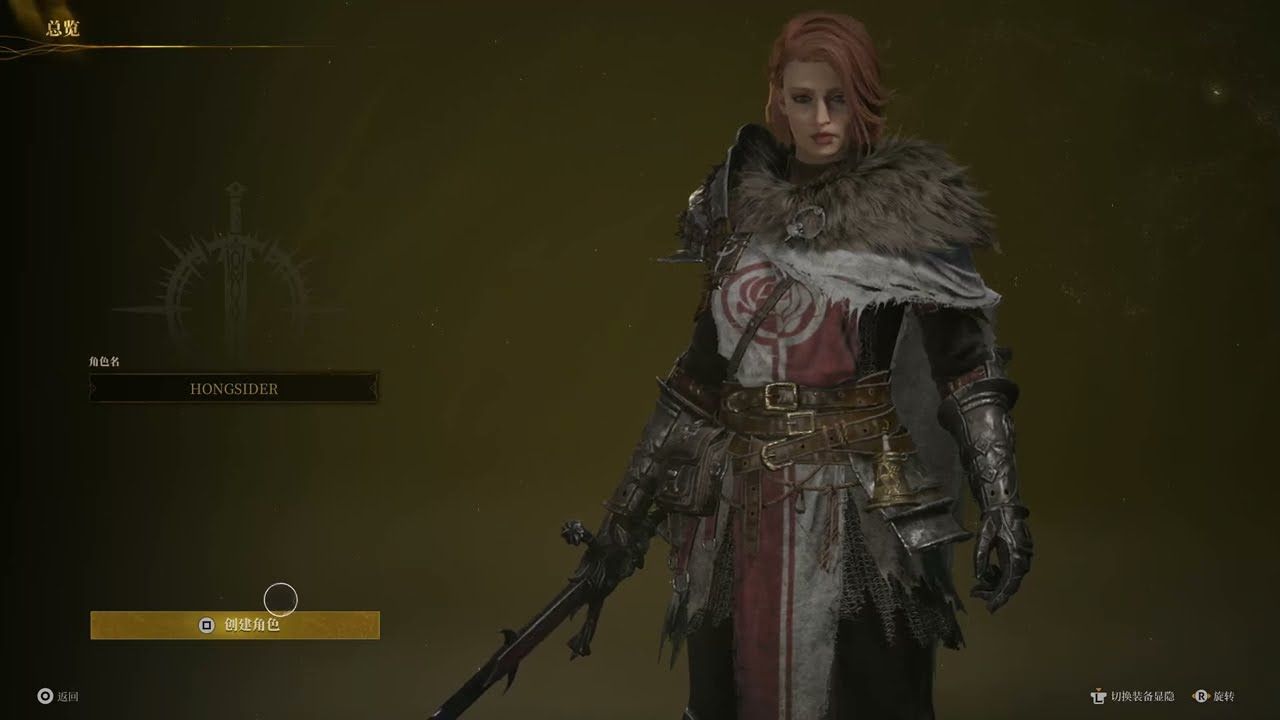
Double-check that both your UID and server match your active character before submitting an order on BitTopup.
How to Recharge Mistfall Hunter on BitTopup: Step-by-Step Guide
Recharging your Mistfall Hunter account through BitTopup takes only a few moments. Follow this straightforward process:
- Select Your Package: Browse the available Mistfall Hunter denominations, currency packs, or Season Pass upgrades on the BitTopup product page.
- Enter Account Information: Paste your unique User ID (UID) and choose your active server region from the drop-down menu.
- Proceed to Checkout: Click the buy button to move to the secure checkout page, where you can view live rates and available global payment options.
- Finalize Payment: Select your preferred payment channel and complete the transaction.
- Check Your In-Game Inventory: Once your order status updates to complete, open Mistfall Hunter to confirm that your balance or items have arrived.
Mistfall Hunter In-Game Items, Currency, and Season Pass Guide (2026)
Mistfall Hunter features a dedicated in-game store focused on customization, seasonal progression, and convenience. In 2026, seasonal updates continue to expand cosmetic collections and gameplay utilities.
Season Pass
The Season Pass allows players to earn progressive rewards as they complete daily bounties, defeat roaming bosses, and extract Gyldenmist. Unlocking the premium track grants access to exclusive hunter outfits, weapon appearances, custom emote wheels, and bonus camp materials that speed up base crafting.
Character & Weapon Cosmetics
Cosmetic items alter the visual design of your chosen class, including Shadowstrikers, Mercenaries, and Sorcerers. Purchasing premium currency allows you to buy unique armor sets, glowing weapon coatings, and back attachments without altering combat stats, preserving balanced PvP competition.
Camp Expansion and Convenience Packs
Expedition survival depends on your readiness before deploying. Premium packs can provide inventory expansion vouchers, storage upgrades, and convenience passes to help manage your spoils between extraction runs.
Server Region Compatibility: NA Server vs International Server Purchases
Mistfall Hunter operates dedicated regional clusters to maintain low-latency matchmaking during intense combat encounters. Because account data does not transfer automatically across server partitions, your top-up must match your active profile.
| Server Region | Target Player Base | Account Synchronization | Top-Up Requirement |
|---|---|---|---|
| North America (NA) | US, Canada, Mexico | Partitioned to NA Cluster | Select NA server + Enter NA UID |
| International / Global | Europe, Asia-Pacific, South America | Partitioned to Global Cluster | Select Global/Target Server + Enter UID |
Selecting an incorrect server region can result in delivery delays. Always verify the server name printed next to your UID in the main menu before confirming your purchase.
Mistfall Hunter Camp Economy: Facilities, Gyldenmist, and Progression
Your personal camp serves as your staging ground between dangerous excursions into the mist. Success in Mistfall Hunter relies heavily on upgrading camp infrastructure:
- The Forge: Allows crafting and repairing weapons and armor using salvaged materials.
- Storage Chests: Expanding vault capacity ensures you do not lose high-tier weapons when stash limits are reached.
- Alchemical Lab: Refines raw Gyldenmist collected from fallen creatures into useful potions, buffs, and utility charms.
- The Merchant Outpost: Facilitates trading surplus gear for essential supplies prior to queuing for raids.
Recharging your account for battle pass tiers and resource bundles speeds up camp utility upgrades, allowing you to re-enter high-stakes extraction zones fully prepared.
Payment Security: Safe Checkout Without Account Passwords
Account safety is a core concern for online gamers. BitTopup utilizes a direct-to-ID delivery system designed to eliminate account security risks:
- Zero Password Requirements: You never need to supply your Steam, Epic Games, or platform password. Only your public UID is used to route items.
- Encrypted Transactions: Every checkout is protected by industry-standard encryption protocols to safeguard transaction details.
- No Account Sharing: Your credentials remain entirely in your control, preventing unauthorized logins, unexpected IP lockouts, or breach risks.
Troubleshooting Mistfall Hunter Recharge and Delivery Inquiries
If you experience an issue with your order, check these common troubleshooting scenarios:
- UID Typo: If the UID was entered incorrectly, the system may fail to locate your character. Keep your order confirmation number ready when speaking to support.
- Wrong Server Selected: If you play on NA but selected International, delivery cannot complete until the server route is adjusted.
- Maintenance Desync: If the Mistfall Hunter servers are down for maintenance or a patch rollout, purchases will deliver automatically once the game servers reopen.
- Client Cache: Sometimes the in-game display requires a fresh session to update. Completely restart your game client to refresh your balance.
If your items have not arrived after restarting the game, reach out to BitTopup customer support with your order number for fast verification.
Frequently Asked Questions
What information do I need to provide to recharge Mistfall Hunter?
You only need to provide your in-game User ID (UID) and the server region where your character is located (such as NA or International). No sensitive personal data is required.
Do I need to share my Steam or platform password to recharge Mistfall Hunter?
No. BitTopup processes recharges directly via your public User ID. You should never share your account passwords or login verification codes.
Does server selection (NA vs International) affect my Mistfall Hunter recharge?
Yes. In-game characters are locked to specific regional servers. If you select the wrong region during checkout, your items cannot be routed correctly. Always confirm your server in your profile menu before purchasing.
What items can I unlock using Mistfall Hunter in-game top-ups?
You can unlock premium Season Pass tracks, character outfits, specialized weapon skins, cosmetic effect bundles, and camp utility upgrades.
How quickly will my Mistfall Hunter recharge reflect in my game account?
Orders are processed through automated routing systems right after payment verification. Under normal conditions, your balance updates shortly after completing checkout. You may need to restart the game client to refresh your display.
What should I do if my Mistfall Hunter order delivery is delayed?
First, restart your game client to verify your updated balance. If your order status on BitTopup shows completed but items have not appeared in your inventory, contact BitTopup customer support with your order ID for immediate assistance.