



Meyo Top Up: Quick and Secure Gold Recharge
Meyo is a global social platform designed for interactive voice party rooms, real-time messaging, video interactions, and social mini-games. To participate fully in voice rooms, join interactive activities, and send gifts to creators and friends, users need Meyo Gold.
BitTopup provides a direct, secure, and fast method for your Meyo top up. By using your Meyo Player ID, you can reload your Gold balance without sharing passwords or sensitive account credentials. With automated order processing, transparent checkout, and 24/7 customer support, BitTopup ensures your account balance updates quickly so you never miss a moment during live voice events.
How to Recharge Meyo Gold on BitTopup Using Player ID
Recharging your Meyo account on BitTopup is straightforward. Follow these steps to complete your purchase:
- Select Your Denomination: Choose the Meyo Gold package that fits your needs from the available product list on BitTopup.
- Enter Your Meyo Player ID: Input your unique numerical Player ID into the required field. Make sure to double-check the digits to prevent sending Gold to the wrong account.
- Proceed to Checkout: Click the purchase button and select your preferred payment method from the available local or international payment channels.
- Complete the Payment: Follow the secure payment gateway prompts to authorize your transaction.
- Receive Your Gold: Once the transaction is confirmed, the Gold is credited directly to your Meyo account balance. Open your Meyo app to check your updated wallet.
Step-by-Step Guide: How to Find Your Meyo Player ID
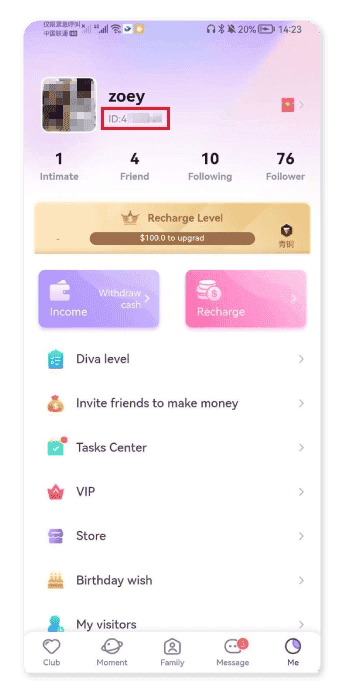
Your Meyo Player ID is the unique numerical identifier linked to your profile. You only need this ID to complete a top-up on BitTopup.
To locate your Player ID in the app:
- Open the Meyo app on your smartphone or tablet.
- Tap the Me (Profile) icon located in the bottom-right corner of the main navigation bar.
- Look directly beneath your profile picture and username at the top of the screen.
- You will see ID: followed by a sequence of numbers.
- Tap the copy icon next to your ID number to copy it directly to your clipboard, ensuring zero typing mistakes when ordering on BitTopup.
| Profile Field | Location | Usage |
|---|---|---|
| Player ID | Under avatar on "Me" tab | Required for BitTopup Gold recharge |
| Username / Nickname | Top center of "Me" tab | Display only (do not use for top-up) |
| Account Region | App Settings | Global server compatibility |
What Is Meyo Gold and How to Use It for Gifting and Parties
Meyo Gold is the primary in-app premium currency on the Meyo platform. It enables dynamic social interactions across all chat rooms and live voice spaces.
Virtual Gifting
Express appreciation to your favorite room hosts, broadcast streamers, and party members by sending animated virtual gifts. Gifts range from simple tokens to luxury full-screen animated effects. Sending gifts increases your room interaction level, highlights your profile, and helps your favorite hosts climb the community leaderboards.
Voice Party Rooms and Interactive Games
Use Gold to participate in community activities, open special mystery gift boxes, activate exclusive voice room themes, and access interactive games hosted inside party channels. Gold lets you create engaging moments with other users in real time.
Exclusive Profile Embellishments
Gold allows users to acquire custom entry effects, distinctive avatar frames, specialized chat bubbles, and VIP badges. These visual upgrades make your profile stand out when entering public voice rooms or messaging in crowded channels.
Password-Free and Secure Meyo Gold Top-Up Process
Account safety is a top priority when purchasing digital currencies online. BitTopup uses a direct ID-based delivery system that requires zero personal login details.
- No Password Required: You never need to provide your Meyo password, verification SMS codes, or linked social media logins (Facebook, Google, or Apple ID).
- Zero Risk of Account Takeover: Because no login access is granted, your personal messages, contacts, and account settings remain completely protected.
- Encrypted Transactions: BitTopup uses bank-grade SSL encryption across all checkout pages to safeguard your personal data and payment details.
- Global Account Compatibility: The Player ID top-up system works across all regions without server locks or regional restrictions.
Delivery Timeframe and Troubleshooting Meyo Recharge Issues
Orders on BitTopup are processed through an automated delivery system. In most cases, Meyo Gold arrives within a few minutes after payment confirmation.
If you experience a delay in seeing your balance update, follow these troubleshooting steps:
1. Refresh Your Meyo App
If the Gold balance does not update immediately, completely close the Meyo app from your recent apps switcher and reopen it. Go to the Me tab and check the Wallet section to verify the balance.
2. Verify Your Internet Connection
A weak Wi-Fi or cellular data connection can prevent the app from updating your wallet balance in real time. Switch between mobile data and Wi-Fi, then refresh your profile page.
3. Check Order Status on BitTopup
Log in to your BitTopup account and check your order history. If the order status shows Completed, the Gold has been dispatched to the Player ID submitted. If the status is Pending, payment verification is still processing.
4. Contact BitTopup Customer Support
If your Gold has not arrived after 15 minutes and your payment went through, contact the BitTopup 24/7 customer support team. Provide your BitTopup Order ID, Meyo Player ID, and proof of payment for immediate investigation.
Supported Payment Options for Fast Meyo Checkout
BitTopup supports a wide variety of trusted payment methods so users around the world can recharge without friction. Available options include major credit and debit cards, secure e-wallets, online banking transfers, and regional payment gateways.
Live pricing, package sizes, and payment availability are updated in real time on the BitTopup checkout screen. Select your Gold amount, enter your Player ID, and complete your purchase securely in just a few clicks.
Frequently Asked Questions About Meyo Top Up
What is Meyo Gold used for in the app?
Meyo Gold is the premium currency in Meyo. You can use it to send virtual gifts to room hosts, unlock exclusive entrance effects, buy avatar frames, enter voice party events, and play interactive social mini-games inside group chat rooms.
How do I find my Meyo Player ID for recharge?
Open the Meyo app and tap the Me icon in the bottom-right corner. Your Player ID is the number shown directly beneath your profile picture and nickname. Tap the copy icon next to it to copy the ID accurately.
Do I need to share my Meyo password to buy Gold?
No. BitTopup only requires your numerical Meyo Player ID to deliver Gold directly to your account. You should never share your account password or verification codes with anyone.
How quickly will Meyo Gold arrive in my account after payment?
Meyo Gold is delivered automatically once your payment is confirmed. Most orders arrive within minutes. If there is network congestion, restarting the Meyo app usually updates the wallet display.
What should I do if my Meyo Gold recharge has not arrived?
First, force-close and restart your Meyo app to refresh your wallet balance. Next, verify that the Player ID entered matches your account. If the balance remains unchanged after a few minutes, reach out to BitTopup 24/7 customer support with your order number.
Can I recharge Meyo Gold for a friend using their Player ID?
Yes. You can top up Gold for friends, family, or room hosts by entering their Meyo Player ID during checkout on BitTopup. Make sure to confirm their correct Player ID before placing the order.