



Hapi Arabic Top Up: What Are Coins and What Are They Used For?
Hapi Arabic is a leading social voice chat and entertainment platform across the Middle East and North Africa. Users gather in themed voice rooms, participate in live talent broadcasts, celebrate community events, and connect through interactive group conversations.
Coins serve as the primary in-app currency within Hapi Arabic. They allow you to access premium social features, reward room hosts, and customize your profile presence. When you hold a balance of Hapi Arabic coins, you gain access to several key functionalities:
- Luxury Animated Gifts: Send virtual gifts ranging from roses and coffee cups to high-tier sports cars, yachts, and animated rocket launches in voice rooms. Sending gifts displays special animations on screen, boosts room popularity, and shows appreciation to room owners.
- VIP Badges and Avatar Frames: Stand out in active voice rooms with customized avatar frames, glowing nameplates, and special chat bubble designs purchased from the in-app mall.
- Entrance Effects: Announce your presence with custom vehicle arrival animations and sound alerts whenever you enter a voice room.
- Voice Room Upgrades: Room hosts can use coins to unlock higher mic slots, pin announcements, and activate interactive room tools.
- In-App Mini-Games and Lucky Draws: Participate in community mini-games and social events hosted inside chat rooms.
| Feature | Primary Coin Usage | In-App Benefit |
|---|---|---|
| Gifting | Animated luxury gifts | Increases host ranking and room heat |
| Profile Customization | Frames, bubbles, entrance cars | High visibility across all chat rooms |
| Room Hosting | Room themes, mic slots, pinned posts | Increases room discovery and guest capacity |
| Events | Seasonal leaderboard challenges | Exclusive profile badges and trophies |
How to Find Your Hapi Arabic Player ID
To complete a recharge on BitTopup, you only need to provide your numerical Player ID. Your account remains completely secure because no login credentials or passwords are required.
Follow these quick steps to locate your ID:
- Open the Hapi Arabic application on your mobile device.
- Tap the Profile / Me icon located in the bottom-right corner of the home screen.
- Your Player ID is displayed directly beneath your profile avatar and nickname.
- Tap the Copy icon next to the number to copy your Player ID to your clipboard.
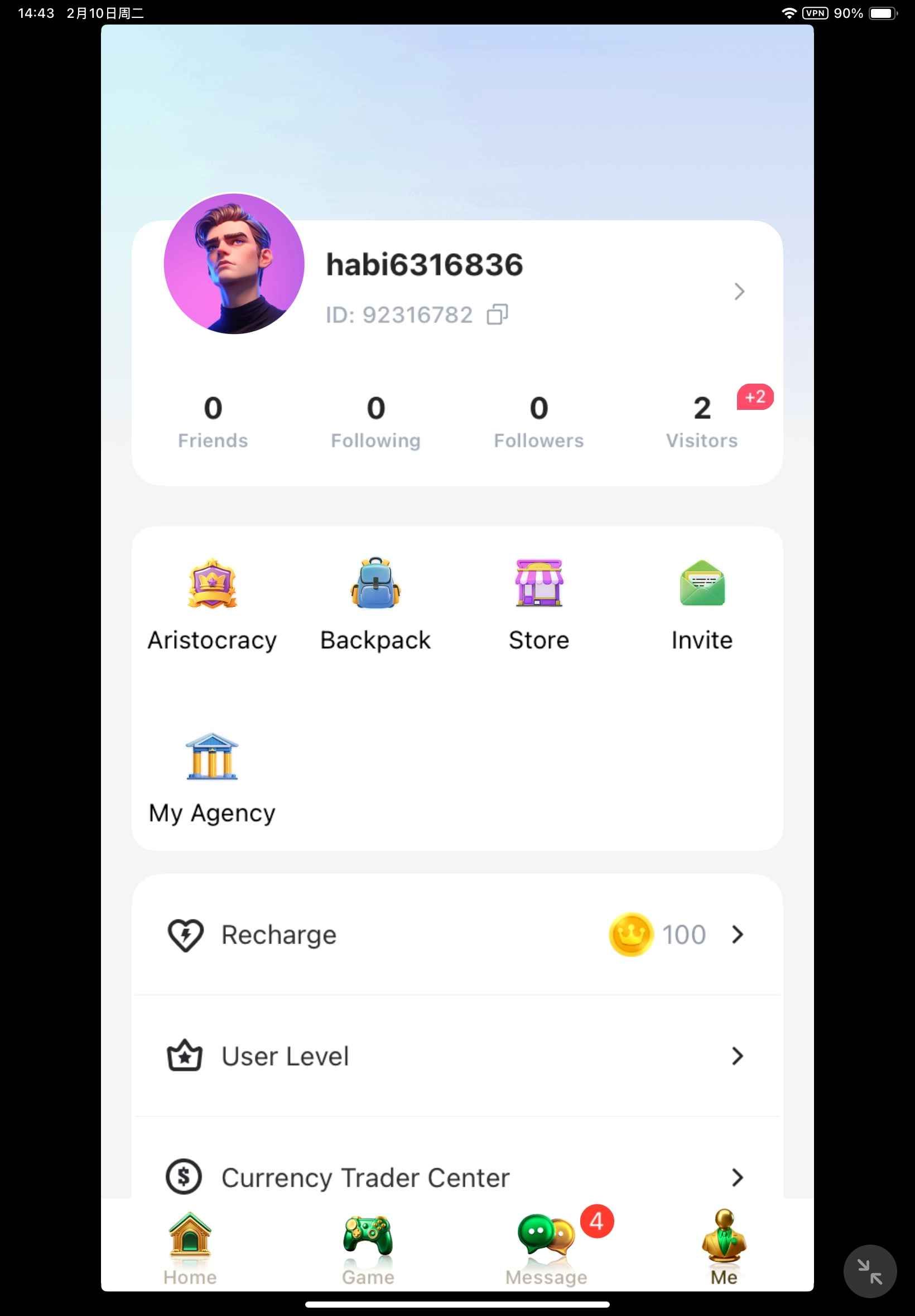
Double-check that you have copied the full numeric ID before proceeding to checkout to ensure your coins arrive directly to your account.
How to Recharge Hapi Arabic Coins on BitTopup
Recharging your Hapi Arabic coins on BitTopup is quick and straightforward. Follow this step-by-step process:
- Select Your Coin Package: Browse the available Hapi Arabic coin denominations on this page and select the package that fits your needs.
- Enter Your Player ID: Paste your numeric Hapi Arabic Player ID into the designated input field.
- Proceed to Checkout: Review your selected package and confirm that the Player ID is accurate.
- Choose Your Payment Option: Pick your preferred payment method from the live options presented on the secure checkout screen.
- Complete the Transaction: Finalize your order. Once payment confirmation is received, your Hapi Arabic coins will be processed and credited directly to your in-game balance.
Why Recharge Hapi Arabic Coins with Player ID Only (No Password Required)
Account safety is a major priority when purchasing digital entertainment currencies. BitTopup utilizes direct ID-based processing, which offers several distinct safety benefits:
- Zero Password Sharing: You never have to share your Hapi Arabic account password, phone verification code, or social login credentials. Your login details remain entirely private.
- No Account Linking Required: You do not need to link third-party social media profiles to complete a purchase.
- Safe for Gifting: Because only the Player ID is required, you can easily send coin recharges directly to friends, family members, or favorite room hosts without needing access to their devices or accounts.
- Direct System Delivery: Orders are fulfilled directly to the specified account ID through secure server communication, reducing manual handling and wait times.
Supported Payment Methods for Hapi Arabic Recharges in 2026
BitTopup supports a wide variety of domestic and international payment solutions tailored for users across the GCC, broader MENA region, and worldwide.
Depending on your location, available payment options at checkout include:
- Credit and Debit Cards: Visa, Mastercard, and regional debit card networks.
- Local E-Wallets and Digital Payments: Popular domestic digital wallets and instant payment solutions across Saudi Arabia, the United Arab Emirates, Kuwait, Egypt, and other countries.
- Online Banking and Direct Transfers: Secure online banking solutions supported by regional payment processors.
All exchange rates, total prices, and local payment methods are clearly displayed in real time on the live checkout screen before you finalize your order. There are no hidden processing fees at checkout.
Troubleshooting Common Hapi Arabic Top Up Issues
While the vast majority of orders arrive swiftly, occasional delays or user errors can occur. Here is how to resolve common situations:
1. Coins Have Not Appeared in Your Account
- Restart the App: Fully close the Hapi Arabic app and reopen it to refresh your server data and wallet balance.
- Check Your Connection: Ensure your mobile device has an active Wi-Fi or cellular data connection.
- Allow Brief Processing Time: During peak hours or seasonal platform events, server updates may take a few minutes to reflect.
2. Incorrect Player ID Entered
- If you realize you entered an incorrect Player ID, contact BitTopup Customer Support immediately via live chat.
- Provide your BitTopup Order Number and the correct Player ID.
- Note: If an order has already been successfully delivered to the incorrect ID on the server, completed digital transactions cannot be reversed. Always verify your ID before confirming payment.
3. Payment Failed or Declined
- Ensure your payment card or wallet has sufficient funds.
- Check whether international or online transactions are enabled on your card through your banking app.
- Try an alternative local payment method available on the checkout page.
Frequently Asked Questions
How do I find my Hapi Arabic Player ID?
Open the Hapi Arabic app, navigate to the Profile (Me) tab in the bottom right corner, and locate the numeric ID displayed under your avatar. Tap the copy icon next to the number to copy your Player ID.
Do I need to provide my Hapi Arabic password to recharge?
No. Recharges on BitTopup require only your Hapi Arabic Player ID. You should never share your account password or SMS verification codes with anyone.
What can I purchase with Hapi Arabic coins?
With Hapi Arabic coins, you can send animated luxury gifts in voice chat rooms, purchase exclusive avatar frames and entrance effects from the store, activate VIP badges, and unlock room hosting tools.
How long does it take for Hapi Arabic coins to arrive after checkout?
Orders are processed automatically once your payment is confirmed. In most cases, your coins reflect in your Hapi Arabic account balance shortly after checkout.
Can I recharge Hapi Arabic coins for a friend?
Yes. Simply enter your friend's Hapi Arabic Player ID instead of your own during the checkout process. The coins will be delivered directly to their account balance.
What should I do if I entered the incorrect Player ID during recharge?
Contact the BitTopup 24/7 customer support team immediately with your order details. If the order has not yet been processed by the delivery system, support will assist in updating your ID.