



Hago Top Up: Fast and Secure Diamond Recharge
Hago combines interactive mobile gaming, audio party rooms, and live streaming into a single social ecosystem. Whether you play casual mini-games with friends, participate in lively voice channels, or support talented creators in live broadcasts, Diamonds serve as the primary premium in-app currency.
BitTopup provides a direct, secure Hago top up service designed to credit Diamonds straight to your account balance. By using your numerical Hago Player ID, you can complete transactions without sharing your login credentials or linking personal social media profiles. Choose your desired Diamond package, complete the checkout process, and receive your balance directly in-app.
What Are Hago Diamonds and How to Use Them
Diamonds allow you to access premium social features, customize your personal profile, and interact dynamically during live streams. Understanding how Diamonds function helps you get maximum value from your recharge.
In-App Gifts for Live Streamers and Audio Hosts
Sending virtual gifts is the core method for supporting creators on Hago. You can spend Diamonds on a wide variety of animated gifts, ranging from simple flowers and stars to high-tier entrance effects, sports cars, and virtual castles. Gifting boosts the host's room ranking and highlights your profile in the room's contributor leaderboard.
Exclusive Room Effects and Avatar Customization
Diamonds allow you to purchase premium room entrance effects, specialized microphone badges, personalized chat bubbles, and unique avatar frames. These visual upgrades distinguish your profile across public voice rooms and community channels.
Interactive Social Games and Party Rooms
Hago hosts an extensive collection of casual games, including Sheep Fight, Knife Hit, Ludo, and Brain Quiz. Diamonds allow you to enter special prize events, purchase interactive game items, send celebratory animations to other participants, and unlock unique party perks.
| Hago Feature | Diamond Utility | In-App Advantage |
|---|---|---|
| Live Streaming | Send virtual gifts to hosts | Increases stream interaction and climbs contributor leaderboards |
| Audio Chat Rooms | Send room-wide effects and gifts | Highlights your microphone seat and customizes chat appearance |
| Profile Customization | Buy avatar frames and chat bubbles | Personalizes your profile across all channels and mini-games |
| Mini-Games | Access special items and party perks | Enhances social gameplay during friendly competitions |
How to Recharge Hago Diamonds on BitTopup
Recharging your account takes only a few simple steps. Follow this guide to buy Hago Diamonds online:
- Select Your Diamond Pack: Browse the available denominations on the BitTopup product page and pick the package that fits your needs.
- Enter Your Hago Player ID: Input your numerical Player ID into the required field. Ensure that every digit matches your in-app profile.
- Select a Payment Method: Choose your preferred payment option from the secure checkout menu.
- Complete Checkout: Follow the on-screen instructions to finalize your payment securely.
- Check Your Balance: Launch Hago, open your profile wallet, and confirm that the Diamonds have been credited.
How to Find Your Hago Player ID
To ensure your Hago recharge is credited to the correct account, you must provide your exact Hago Player ID. You can find this number directly inside the Hago mobile application.
- Open the Hago app on your Android or iOS device.
- Tap the Me / Profile tab located in the bottom-right corner of the screen.
- Look at the top section below your profile avatar and username.
- Find the numerical sequence labeled ID.
- Tap the Copy icon next to the numbers to copy the ID directly to your clipboard.
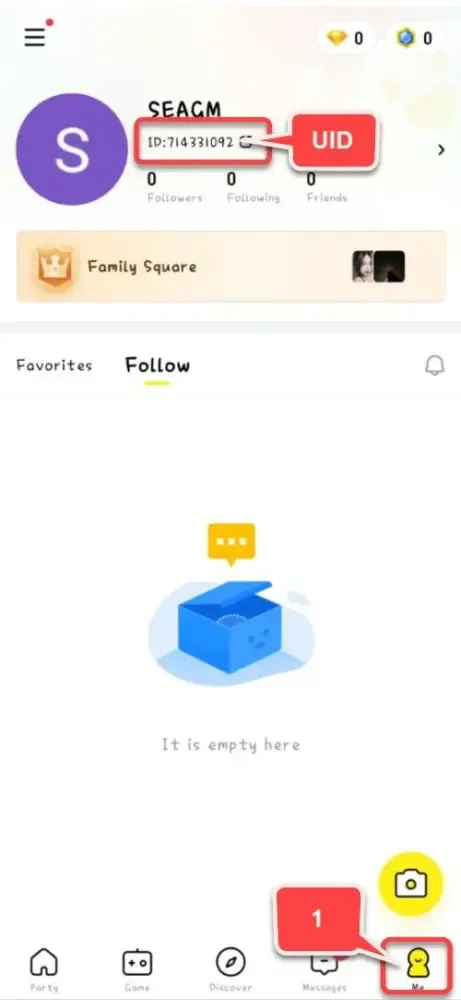
Paste this copied numerical ID directly into the BitTopup order form to prevent typing mistakes.
How to Send Hago Diamonds to Friends
Because BitTopup relies strictly on the Hago Player ID to route Diamonds, you can recharge accounts for your friends, family members, or favorite live hosts directly.
Steps to Surprise a Friend with Diamonds:
- Ask your friend for their numerical Hago Player ID (or copy it from their in-app public profile card).
- Select the Diamond package you wish to gift on the BitTopup product catalog.
- Enter your friend's Hago Player ID into the Player ID input box instead of your own.
- Complete the checkout process through your chosen payment channel.
- Once the transaction completes, the Diamonds will deposit directly into your friend's in-app wallet balance.
This method requires zero account access sharing, making it a safe and convenient way to send gifts for birthdays, stream milestones, or community competitions.
Safe UID Checkout and Payment Methods in 2026
Account safety is a top priority when purchasing digital currencies online. BitTopup utilizes direct UID delivery to keep your account fully protected at all times.
- Zero Password Sharing: You never have to share your Hago password, linked Google account, Apple ID, or phone verification codes. Recharges require only the public Player ID.
- Encrypted Payment Channels: All payment transactions are protected by industry-standard encryption protocols, ensuring that your financial data remains secure.
- Transparent Pricing: Current pack prices and denominations are clearly displayed on the checkout interface before you confirm your order.
- Direct Account Crediting: Orders are processed directly to the Hago account linked to the provided UID, reducing unnecessary delays.
Troubleshooting Common Hago Recharge Issues
If you experience any delays or issues with your Hago Diamond top up, check the following solutions:
Diamonds Have Not Appeared in Your Account
- Restart the Hago App: Close Hago completely from your recent apps switcher and reopen it. This forces the application to refresh its server data and sync your updated wallet balance.
- Check Your Internet Connection: Ensure your device has an active Wi-Fi or mobile data connection to display real-time wallet balances.
- Verify Order Status on BitTopup: Check your order confirmation page to make sure the payment went through successfully.
Incorrect Player ID Entered
If you accidentally submitted the wrong Player ID during checkout:* If the transaction has already been completed on the server, Diamonds sent to an existing, valid third-party ID cannot be recalled.* Always verify that the copied numerical ID matches your profile before completing payment.* If your transaction is still pending, contact BitTopup customer support immediately with your order details.
Contacting Customer Support
BitTopup provides 24/7 customer service. If you encounter any unexpected issues, keep your BitTopup Order ID and transaction receipt ready and reach out through the on-site support portal for assistance.
Frequently Asked Questions About Hago Top Up
How do I find my Hago Player ID for recharge?
Open the Hago app, tap the Me tab in the bottom-right corner, and locate the numerical ID displayed below your profile picture. Tap the copy icon next to the number to copy it to your clipboard.
Do I need to share my Hago password to recharge Diamonds?
No. BitTopup requires only your public Hago Player ID. You should never share your account passwords, verification SMS codes, or linked social logins with anyone.
Can I recharge Hago Diamonds for a friend?
Yes. Enter your friend's Hago Player ID in the Player ID field on BitTopup and choose the Diamond package. The Diamonds will be delivered directly to their in-app wallet.
How fast will the Hago Diamonds arrive after payment?
Under normal operating conditions, Diamonds are credited to your account shortly after payment confirmation. Restart your Hago app to see the refreshed wallet balance.
What should I do if my Hago Diamonds have not arrived?
First, restart your Hago app and check your network connection. If the balance does not update, verify your order status on BitTopup and reach out to the 24/7 customer support team with your order number.
What payment options can I use to buy Hago Diamonds on BitTopup?
BitTopup supports a wide range of secure international and local payment options. You can view all available payment methods for your region directly on the checkout screen.