


CHATA Top Up: What Are CHATA Coins and How Are They Used in 2026?
CHATA is an interactive voice chat, entertainment, and live streaming platform designed for global communities to connect, socialize, and share content in real time. Please note that CHATA in this context refers specifically to the social entertainment mobile app, distinct from any telecommunication services or consumer food brands sharing a similar name.
Within the CHATA ecosystem, coins serve as the primary premium digital currency. Users utilize coins across several interactive functions:
- Virtual Gifting: Send animated digital gifts to streamers, room hosts, and community creators during audio parties or live broadcasts to show appreciation and boost their rankings.
- Interactive Live Features: Access premium entrance effects, spotlighted chat bubbles, and priority seating in high-traffic group voice rooms.
- Profile Customization: Acquire exclusive avatar frames, badges, and status effects that showcase your VIP standing inside the community.
- Mini-Games and Events: Participate in seasonal community competitions, creator battles, and interactive events run across the app in 2026.
To maintain an uninterrupted experience during live sessions, getting a quick balance refill ensures you never miss a moment to support your favorite hosts.
Step-by-Step Guide: How to Recharge CHATA Coins on BitTopup
Recharging your CHATA account on BitTopup is designed to be direct and straightforward. Follow these steps to complete your order:
- Select Coin Denomination: Browse the available CHATA coin packages on BitTopup and choose the balance tier that fits your needs.
- Enter Your Player ID: Input your numeric CHATA Player ID into the designated input field. Double-check the number to ensure accuracy.
- Proceed to Checkout: Click the buy button to move to the secure payment screen. Choose your preferred payment method from the available local and international options.
- Complete Payment: Finalize the transaction. Once payment confirmation is received, your CHATA coins are credited directly to your in-app account balance.
- Check Balance in App: Open CHATA, go to your profile, and verify that your updated coin total is reflected.
How to Locate Your CHATA Player ID in the App
Your CHATA Player ID is a unique numeric identifier linked to your profile. You only need this ID to receive coins—no account passwords or social login credentials are ever required.
Follow this walkthrough to retrieve your ID:
- Launch the CHATA app on your mobile device.
- Tap the Profile or Me icon located in the bottom navigation bar.
- Look directly beneath your profile avatar and display name.
- Locate the numeric string labeled ID or User ID.
- Tap the copy icon next to the number to copy your ID directly to your clipboard.
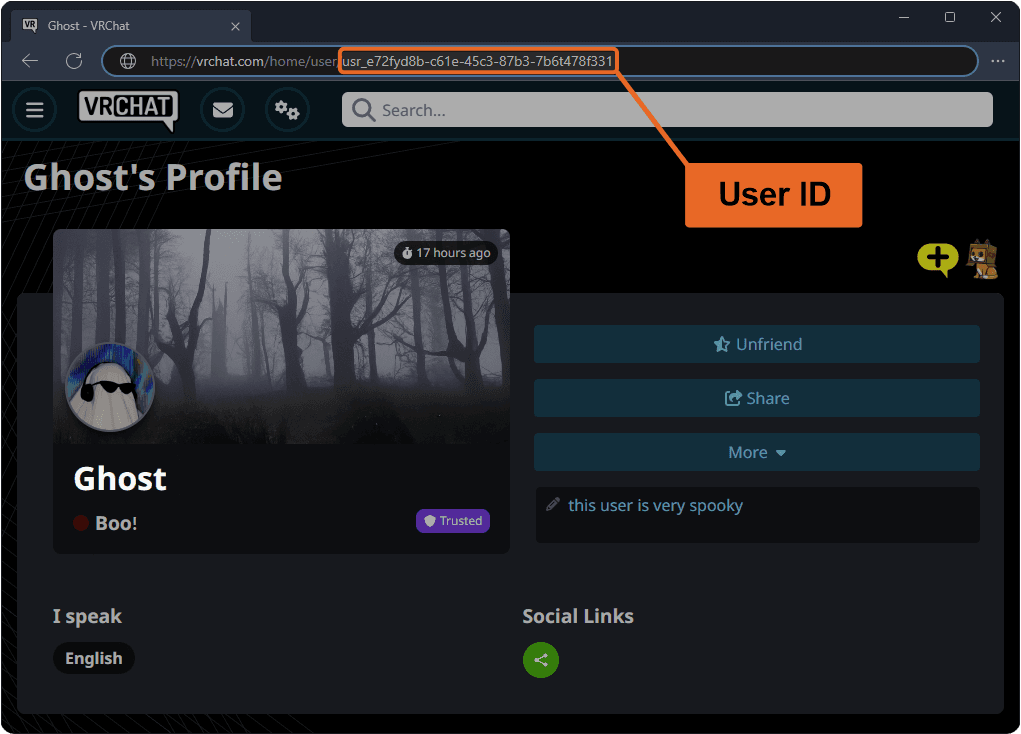
Always paste the copied ID directly into the BitTopup checkout field to avoid typing errors.
Security Guarantee: ID-Only Recharge Without Password Sharing
Account safety is a fundamental priority when purchasing digital currencies online. BitTopup processes all CHATA top-ups via direct User ID crediting, providing complete account privacy.
- No Passwords Required: You never need to share your account password, email access, or social login credentials (Facebook, Google, Apple ID).
- No Direct Login Sessions: BitTopup systems deliver coins directly to the public Player ID without accessing your personal messages, contacts, or internal account settings.
- Safe for Friends and Family: Because the process only requires an ID, you can safely send coin gifts to friends, streamers, or family members simply by inputting their Player ID at checkout.
- Secure Payment Processing: All checkout channels use encrypted processing protocols to protect your financial data.
Supported Payment Methods and Instant Delivery Process
BitTopup provides a variety of payment methods tailored to global users, including international credit/debit cards, regional digital wallets, and local payment channels. Available methods, exchange rates, and live totals are clearly presented on the checkout screen before you complete your purchase.
Once payment processing completes, our automated fulfillment system routes the coins directly to your CHATA profile. In standard operating conditions, coin delivery is triggered immediately upon payment verification, allowing you to return to your audio rooms without disruption.
CHATA Coin Recharge Overview
| Feature | Details |
|---|---|
| Product Name | CHATA Coins |
| Region | Global |
| Required Input | CHATA Player ID only |
| Password Required? | Never |
| Primary Uses | Virtual gifts, live stream features, profile badges, chat perks |
| Platform | BitTopup |
| Delivery Method | Direct in-app credit |
Troubleshooting Common CHATA Recharge Issues and Delivery Delays
If you experience any issues after completing your order, review these troubleshooting steps:
- Coins Not Showing Immediately: Fully close the CHATA application from your device's background apps and restart it. Check your profile wallet to ensure the cache has updated.
- Incorrect Player ID Entered: If you entered an incorrect or mistyped Player ID, check your order receipt immediately. If the ID exists on the platform and delivery has already completed, digital transactions cannot be reversed. If the ID is invalid, reach out to customer support to assist with updating the order.
- Payment Pending Verification: Certain payment providers may place a temporary hold for security checks. Your coins will dispatch automatically as soon as your payment processor approves the transaction.
- Contacting Support: If your order status indicates complete but your balance does not update within a reasonable period, provide your BitTopup Order Number, your CHATA Player ID, and a screenshot of your in-app profile wallet to BitTopup customer support for immediate investigation.
Frequently Asked Questions
Where can I find my CHATA Player ID?
Open the CHATA app and tap the Profile icon in the bottom menu. Your numeric Player ID is displayed right under your username and profile picture. You can tap the copy icon next to it to copy the number.
Do I need to provide my CHATA password to recharge coins?
No. Recharging through BitTopup only requires your CHATA Player ID. You should never share your account password, SMS verification codes, or login details with anyone.
Can I recharge CHATA coins for a friend using their Player ID?
Yes. Because the top-up process only requires a Player ID, you can enter your friend's CHATA ID in the input box at checkout. The coins will be delivered directly to their account.
How long does it take for CHATA coins to arrive after payment?
Delivery begins automatically as soon as your payment is confirmed by your provider. In most cases, the coins reflect in your CHATA account balance shortly after checkout.
What should I do if I entered the wrong CHATA Player ID?
Please double-check your ID before completing payment. Digital top-ups delivered to a valid, active account cannot be recalled. If you notice a typo before the order processes, contact BitTopup support immediately with your order details.
What can CHATA coins be used for in the app?
CHATA coins are used to purchase and send animated virtual gifts to hosts, unlock premium avatar frames, purchase room entry effects, and access exclusive perks inside live voice and video rooms.