



Slam Dunk Mobile Point Top Up Guide
Slam Dunk Mobile Point is the official premium currency used to fund your account in the Global version of Slam Dunk Mobile. Points are deposited directly into your DeNA account balance, allowing you to exchange them for in-game Vouchers, exclusive player profiles, Awakening materials, and seasonal event packages. Whether you are building a competitive 3v3 half-court squad or climbing the Ranked ladder, having an adequate balance of Points ensures your roster stays competitive with fully unlocked talent trees and signature skill mastery.
BitTopup provides a direct recharge service for Slam Dunk Mobile Global players across Android and iOS platforms. By using your direct DeNA ID and selecting your operating system server, your order is credited directly to your account without needing to share login credentials.
How to Recharge Slam Dunk Mobile Points on BitTopup
To complete your order, follow these straightforward steps:
- Select your desired Slam Dunk Mobile Point package from the product catalog.
- Enter your DeNA ID in the player ID field.
- Choose your corresponding Server platform from the dropdown: * Select google if you play on an Android device. * Select IOS if you play on an Apple iPhone or iPad.
- Check the live checkout screen to verify your order total and select your preferred payment method.
- Complete the payment process.
- Open Slam Dunk Mobile on your device. Your Points will reflect in your DeNA account balance, ready for in-game conversion.
How to Find Your Slam Dunk Mobile DeNA ID and Server
Your DeNA ID is a unique numeric account identifier distinct from your in-game character nickname. Entering the exact DeNA ID ensures your Point recharge is credited to the correct account profile.
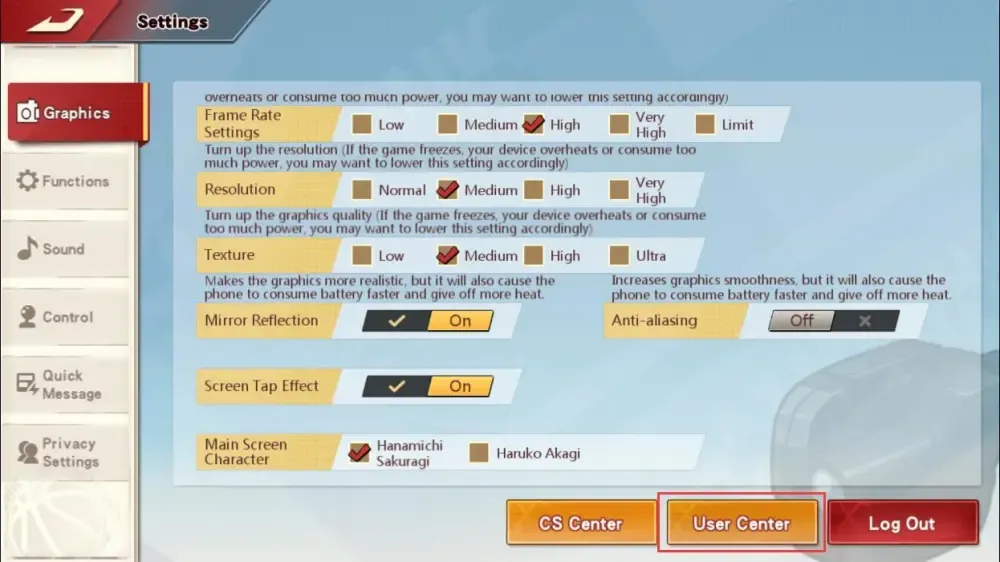
Steps to Locate Your DeNA ID:
- Launch Slam Dunk Mobile on your mobile device and log in to your account.
- Tap your User Center / DeNA Floating Icon or open the in-game Settings menu.
- Navigate to the User / Account tab.
- Your DeNA ID (a multi-digit number) will be displayed clearly on the account information screen.
- Copy or write down this number for checkout.
Selecting the Right Server:
- google: Choose this option if your account was created and is active on the Google Play / Android build.
- IOS: Choose this option if your account is bound to iOS Game Center or Apple ID.
Slam Dunk Points vs Vouchers: Conversion Rates and Utility
Understanding how Points convert into in-game currency is essential for maximizing your account progression. When you buy Points on BitTopup, they are credited directly as DeNA platform points. Inside the game client, these points are converted into Vouchers or used for direct purchases in the Point Mall.
| Item / Currency | In-Game Conversion & Use Case | Primary Gameplay Benefit |
|---|---|---|
| Slam Dunk Points | Direct DeNA balance credited via top-up | Base currency converted 1:1 into Vouchers or spent on Point shop bundles |
| Vouchers (Coupons) | Exchanged directly from Points inside the Mall | Used for Premium Gacha, Character Profile unlocks, and Special Crates |
| Player Talent Cards | Purchased with Vouchers in character menus | Unlocks skill branches for key players like Sakuragi, Rukawa, and Sendoh |
| Awakening Cards | Acquired through Voucher event pools | Grants advanced skill variations, improved block ratings, and shot mechanics |
| Monthly / Growth Pass | Activated via direct point-value redemption | Grants recurring daily Diamonds, Training Manuals, and Rank Protection cards |
How to Convert Points to Vouchers In-Game:
- Open Slam Dunk Mobile and enter the main lobby.
- Tap the Shop / Mall icon on the screen.
- Select the Vouchers section.
- Choose the Voucher quantity matching your available Point balance.
- Confirm the transaction to instantly credit Vouchers to your bag.
What Slam Dunk Mobile Points Unlock: Awakening and Roster Growth
Success in high-tier competitive play requires specialized character builds and upgraded skill nodes. Slam Dunk Mobile Points give you the resources required to develop your players:
- Awakening Skill Branches: Advanced characters possess Awakening skill trees that provide distinct offensive animations, faster drive moves, and enhanced contest resistances. Awakening cards require Voucher investment.
- Mastery Talent Nodes: Every position—Point Guard (PG), Shooting Guard (SG), Small Forward (SF), Power Forward (PF), and Center (C)—requires specific talent upgrades such as dive-catch speed, rebound box-out strength, and fadeaway contest resistance.
- Special Event Profiles: Access limited-edition player versions and legendary jerseys that grant subtle attribute enhancements and custom court presentations.
- Trait Upgrades & Materials: Acquire Trait Chests and Training Manuals to boost team-wide synergy during competitive ranked matches.
Safe ID-Only Top-Up: Zero Password Exposure
Account safety is a core priority when purchasing game currency online. BitTopup uses direct ID-based fulfillment for Slam Dunk Mobile Point purchases.
- No Password Sharing: You only provide your DeNA ID and Server selection. We never ask for your account password, email access, Google credentials, or Apple ID.
- Zero Risk of Account Lockouts: Because no third party logs into your device profile, your account remains completely secure from suspicious login triggers or regional security locks.
- Direct System Delivery: Orders are processed through official billing routes to ensure your account standing remains in good order.
Troubleshooting Common Slam Dunk Mobile Recharge Issues
If you experience any delay or issue with your order, check these common causes:
- Mismatched Server Selection: Ensure you selected google if your game client runs on Android, or IOS if your device is Apple. Selecting the wrong platform may prevent Points from displaying in your specific client balance.
- Incorrect DeNA ID Input: Double-check the numeric string from your User Center. If you entered an incorrect DeNA ID during checkout, reach out to BitTopup customer support immediately with your order number.
- App Cache & Display Sync: After completing your order, fully close the Slam Dunk Mobile app and relaunch it. Check your in-game mailbox or the Point Mall balance tab to confirm the updated balance.
Frequently Asked Questions
How do I find my Slam Dunk Mobile DeNA ID?
Open the game, tap on the DeNA floating icon or enter the in-game Settings menu, and open the User/Account tab. Your multi-digit DeNA ID is shown directly on the user profile screen.
How do I convert Slam Dunk Points into Vouchers in-game?
Once your Points arrive, enter the in-game Shop, select the Voucher exchange tab, and choose the amount you wish to convert. The Vouchers will be credited to your inventory immediately upon confirmation.
What is the exchange rate between Slam Dunk Points and Vouchers?
In the Global client, Slam Dunk Points exchange at a standard 1:1 equivalent rate to in-game Vouchers, matching standard store package tiers.
Do I need to share my account password to recharge Slam Dunk Mobile Points?
No. BitTopup only requires your DeNA ID and your operating system server (google or IOS). You never need to share passwords, verification codes, or third-party account logins.
How do I choose between Google and iOS server options?
If you play on an Android smartphone, tablet, or emulator, select the google server option. If you play on an iPhone or iPad, select the IOS server option.
What should I do if my Slam Dunk Mobile Points do not appear after purchase?
Restart your game client to refresh account data. If your Points still do not appear after a few minutes, check your order status on BitTopup and contact 24/7 customer support with your order number and DeNA ID for quick assistance.