

Eneba Gift Card US Top Up: Fund Your Eneba Wallet Instantly
An Eneba Gift Card (US) provides a direct, secure way to reload your Eneba account balance without linking personal credit cards or sharing banking details. Once redeemed, the card's USD value is immediately credited to your Eneba Wallet, allowing you to purchase thousands of digital gaming products, subscription codes, and software licenses.
BitTopup delivers your official 16-character alphanumeric voucher code directly to your screen and confirmation email upon successful payment. With no account credentials required and instant digital processing, you get access to your gaming funds whenever you need them.
What is an Eneba Gift Card (US) and Supported Purchases
An Eneba Gift Card is a prepaid digital voucher denominated in United States Dollars (USD). When you activate the code on your Eneba account, the full face value transfers directly to your internal Eneba Wallet balance. This balance can be used at checkout as a primary payment method or combined with other payment options if a balance shortfall occurs.
Your Eneba Wallet balance supports a wide catalog of digital inventory, including:
- PC Game Keys: Steam, Epic Games, Origin, Ubisoft Connect, Battle.net, and GOG keys.
- Console Network Cards: PlayStation Network (PSN) vouchers, Xbox Gift Cards, and Nintendo eShop funds.
- Subscriptions: Xbox Game Pass, PlayStation Plus, Nintendo Switch Online, EA Play, and streaming access passes.
- In-Game Currencies & Points: Riot Points, Roblox Robux, Apex Coins, and mobile gaming vouchers.
- Software & Utilities: Antivirus subscriptions, operating systems, and productivity suites.
Eneba US Region Requirements and Currency Rules
Eneba enforces geographic and currency locking to comply with regional pricing structures. An Eneba Gift Card (US) is strictly valid for accounts configured to the United States region and operating in USD ($).
| Specification | Details |
|---|---|
| Region Compatibility | United States (US) Accounts Only |
| Currency Denomination | United States Dollar (USD / $) |
| Code Format | 16-Character Alphanumeric Voucher Key |
| Voucher Code Validity | 12 Months from Issue Date |
| Wallet Funds Expiration | No expiration once credited to your wallet balance |
| Delivery Mode | Instant Digital Code via BitTopup Checkout & Email |
| Account Sharing Required | None (100% Zero-Credential Process) |
Attempting to redeem a USD-denominated card on an account registered with a different base currency (such as EUR, GBP, or BRL) will trigger a currency mismatch error. To ensure smooth activation, verify that your account location is set to the United States before applying your voucher.
How to Top Up and Redeem Your Eneba Gift Card Code
Applying your digital voucher code takes less than a minute. Follow these steps to recharge your Eneba Wallet balance:
- Purchase your Code: Select your desired USD denomination on BitTopup and complete checkout.
- Copy Your Voucher Code: Retrieve your 16-character code from your BitTopup order completion page or order confirmation email.
- Log in to Eneba: Open your browser, visit the official Eneba website, and log into your account.
- Access the Redemption Page: Click your profile avatar in the upper right corner and select Redeem gift card, or navigate directly to the redeem balance section.
- Apply the Code: Paste your 16-character voucher code into the input field and click Apply.
- Confirm Wallet Balance: Your Eneba Wallet will update instantly with the full USD amount.
How to Find Your Eneba Account Details and Redeem Voucher
Because BitTopup provides direct digital code delivery, you do not need to submit your Eneba user ID, email address, or password during checkout. You receive the raw activation code directly.
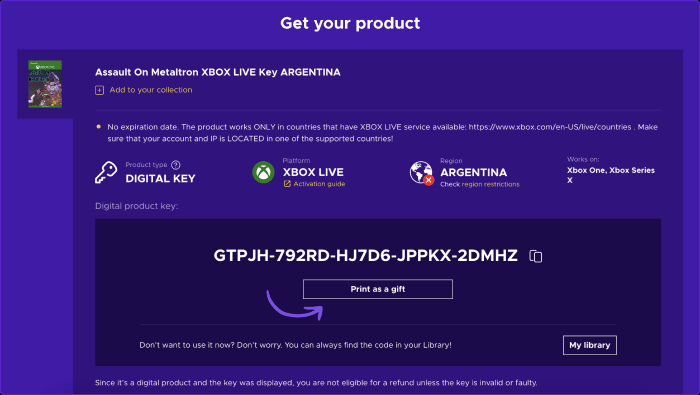
To manage your funds and verify your balance on Eneba:
- Click your user icon at the top right of the Eneba storefront.
- Select Eneba Wallet from the drop-down menu.
- View your current active USD balance, transaction history, and redemption status.
Redemption Limits, Wallet Balances, and Expiration Rules
Understanding account limits and validity guidelines ensures your balance remains accessible and protected:
- Voucher Code Expiration: Unredeemed Eneba gift card codes purchased on BitTopup are valid for 12 months from the date of purchase. Ensure you apply the voucher code to your wallet before this period expires.
- Wallet Fund Validity: Once the code is successfully redeemed and the funds are added to your Eneba Wallet, the balance does not expire and remains available for future checkouts.
- Daily and Monthly Limits: Eneba applies standard anti-fraud thresholds to wallet top-ups. Standard accounts generally have rolling daily and monthly redemption caps. If you reach your limit, wait 24 hours before redeeming additional vouchers.
- Non-Transferable Balance: Funds loaded into an Eneba Wallet cannot be withdrawn to a bank account, transferred to another user, or exchanged for cash.
Troubleshooting Common Eneba Voucher and Activation Errors
If you experience an issue when applying your code, consult these troubleshooting solutions:
1. Error: "Invalid Code Format" or "Code Not Found"
- Check for typographical errors. Common mistakes include mixing up
0(zero) withO(letter),1(one) withI(capital i), or8withB. - Remove any extra blank spaces at the beginning or end of the code string if you copy-pasted the text.
2. Error: "Currency / Region Mismatch"
- Your Eneba account region must match the voucher currency. If your account defaults to EUR or another currency, you cannot apply a USD gift card.
- Turn off active VPN or proxy connections that might incorrectly alter your localized region during redemption.
3. Error: "Code Already Redeemed"
- Refresh your account page and check your Eneba Wallet balance to see if the funds were already credited during a previous click.
- Check your order history to confirm the balance was not applied to a pending order.
4. Error: "Redemption Limit Exceeded"
- If you have applied multiple high-value gift cards in a short window, you may have reached the rolling 24-hour verification limit. Allow 24 hours to pass before attempting the next activation.
If code errors persist after checking these points, contact BitTopup customer support with your order number for verification.
Why Buy Eneba Gift Cards on BitTopup
BitTopup is built to provide a fast, secure, and transparent digital purchasing experience for gamers worldwide:
- Zero Credential Sharing: You never share your Eneba login or password. You receive a direct, standalone activation code to redeem yourself.
- Instant Code Transmission: Digital codes are displayed on-screen immediately after payment processing and backed up to your email.
- Transparent Live Checkout: Check all current prices, denominations, and fee-free transaction options directly on the live checkout interface.
- 24/7 Support Assistance: BitTopup customer service is available around the clock to assist with order tracking, code inquiries, and verification.
- Global Platform Accessibility: Enjoy localized interfaces, multi-currency support, and strict transaction encryption standards.
Frequently Asked Questions
How do I add money to my Eneba account using a gift card?
Log into your account on the Eneba website, click your profile icon, select Redeem gift card, paste your 16-digit voucher code into the box, and click Apply. The funds will instantly appear in your Eneba Wallet balance.
Can I use an Eneba US gift card in another region?
No. Eneba US gift cards are locked to the United States dollar (USD). You must have an account configured for the US region. Attempting to redeem a USD code on an account set to a different currency will cause a redemption error.
Do Eneba gift card codes expire after purchase?
Unredeemed gift card voucher codes remain valid for 12 months from the date of issue. Once you redeem the code and load the money into your Eneba Wallet, the balance itself does not expire.
What can I buy on Eneba with my wallet balance?
You can use your Eneba Wallet balance to purchase any eligible digital product on the platform, including PC game activation keys, console subscription cards, in-game point vouchers, DLCs, and software licenses.
Are there daily or monthly redemption limits on Eneba gift cards?
Yes. Eneba enforces standard account security limits that cap the maximum amount of wallet credit you can redeem within rolling 24-hour and 30-day windows. High-volume buyers should spread large redemptions across multiple days.
What should I do if my Eneba voucher code is not working?
First, confirm there are no typos or accidental spaces in your code. Next, verify that your account location is set to the United States and disable any active VPN. If the error continues, reach out to BitTopup support with your order details for assistance.