

Apple Gift Card (FR) Top Up and Supported Services in 2026
An Apple Gift Card (FR) is the universal digital voucher used to add Euro (EUR) funds directly to an Apple Account registered in France. In 2026, Apple maintains a unified gift card system in France that combines the functions of the legacy App Store & iTunes cards and Apple Store retail cards. Redeeming this voucher deposits the exact Euro value directly into your Apple Account balance.
Once redeemed, your Apple Account balance applies automatically as the primary payment method for digital products, hardware purchases, and recurring subscriptions within the French Apple ecosystem.
What You Can Buy with a France Apple Account Balance
- App Store Purchases: Paid games, utility apps, and in-app purchases (microtransactions, seasonal battle passes, and virtual currencies).
- Subscriptions: Official Apple services including iCloud+ storage plans, Apple Music, Apple TV+, Apple Arcade, Apple Fitness+, and Apple One bundles.
- Digital Media: Movies, TV shows, and audiobooks purchased or rented via the Apple TV app and Apple Books.
- Hardware and Accessories: Physical devices, cases, cables, and accessories purchased directly from the official French Apple Online Store or Apple Store App.
Critical Region Restrictions: France Apple ID Verification
Apple gift cards are strictly region-locked and currency-locked. An Apple Gift Card (FR) denominated in Euros can only be redeemed on an Apple Account whose storefront region is set to France.
If your Apple Account is set to another country (such as the United States, Germany, the United Kingdom, or Japan), the App Store will reject the 16-digit voucher with a region mismatch error. Before buying, verify your account's regional configuration.
How to Check Your Apple ID Region
- Open the Settings app on your iPhone or iPad.
- Tap your Name / Profile banner at the top.
- Select Media & Purchases, then tap View Account.
- Tap Country/Region to verify that your active storefront is set to France.
| Feature | Apple Gift Card (FR) Requirement |
|---|---|
| Account Region | France (FR Storefront) |
| Account Currency | Euro (€ / EUR) |
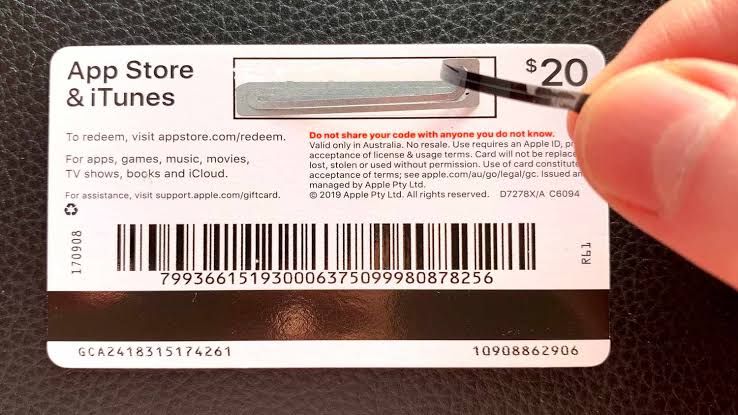
| Delivery Format | 16-Digit Alphanumeric Digital Code |
| Account Password Needed? | Never (Self-Redemption via Code) |
| Expiration Date | No Expiration Date |
Step-by-Step Guide: How to Buy and Recharge Apple Gift Card (FR) on BitTopup
To complete an Apple Gift Card FR recharge, you do not need to share your Apple ID password or grant account access. BitTopup sends a genuine 16-digit digital code directly to your order screen and email.
- Select Denomination: Choose the Euro value of the Apple Gift Card (FR) you need on the live BitTopup product page.
- Enter Contact Details: Input your valid email address to ensure direct digital delivery of the redemption code and invoice.
- Proceed to Checkout: Check the live checkout screen for real-time pricing and select your preferred payment method.
- Receive Digital Code: Once payment is confirmed, your 16-digit Apple Gift Card code displays immediately on your order confirmation screen and arrives in your email inbox.
- Redeem to Account: Apply the code to your French Apple Account following the platform-specific instructions below.
How to Redeem Your 16-Digit Apple Gift Card Code Across All Apple Devices
Apple allows you to redeem your 16-character code on any device connected to your French Apple ID.
On iPhone, iPad, or iPod Touch
- Open the App Store app.
- Tap your profile icon or photo in the upper right corner.
- Tap Redeem Gift Card or Code.
- Select Enter Code Manually and type the 16-digit code provided by BitTopup.
- Tap Redeem in the upper right corner. The Euro balance updates immediately.
On Mac (macOS)
- Open the App Store on your Mac.
- Click your name or the sign-in button at the bottom of the sidebar.
- Click Redeem Gift Card in the top right corner.
- Type your 16-digit voucher code into the input field and click Redeem.
On Windows PC
- Open the Apple Music app, Apple TV app, or iTunes for Windows.
- Click your account name at the bottom of the sidebar (or choose Account from the top menu bar).
- Select Redeem.
- Enter your 16-digit code and confirm redemption.
On Apple Vision Pro
- Open the App Store.
- Select your account profile.
- Choose Redeem Gift Card or Code and enter the 16-digit alphanumeric key.
Payment Methods, Pricing, and Instant Digital Delivery Details
BitTopup delivers Apple Gift Card (FR) digital codes through an automated delivery pipeline. As soon as the transaction processes, the code generates instantly without manual review delays.
- Transparent Live Checkout: The exact payment amount and currency conversion appear directly on the checkout screen before payment confirmation.
- No Account Sharing: BitTopup will never ask for your Apple ID password, two-factor authentication (2FA) verification codes, or personal security answers.
- Encrypted Processing: All transactions use encrypted gateways to protect your billing information.
Troubleshooting Common Apple Gift Card Redemption Errors
Error: "This code must be redeemed in the French storefront"
- Cause: Your Apple ID is registered in a country other than France.
- Solution: Check your Apple ID region settings. You must switch your storefront to France or redeem the card on a dedicated French Apple Account.
Error: "This code has already been redeemed"
- Cause: The code was already applied to an Apple ID balance.
- Solution: Sign out of the App Store and sign back in to refresh your balance display. Check your purchase history under your Apple Account settings to confirm if the funds were credited. If not, verify whether another family member on your device redeemed the code.
Error: "Code is not valid"
- Cause: Typing error during manual entry.
- Solution: Apple gift card codes do not contain certain ambiguous characters like the letters O, I, or Z to avoid confusion with 0, 1, or 2. Copy and paste the exact code directly from your BitTopup order details to avoid manual keystroke mistakes.
Why Choose BitTopup for Apple Gift Card FR Recharge
- Instant Code Generation: Fast digital dispatch directly to your screen and email inbox.
- Strict Security Standards: Keep full control over your Apple credentials—redeem the code yourself without sharing account logins.
- 24/7 Customer Support: Dedicated customer service team ready to assist with code verification and order tracking.
- Reliable Source: Authentic digital codes ready for instant redemption across the French App Store, iTunes, iCloud+, and Apple Store services.
Frequently Asked Questions
Can an Apple Gift Card (FR) be topped up or recharged directly?
No. Apple Gift Cards are single-use prepaid vouchers. You cannot add money back onto an existing gift card number. To add more funds to your French Apple Account balance, purchase a new Apple Gift Card (FR) code on BitTopup and redeem it to your account.
Can I use a France Apple Gift Card on an account registered in another country?
No. Apple gift cards are strictly locked to the country and currency of purchase. A France (FR) card denominated in Euros will only redeem on an Apple ID whose region is set to France. It will not work on US, UK, German, or other regional storefronts.
How do I redeem my Apple Gift Card code on an iPhone or iPad?
Open the App Store, tap your profile icon at the top right, select Redeem Gift Card or Code, choose Enter Code Manually, type your 16-digit code, and tap Redeem.
What can I buy with an Apple Gift Card France balance?
You can use your balance for App Store apps and games, in-app purchases, Apple Music, iCloud+ storage plans, Apple TV+ subscriptions, Apple Books, and physical Apple hardware or accessories through the official French Apple Store online.
Can I convert an Apple Gift Card balance to cash or Apple Pay?
No. Apple Account balances cannot be redeemed for cash, transferred to another Apple ID, or used as an Apple Pay funding source for third-party merchant checkouts. The balance can only be spent on authorized Apple services and products.
What should I do if my code shows as invalid or already redeemed?
First, verify that you entered the 16 characters accurately without extra spaces. Refresh your App Store balance by signing out and back in. If the issue persists, check your order summary in your BitTopup account and reach out to BitTopup 24/7 customer support with your order number for verification.