How to Get Your PoppoLive ID

Learn how to locate and verify your PoppoLive User ID in just a few quick taps—ensure you double-check it, since once you’ve recharged, the ID cannot be changed.

Author: Ryan PatelRyan Patel Publish at: 2025/04/27 1 min read

How to Get Your PoppoLive User ID

Your PoppoLive User ID is the unique code that identifies your profile for gifting, friend requests, and event participation. Follow these simple steps to find and confirm your ID:

  1. Log In
    Open the PoppoLive app and sign in to your account.

  2. Open Your Profile
    Tap the 【My 】 button in the top-right corner of the screen.

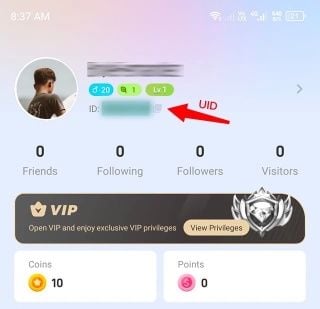
  3. Find Your User ID
    Below your profile picture, you will see your User ID displayed.

  4. Verify Carefully
    Double-check that this is the exact ID you intend to use—once you successfully recharge or make a purchase, you will not be able to change your User ID.
    How to recharge Poppo Live Coins

Share

Recommended News

All products

Support Payments

Payment Support Visa MastercardPayment Support Binance Pay and Crypto PayPayment Support Apple Pay Google PayPayment Support Alipay HKPayment Support GCashPayment Support Touch n GoPayment Support madaPayment Support SBP(СБП)Payment Support Toss Kakao Naver Payco SamsungPayment Support Humo Uzcard Uzum

Visa Mastercard · Binance Pay and Crypto Pay · Apple Pay Google Pay · Alipay HK · GCash · Touch n Go · mada · SBP(СБП) · Toss Kakao Naver Payco Samsung · Humo Uzcard Uzum

10 Years Trusted Game & Live Streaming Top-Up Platform

Since 2016 | 5,000,000+ Users Worldwide

KAMAGEN LIMITED

Registration No. 76888246

Room 1508, 15/F, Grand Plaza Office Tower II, 625 Nathan Road, Mong Kok, Kowloon, Hong Kong

BUSINESS COOPERATION: ibittopup@gmail.com

© 2016-2026 BitTopup. All Rights Reserved.

customer service