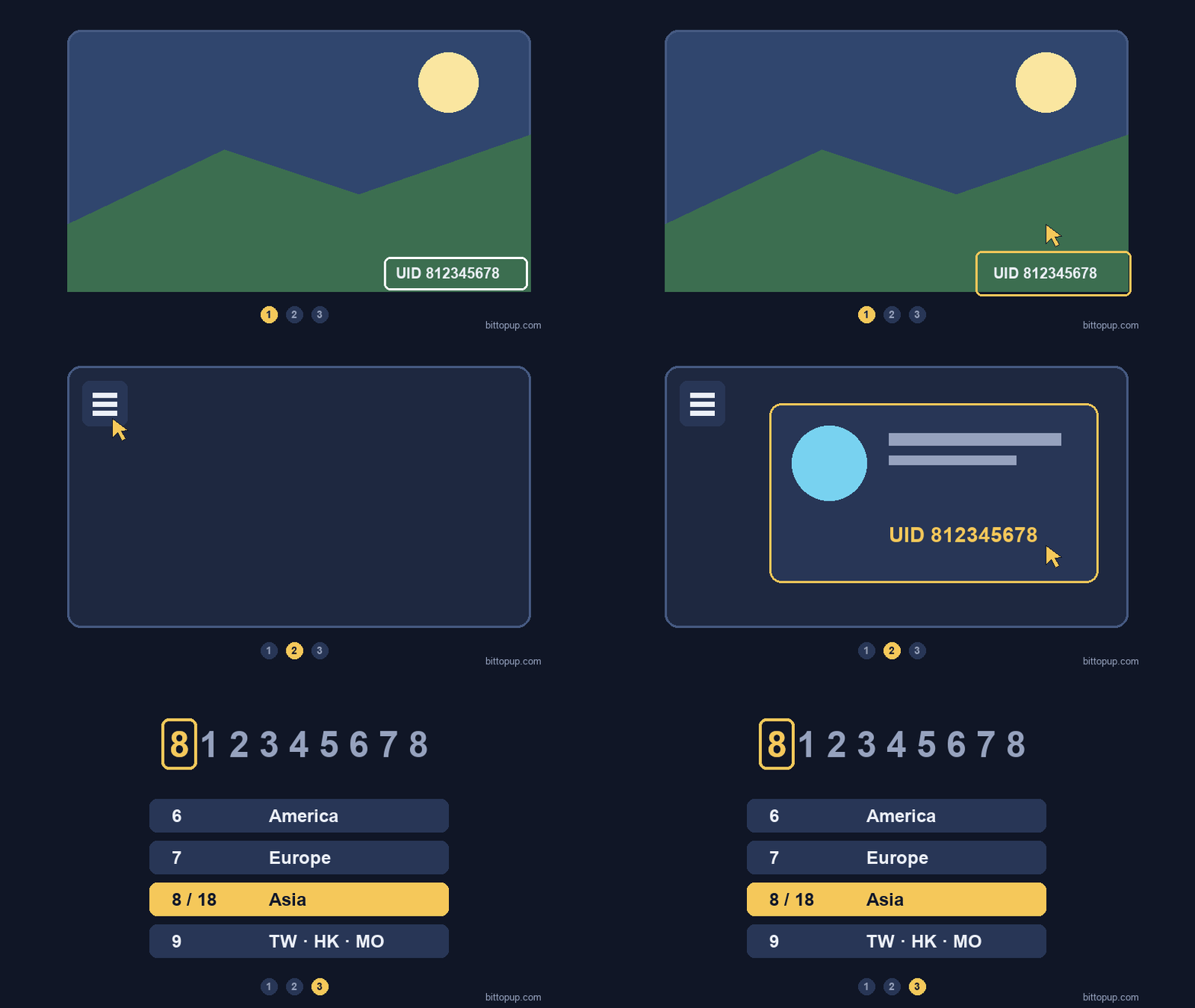
Your Genshin Impact UID is the 9- or 10-digit number in the bottom-right corner of the screen while you play (PC, mobile and PlayStation), and it is also shown in Paimon Menu → Profile.
To check it without opening the game, log in to HoYoLAB: if your game account is linked, the UID is listed in your game records. The first digit shows the server: 6 America, 7 Europe, 8 or 18 Asia, 9 TW/HK/MO.
What Exactly Is Your UID?
Think of your Genshin Impact UID as your gaming fingerprint. This permanent 9- or 10-digit identifier gets assigned the moment you create your account, and here"s the cool part – that first digit actually tells a story. See a 6? You"re on North America servers. Got a 7? That"s Europe. And 8 (or 18 on newer 10-digit UIDs) means you"re playing on Asian servers, while 9 is the TW, HK, MO server.

The remaining eight digits? They"re basically your “birth order” number, showing exactly when you joined that server compared to everyone else. It"s like being the 47,382,956th person to walk through the door.
Here"s something I find fascinating (and yes, I"m a data nerd): community research from 102 North American players revealed that 46.08% have UIDs starting with 60X. But only 5.88% claim those coveted early 60000000X numbers. Those folks? Probably beta testers or miHoYo employees who got in early.
Unlike your display name – which you can change whenever the mood strikes – your UID is forever. And honestly? That"s a good thing for keeping track of people.
Finding Your UID on PC
This one"s dead simple. Your UID sits permanently in the bottom-right corner of your screen during gameplay. Always there, always visible.
Want more details? Hit ESC to open the Paimon Menu, then click Profile. You"ll see your UID displayed alongside your Adventure Rank and World Level – basically your gaming resume in one spot.

Some launcher versions show your UID in account management, though this feature seems to come and go with updates. Can"t rely on it consistently.
Quick reality check: Without opening the game, the official way is HoYoLAB: if your game account is linked, your UID is listed in your game records. I know, I know – seems obvious, but you"d be surprised how often people ask. Your best backup plan? Ask a friend to check their friends list, or dig through old screenshots where your UID appears in the corner.
Mobile UID Discovery (iOS & Android)
Both iOS and Android handle this identically to PC. That same bottom-right corner placement during gameplay, and the same Paimon Menu → Profile route for the detailed view.
One gotcha though – check your UI scale settings. Sometimes the UID gets cut off or hidden if your display settings are wonky. And here"s a pro tip: screenshot your UID immediately after finding it. Trust me, you"ll thank yourself later when someone asks for it during a co-op session.
PlayStation Console Players
PS4 and PS5 users get the exact same treatment – bottom-right corner during gameplay, same menu navigation. The cross-platform compatibility works beautifully too, so your UID functions perfectly whether you"re chatting with PC or mobile players (assuming you"re all on the same regional server, of course).
If you"re having visibility issues on console, check your TV"s overscan settings. Sometimes the edges get clipped.
Server Differences Matter More Than You Think
Here"s where things get strict. That first digit isn"t just decoration – it"s a hard barrier. NA players (6) can only interact with other NA accounts, period. European (7) and Asian (8) servers follow the same iron-clad rules.

No cross-region play. No exceptions. I"ve seen countless frustrated players trying to figure out why they can"t find their friend, only to discover they"re on different regional servers.
Lower UID numbers do indicate earlier account creation, which can be fun for estimating how long someone"s been playing. Though honestly, with millions of players, the difference between a 60500000X and 60600000X UID isn"t that meaningful anymore.
Genshin UID prefixes: which server is my account on?
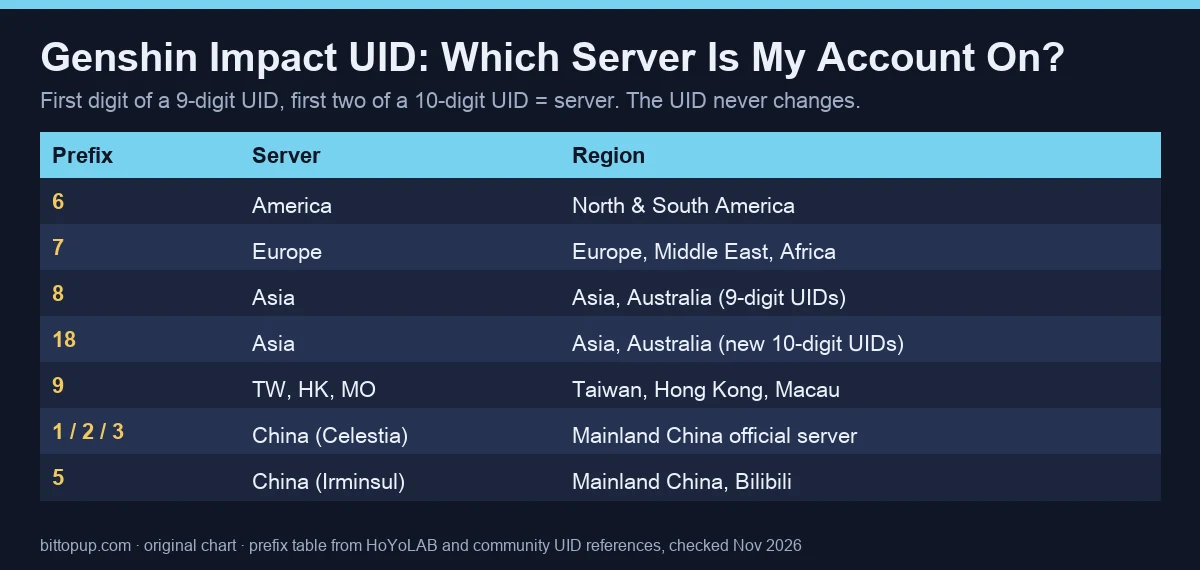
UID starts with | Server | Notes |
|---|
6 | America | North and South America |
7 | Europe | Europe, Middle East, Africa |
8 | Asia | Older 9-digit Asia accounts |
18 | Asia | New Asia accounts have 10-digit UIDs |
9 | TW, HK, MO | Taiwan, Hong Kong, Macau |
1, 2, 3 / 5 | China | Mainland China official server / Bilibili server |
You cannot move a UID to another server. A new server means a new account and a new UID.
How to look up a Genshin player by UID
In game: Paimon Menu → Friends → Add Friend, enter the UID and press Search. You see the nickname, Adventure Rank, signature and name card. This only works for accounts on your own server.
Enka.Network (third-party site): enter a UID to see the player's public profile and the characters in their in-game Character Showcase, if they turned on Show Character Details.
A UID alone cannot be used to log in or take over an account. Never share your password, HoYoLAB cookies or login codes with anyone who asks for your UID.
When Things Go Wrong
“UID does not exist” errors usually mean one of three things: server mismatch, typos, or Adventure Rank issues. Both players need AR16 for co-op functionality – that"s non-negotiable.
“Unable to add friend” errors? Those often indicate temporary system hiccups affecting multiple players. Usually resolves within a few hours, though it"s frustrating when you"re trying to coordinate with someone new.
Can"t see your UID at all? Check your graphics menu"s UI display settings first, then try restarting the game client. Mobile users should also verify that screen rotation settings aren"t messing with UI positioning.
Safety and Privacy Considerations
Sharing your UID for legitimate co-op carries minimal risk since UIDs only enable social features. But here"s what you should never share alongside your UID: HoYoLAB passwords, tokens, or cookies. Ever.
Legitimate services verify account ownership through in-game signature modifications, not login credentials. If someone"s asking for your password “to verify” your UID, that"s a red flag.
When posting UIDs in forums or Discord, include your server region, World Level, and what specific help you need. Saves everyone time figuring out compatibility before sending friend requests.
Actually Using Your UID
Friend requests require Adventure Rank 2 minimum. Navigate to Paimon Menu → Friends → Add Friend, enter the UID, hit Search, then send your request. You"re capped at 45 friends total, and here"s an annoying quirk – you can"t cancel requests once they"re sent.

Co-op Mode bumps the requirement to Adventure Rank 16, plus you need to complete “Prologue: Act I” of the Archon Quest. That"s roughly 3-6 hours of gameplay for new players.
World Level restrictions prevent joining higher-level worlds, though WL8 and WL9 players can access each other"s worlds freely since Version 5.3. Small quality-of-life improvement that makes endgame co-op much smoother.
Services like Genshin Impact UID Recharge often require friend additions for delivery verification – standard practice in the industry.
Cross-Platform Consistency
Account linking maintains identical UIDs across PC, mobile, and PlayStation platforms. Your UID follows you everywhere, which is exactly how it should work.
One technical note (because Version 2.3 changed things): authentication links for third-party tools expire within 24 hours now. So if you"re using wish history trackers or statistics tools, you"ll need to refresh connections periodically.
Customer support always requires UID verification alongside server region, Adventure Rank, and recent transaction details for Top Up Genshin Impact Crystals issues. Keep these handy.
Quick Answers to Common Questions
Can I check my UID without logging in?
Nope. No official method exists. Your options are asking friends to check their friends list or hunting through old screenshots.
Why do friends get “UID does not exist” errors?
Usually server mismatches (different first digits), typos in the 9-digit sequence, or Adventure Rank requirements not met. Both players need the same regional server and AR16 for co-op.
Is sharing my UID publicly safe?
UIDs only enable social features, so minimal risk. Just never share passwords, tokens, or cookies alongside UID requests.
Can I change my UID later?
UIDs are permanent. Unlike display names, there"s no changing them once assigned.
For players looking to enhance their Teyvat experience with additional resources, Buy Genesis Crystals through BitTopup ensures secure transactions with competitive pricing, fast delivery, comprehensive customer support, and industry-leading safety compliance across all supported regions.